Huawei SmartLogger Modbus RTU Setup Guide
The Huawei SmartLogger uses a Modbus Remapped register scheme where each connected SUN2000 inverter is accessible at a calculated starting address — not at the inverter's own Modbus ID. This guide walks through the register layout, address formula, scaling rules, and how to poll a full solar plant using ModbusManager.
What is Modbus Remapped?
When SUN2000 inverters connect to a SmartLogger via RS485, the SmartLogger acts as the single Modbus slave on the external RS485 bus. It remaps each inverter's registers into a sequential address space, making them all available from one slave ID.
This is different from daisy-chaining inverters directly — you do not talk to each inverter at its own Modbus ID. You talk to the SmartLogger only, and use the remapped addresses to target specific inverters.
0 for the SmartLogger and its remapped registers. The inverter number is encoded in the register address, not in the slave ID. (Some gateways or RS485 setups expose the SmartLogger at address 1 — check SmartLogger › Settings › Modbus if a read at 0 returns nothing.)
Inverter Address Formula
The starting holding register for inverter N (1-based) is:
start_address = 51000 + 25 × (N − 1)
Examples for a 24-inverter plant:
| Inverter | Start Address (0-based) | Decimal |
|---|---|---|
| 1 | 0xC738 | 51000 |
| 2 | 0xC751 | 51025 |
| 3 | 0xC76A | 51050 |
| 12 | 0xC7FF | 51275 |
| 24 | 0xC897 | 51575 |
Each inverter block occupies 25 registers. Reading FC03 from the start address with quantity = 25 retrieves all parameters for that inverter in one request.
Key Registers (Offsets from Start Address)
The offsets below follow Huawei's SmartLogger Modbus Interface Definition, section 2.7 (Remapped Modbus definitions), Table 2-7. Each value's offset is its position within the 25-register inverter block; multi-register values (I32 / U32) occupy two consecutive registers.
| Offset | Parameter | Type | Gain | Unit |
|---|---|---|---|---|
| +0 … +1 | Active power | I32 | ÷1000 | kW |
| +2 … +3 | Reactive power | I32 | ÷1000 (signed) | kVar |
| +4 | Total DC input current | I16 | ÷100 | A |
| +5 … +6 | Total input power | U32 | ÷1000 | kW |
| +7 | Insulation resistance | U16 | ÷1000 | MΩ |
| +8 | Power factor | I16 | ÷1000 | — |
| +9 | Inverter status | U16 | raw (enum) | — |
| +11 | Cabinet temperature | I16 | ÷10 | °C |
| +12 … +13 | Major fault code | U32 | Alarm ID (bit 31–16) + Cause ID (bit 15–0) | — |
| +14 … +15 | Minor fault code | U32 | Alarm ID + Cause ID | — |
| +16 … +17 | Warning code | U32 | Alarm ID + Cause ID | — |
| +18 … +24 | Spare (reserved) | U16 | — | — |
value = (hi << 16 | lo) / 1000. Active and reactive power are signed I32, so treat the combined value as two's complement; total input power is unsigned U32.
Inverter Status Values
The status register (offset +9) returns an enum. The underlying values come from the SUN2000's own Modbus protocol, but the SmartLogger adds two states of its own (per Table 2-7, "Scope" column):
| Value (hex) | Decimal | Meaning |
|---|---|---|
| 0xB000 | 45056 | Communication interrupted (added by SmartLogger) |
| 0xC000 | 49152 | Uploading / firmware update (added by SmartLogger) |
Plant-Level SmartLogger Registers
Besides the individual inverter blocks, the SmartLogger exposes plant-level aggregates in its own register range (section 2.1 of the interface definition, roughly registers 40000–41949). These sum or aggregate across all connected inverters. A few useful ones:
| Register | Parameter | Type | Gain | Unit |
|---|---|---|---|---|
| 40525 | Total active power (all inverters) | I32 | ÷1000 | kW |
| 40544 | Total reactive power | I32 | ÷1000 | kVar |
| 40560 | Total energy yield (E-Total) | U32 | ÷10 | kWh |
| 40562 | Daily energy yield (E-Daily) | U32 | ÷10 | kWh |
| 40543 | Plant status | U16 | raw (enum) | — |
These plant-level registers are read at the SmartLogger's own logic device ID (0), not at an inverter address. Always verify the exact map against the "SmartLogger Modbus Interface Definition" document for your firmware — register availability can differ between SmartLogger 3000A and 1000A models and across firmware versions.
Step-by-Step: Polling with ModbusManager
1 Connect — Set up an RS485 or TCP connection to the SmartLogger. For Modbus-TCP, the logic device ID is 0 (the SmartLogger itself). Baud rate for RS485 is usually 9600 or 19200 (check SmartLogger › Settings › RS485).
2 Open a poll window — Choose Function Code 03 (Read Holding Registers), slave / logic device ID 0. Enter the start address for inverter 1: 51000. Set quantity to 25.
3 Apply scaling — Right-click on registers that need scaling, select Scaling and enter the gain. Active power occupies the first two registers (offset +0/+1) — combine them into an I32 using the 32-bit display column in ModbusManager, then scale ÷1000. Single-register values scale directly: DC current ÷100, power factor ÷1000, cabinet temperature ÷10.
4 Duplicate for each inverter — Clone the poll window and change only the start address: 51000 + 25 × (N−1). Name each window "INV-01", "INV-02", etc.
5 Save workspace — Use File › Save Workspace to store all 24 poll windows in a single JSON file. Reload in one click next time.
Calculating Plant KPIs with Tags (Pro)
ModbusManager Pro includes a tag engine where you can write Structured Text expressions to compute derived values across multiple poll windows. For a 24-inverter plant, a tag that sums active power across all inverters looks like:
// Total active power — sum I32 pairs from all 24 inverters
plant_kw := 0.0;
FOR i := 1 TO 24 DO
  hi := reg[51000 + 25*(i-1) + 0];
  lo := reg[51000 + 25*(i-1) + 1];
  raw := (hi SHL 16) OR lo;
  IF raw > 2147483647 THEN raw := raw - 4294967296; END_IF
  plant_kw := plant_kw + (raw / 1000.0);
END_FOR;
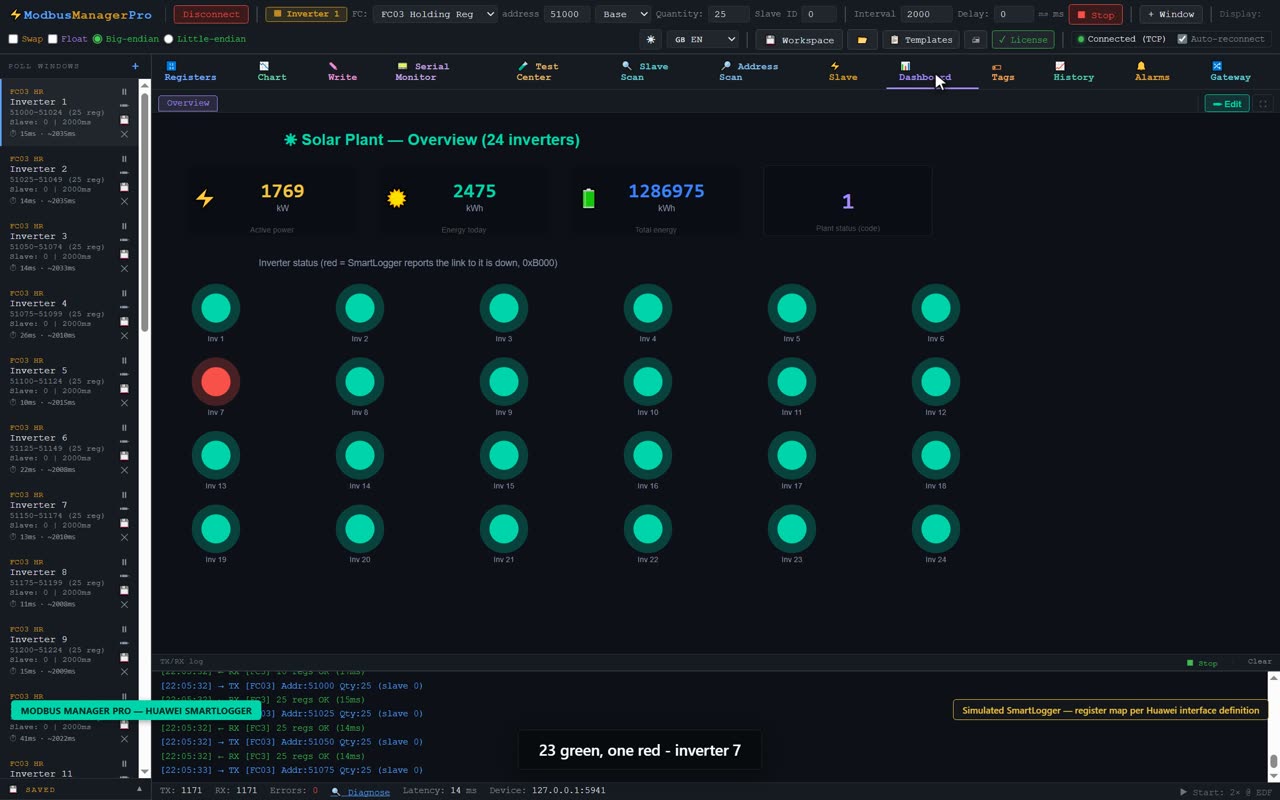
The result can be bound to a Dashboard gauge or KPI element for a live plant overview visible in full-screen runtime mode.
A live gauge answers what the plant is doing now. The question that follows a commissioning visit is usually a different one — what did inverter 7 do overnight, and when did that string drop out? The same tag can be recorded to the built-in Historian, which keeps the values in a local database on the PC and lets you scroll back through days of real inverter data or export a time range to CSV for the handover pack. See Modbus data logger software for how logging intervals, deadband and timestamps work.
Download a Ready-Made Workspace
Rather than building all 24 poll windows, scaling rules, tags and dashboard elements by hand, you can start from a complete example workspace. It contains:
- 24 inverter poll windows (start address 51000, step 25, FC03)
- Scaling for DC current (÷100), power factor (÷1000) and cabinet temperature (÷10)
- Status enum names for the SmartLogger-added codes (0xB000, 0xC000)
- Tags that combine the I32 active-power pairs into kW per inverter, plus plant-level totals
- A Dashboard overview page with per-inverter status lamps and clickable popup windows
SmartLogger_24inv.json
24-inverter solar plant workspace for the Modbus Remapped scheme. Open via File › Open Workspace in ModbusManager Pro.
Try it with ModbusManager Pro
Tag engine + Modbus HMI software for live plant overviews. Free 14-day trial. No credit card. Windows 10/11.
Frequently Asked Questions
Can I use Modbus TCP instead of RS485?
Yes. The SmartLogger supports Modbus TCP on port 502. The register map is identical — the same address formula and scaling applies. Connect ModbusManager via TCP to the SmartLogger's IP address, logic device ID 0.
My inverter reads 0 even though it is running
Check that the SmartLogger has detected the inverter (SmartLogger web UI › Device List). If the inverter shows "undetected", the RS485 wiring between SmartLogger and inverter is the issue, not the Modbus polling side.
The active power register shows a huge number
You are likely reading it as U16 instead of combining the hi/lo pair into I32. Select the 32-bit signed integer display column in ModbusManager for the register pair starting at offset +0 (the first two registers of the inverter block).
Which SmartLogger firmware versions does this apply to?
The Modbus Remapped scheme described here applies to SmartLogger 3000A and SmartLogger 1000A with firmware V300R023 and later. Older firmware versions may use a different starting address or block size — always verify against the "SmartLogger Modbus Interface Definition" document from Huawei's support portal.