// ModbusManager Pro — HMI Dashboard

Modbus HMI Dashboard
Software for Windows

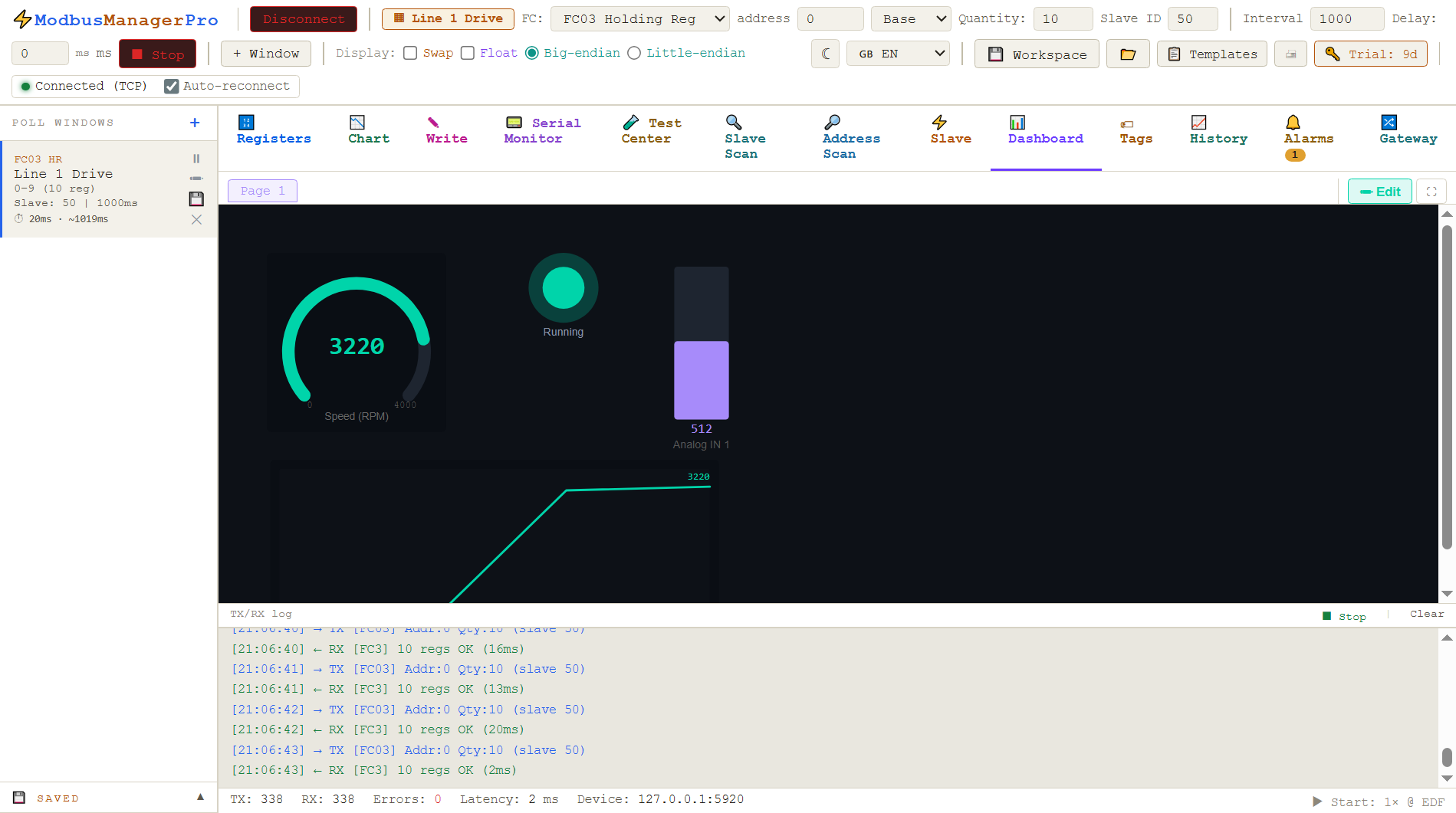
Build a live operator dashboard directly from your Modbus registers — without a SCADA server, OPC-UA license, or subscription. Drag-and-drop gauges, lamps, trend charts and run it fullscreen. Works with RTU and TCP devices on Windows 10/11.

Download Pro trial — free 14 days Buy Pro — $119

No credit card for trial · Windows 10/11 · One-time license

// what is modbus hmi software

Your Modbus data, visualised

A Modbus HMI (Human-Machine Interface) dashboard is a graphical panel that reads live register values from your devices and displays them as gauges, indicators, trends and numbers — the same way an industrial SCADA system would, but without the infrastructure overhead.

ModbusManager Pro is built for engineers, integrators and technicians who need a quick, lightweight way to visualise Modbus data on a Windows PC. You configure poll windows as normal, bind dashboard elements to register values, and the display updates in real time. No server, no OPC-UA, no licensing maze.

Typical use cases: commissioning a new drive or inverter, building a test-bench display, monitoring a solar plant, or creating a simple operator panel for a small system.

In one sentence

ModbusManager Pro reads Modbus RTU / TCP registers, lets you map them to dashboard elements, and displays everything live in a fullscreen operator view — all on a single Windows machine, no extra software.

Who uses it
  • ⚡ Solar / energy engineers monitoring inverters
  • 🏭 Integrators commissioning drive systems
  • 🔬 R&D labs needing a test-bench display
  • 🛠 Technicians who want status at a glance
// dashboard elements

What you can put on the dashboard

All elements are resizable, snap to grid, and bind to a tag or raw register value. Mix and match freely.

Gauge
Circular arc gauge with configurable min/max, coloured zones (green/yellow/red) and a numeric readout. Ideal for speed, pressure or temperature.
🔆
Status lamp
Binary on/off indicator or multi-state lamp driven by a register value. Set custom colours and labels per state — great for alarm and run status.
📈
Trend chart
Rolling time-series chart for up to four tags. Shows the last N samples at the current poll rate. Useful for monitoring temperature drift or power ramp.
🔢
KPI display
Large numeric readout with unit label and optional upper/lower limits. Clean format for displaying power, energy or current values at a glance.
📊
Bar / level
Horizontal or vertical bar showing a value as a filled percentage of the range. Works well for tank fill level, battery state or load percentage.
🪣
Tank & valve
Animated tank fill icon driven by a register value, plus valve icons that open/close based on a coil or discrete input. Adds visual context to P&ID-style dashboards.
// how to build a modbus hmi dashboard

Four steps from device to display

No scripting required for basic dashboards. The tag engine is optional but unlocks computed values like I32/U32 word pairs and gain-applied engineering units.

Step 1
Poll your device
Configure a connection (RTU or TCP), add a poll window for your register range, and verify the raw values in the register table. This works the same as ModbusManager Standard.
Step 2
Define tags
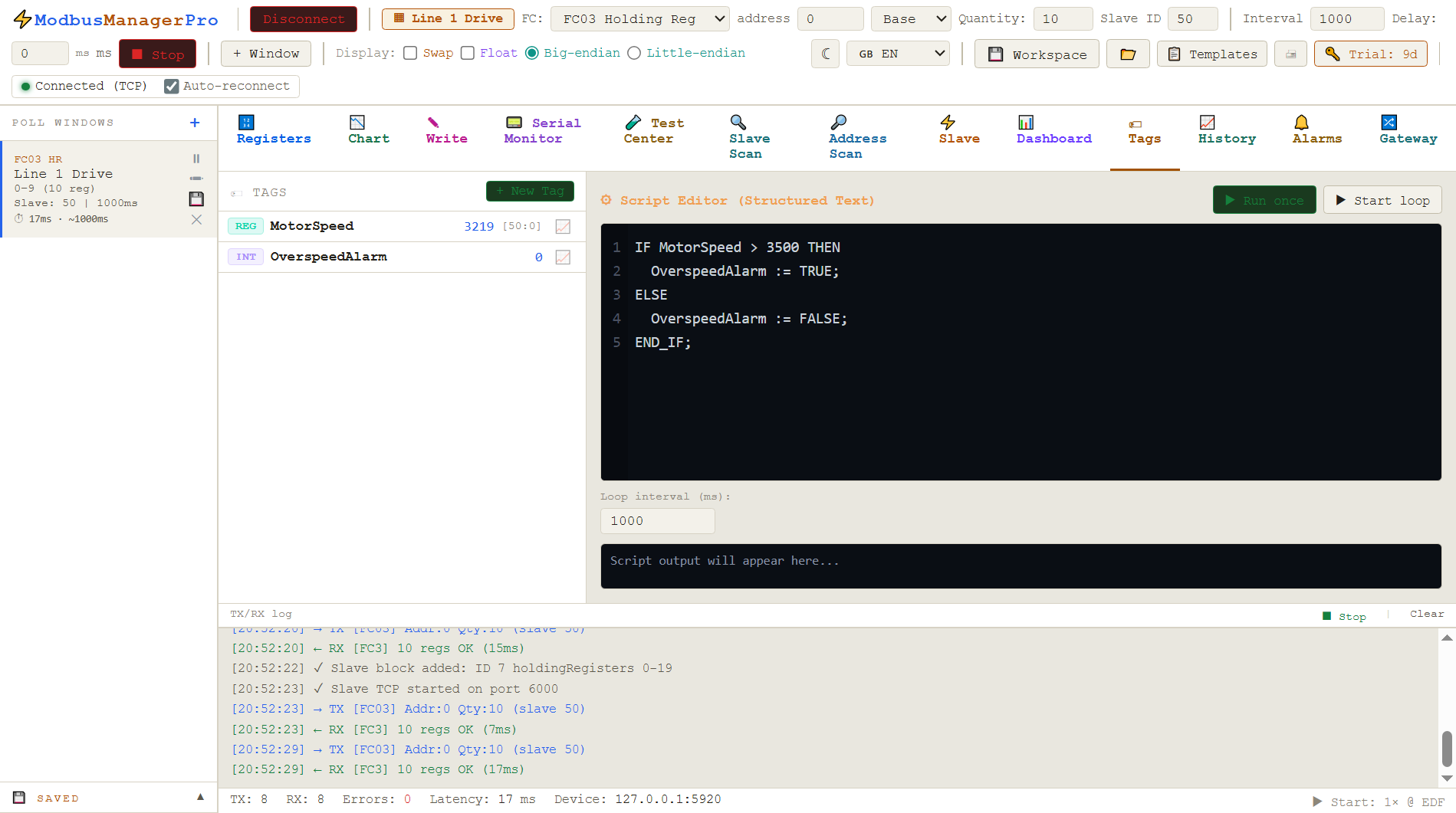
Create register-linked tags that map raw register addresses to named engineering values. Optionally write a Structured Text script to combine word pairs or apply a gain multiplier.
Step 3
Build the dashboard
Open the Dashboard editor, drag elements onto the canvas from the palette, and bind each element to a tag or register. Resize, reposition and set ranges or colour zones.
Step 4
Run fullscreen
Switch to Runtime mode to hide all editor controls. The dashboard fills the screen and updates live at your poll interval. Press Escape to return to the editor.
// tag engine & structured text

Computed values with the tag engine

Raw Modbus registers often need transformation before they make sense on a dashboard. A 32-bit active power value is stored across two 16-bit registers. A temperature is an integer that needs to be divided by 10. A signed reactive power value needs special handling for negative readings.

ModbusManager Pro includes a tag engine with Structured Text scripting. You write simple expressions that run every poll cycle and produce the engineering-unit values that your dashboard elements display.

Tags can also be computed internals — totals, differences or Boolean combinations — that have no direct register address but are derived from other tags.

Example: 32-bit power + gain
// Combine hi/lo word pair → I32, apply gain raw := tag_hi * 65536 + tag_lo; IF raw > 2147483647 THEN raw := raw - 4294967296; END_IF; active_power_kW := raw * 0.001; // Signed reactive power (same pattern) reactive_kVAr := raw_q * 0.001;
Dashboard gauge binds to active_power_kW
// standard vs pro

Which edition do you need?

Both editions include the full Modbus master and slave toolset. Pro adds the Dashboard HMI on top.

Feature Standard — $49 Pro — $119
Modbus RTU, TCP & ASCII master
Built-in Slave Mode & register simulation
Serial Monitor, Test Center, Slave & Address Scan
Charts, scaling, conditional colours, workspaces
Auto-reconnect & 11-language UI
Drag-and-drop HMI Dashboard canvas
Gauges, lamps, bars, trends, tanks, valves
Tag engine with Structured Text scripting
Fullscreen runtime mode
Multi-page dashboard, popup windows
Snap-to-grid, undo/redo, PNG export
Price (one-time, perpetual)$49$119
Need just the polling tool? ModbusManager Standard → $49
// frequently asked questions

Modbus HMI — FAQ

Do I need a separate SCADA server to run a Modbus HMI dashboard?+
No. ModbusManager Pro runs entirely on Windows — no server, no cloud, no OPC-UA license. The dashboard polls your Modbus devices directly and displays live data in the same application.
Does the Modbus HMI work with both RTU and TCP devices?+
Yes. The dashboard reads from any poll window configured in ModbusManager Pro, so you can mix RTU (serial RS-485) and TCP/IP devices on the same dashboard page.
What dashboard elements are available?+
Gauges, numeric KPI displays, status lamps (on/off/colour by value), horizontal and vertical bars, trend charts, tank fill indicators, valve icons and text labels. All elements resize and snap to grid.
Can I build multi-page dashboards?+
Yes. ModbusManager Pro supports multiple dashboard pages in a single workspace. You can link pages via button elements or navigate with tabs in runtime mode.
What is fullscreen runtime mode?+
Runtime mode hides all editor controls and expands the dashboard to fill the screen — suitable for an operator panel or wall display. You exit with Escape.
How does the tag engine work?+
ModbusManager Pro includes a tag engine with Structured Text scripting. You define register-linked tags and write simple expressions (e.g. combining hi/lo word pairs into a 32-bit value, applying gains) that run every poll cycle. Dashboard elements bind to tag values, not raw registers.
Can I export the dashboard to PNG or PDF?+
You can export a snapshot of the current dashboard view to PNG. PDF export is not currently supported.
What is the price and license model?+
ModbusManager Pro costs $119 as a one-time perpetual license for one machine. It includes 12 months of free updates. A 14-day free trial is available — no credit card required.

Try the HMI Dashboard free for 14 days

Download ModbusManager Pro and build your first Modbus dashboard today. No credit card, no cloud, no subscription.

Download Pro trial See pricing

Windows 10/11 · 14-day trial · Pro from $119 one-time