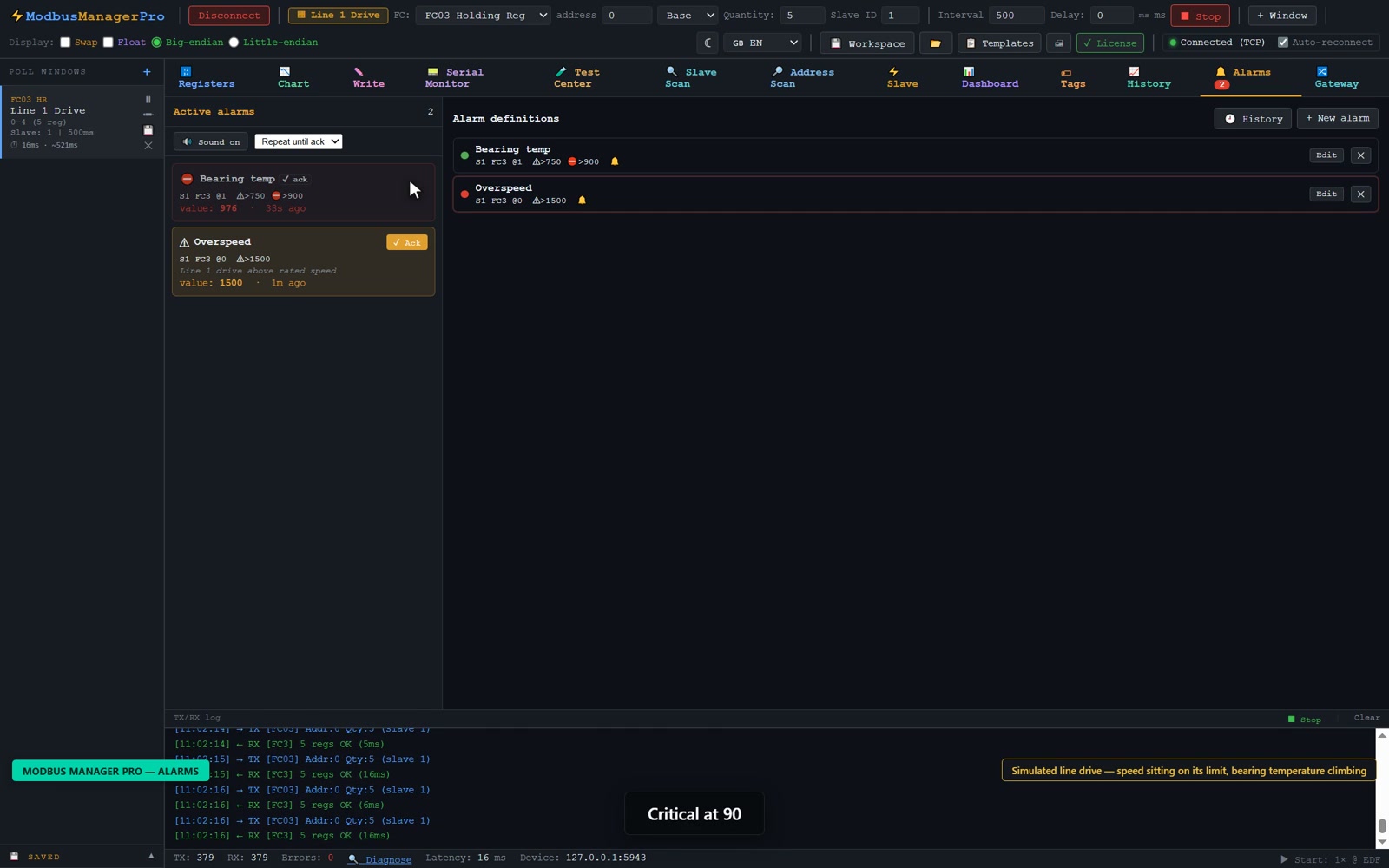
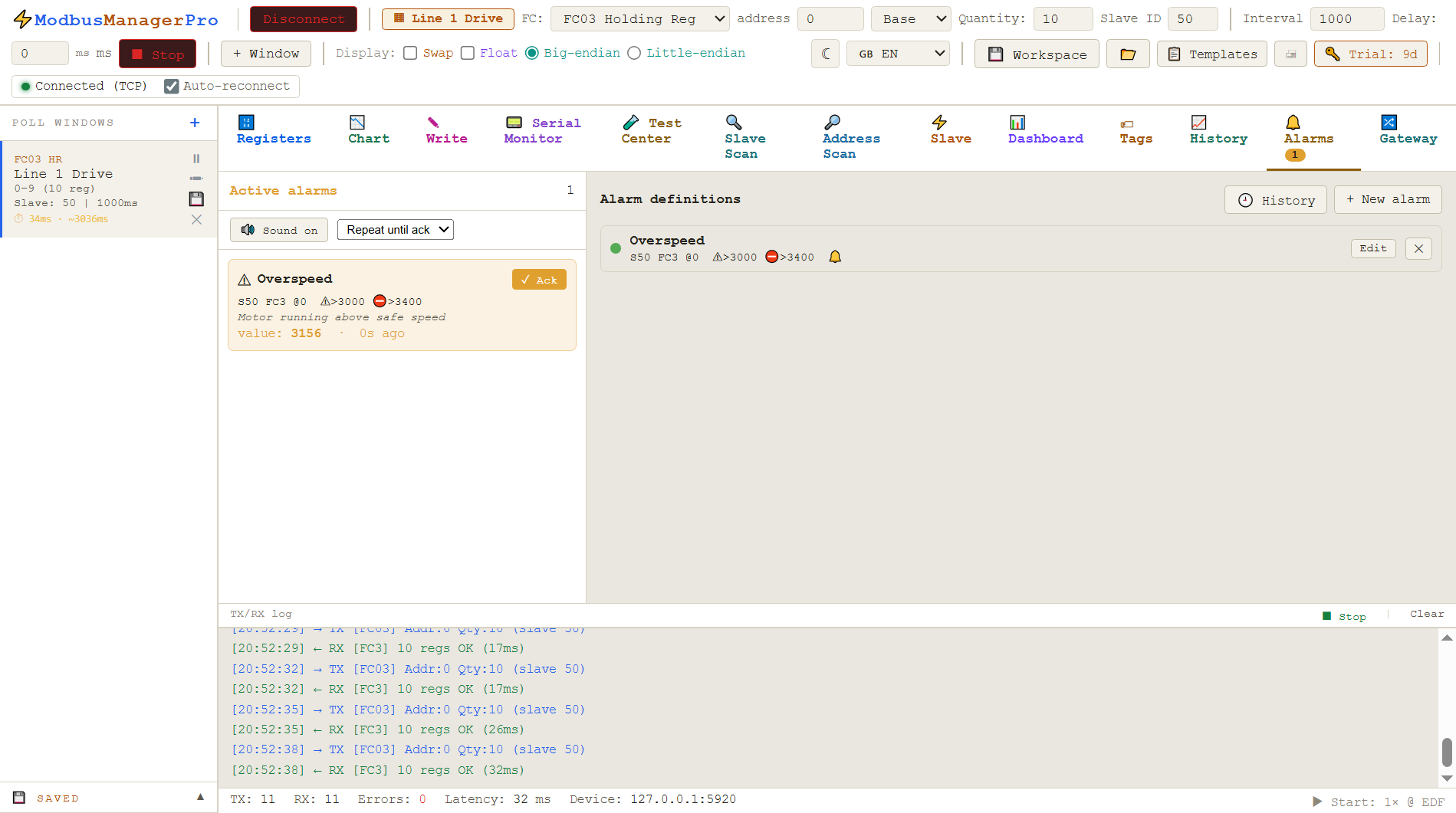
Watch your Modbus registers and tags and get alerted the moment a value crosses a limit — warning and critical levels, hysteresis, activation delay, acknowledge, full alarm history and sound. A built-in alarm system, no SCADA server required. Works with RTU and TCP devices on Windows 10/11.
No credit card for trial · Windows 10/11 · One-time license
// what is modbus alarm monitoring
Know the moment something goes wrong
Polling tells you the value now — but you cannot watch every register all the time. An alarm system watches for you and reacts the instant a limit is crossed.
ModbusManager Pro evaluates the registers and tags you choose on every poll cycle. When a value breaches a threshold, the alarm is raised, shown in colour, optionally sounded, and recorded in history. With warning and critical levels, hysteresis and delay, you get meaningful alerts instead of a flood of noise — all inside the same application, with no separate SCADA or alarm server.
▶3:59
A threshold with no hysteresis trips 23 times in thirty seconds on a drive that is running perfectly normally — then one setting, and the same signal raises one alarm.
// what the alarm system does
Built for real monitoring
Everything you expect from an industrial alarm system, in a desktop Modbus tool.
🔹
Conditions
Greater than, less than, equal, not equal, between or outside a range — on registers or named tags from any slave.
⚠
Warning & critical
Two levels per alarm with automatic escalation from warning (yellow) to critical (red) as the value worsens.
🎚
Hysteresis & delay
Stop chattering near the limit: hysteresis holds the alarm until the value returns, and a delay ignores momentary spikes.
✅
Acknowledge
Acknowledge active alarms from the Alarms tab or directly on the dashboard, individually or all at once.
🕒
Alarm history
Every alarm is logged: when it was raised, acknowledged and cleared, with level and value — a complete audit trail.
🔊
Sound
Audible alerts with different tones for warning and critical, repeating or single beep, plus a global mute. Per-alarm sound.
// how to set up modbus alarms
Three steps to live alerts
Define once, and the alarm system watches every poll cycle.
Step 1
Choose a source
Pick a register (slave, function code, address) or a named tag as the value to monitor. RTU and TCP devices are both supported.
Step 2
Set limits
Choose a condition and set warning and critical limits. Add hysteresis and an activation delay to keep alerts clean, and enable sound if you want it.
Step 3
Monitor & acknowledge
Active alarms appear in the Alarms tab and on the dashboard. Acknowledge them as you handle each one, and review the full history any time.
An active alarm, with its warning and critical limits shown alongside
// where it helps
Typical uses
Unattended monitoring — get an audible alert when a temperature, pressure or level leaves its safe band. Commissioning — catch out-of-range values during a test run and review when they happened. Operator panels — show live alarms on a fullscreen dashboard and acknowledge them on the spot. Fault analysis — use the alarm history to see how often and how long a condition occurred. A focused alternative to a full SCADA alarm server.
// standard vs pro
Which edition do you need?
Both editions include the full Modbus master and slave toolset. Pro adds the alarm system, Historian and Dashboard HMI on top.
Can ModbusManager raise alarms on register values?+
Yes. ModbusManager Pro includes an alarm system. You define alarms on registers or tags with conditions such as greater than, less than, equal, between or outside a range, and the app raises an alarm when the condition is met.
Does it support warning and critical alarm levels?+
Yes. Each alarm can have a warning level and a critical level. An active alarm escalates automatically from warning to critical as the value worsens, shown in different colours.
How do I stop alarms from flickering near the limit?+
Each alarm supports hysteresis and an activation delay. Hysteresis requires the value to move back past the limit by a set amount before the alarm clears, and the delay ignores momentary spikes.
Can I acknowledge alarms and see their history?+
Yes. Active alarms can be acknowledged from the Alarms tab or directly on the dashboard. A full history records when each alarm was raised, acknowledged and cleared.
Do alarms make a sound?+
Yes. Alarms can play an audible alert with different tones for warning and critical, either repeating until acknowledged or a single beep, with a global mute. Sound can be enabled per alarm.
Is the alarm system in the free Standard edition?+
The alarm system is a Pro-edition feature. ModbusManager Standard ($49) covers polling, slave mode and simulation; alarms and the Historian are part of Pro ($119).
// alarms across many devices
Alarms on values from the whole plant
Alarm definitions are easier to maintain when every monitored value lives in one register map with proper engineering units. The gateway collects registers from all your devices and applies scale and type conversion first, so an alarm on “pump 3 pressure” points at a stable address rather than a raw count on a device-specific connection.
Windows 10/11 · 14-day trial · Pro from $119 one-time
Hysteresis on an alarm and a deadband on a logged value solve the same problem from two directions: ignoring movement that does not matter. See logging interval and deadband for how to size a deadband against a signal’s noise floor.
We use Google Analytics cookies to see how the site is used. You can accept or decline — declining keeps analytics off. See our Privacy Policy.