Huawei SUN2000 Modbus Register Map
How to read a Huawei SUN2000 inverter directly over Modbus TCP or RS485 — through the SDongle, the inverter's own network port, or the RS485 terminals. Connection settings, the registers that matter for monitoring, their gains and data types, the power meter and battery registers, and the mistakes that make a SUN2000 return exceptions or nonsense. Behind a SmartLogger the registers are remapped — for that case see the SmartLogger guide. Other inverters: Sungrow.
Connection Settings
A SUN2000 can be reached three ways, and they do not use the same port or unit ID. Most "no response" problems are one of these two numbers.
| Path | Protocol / port | Unit ID | Notes |
|---|---|---|---|
| SDongleA-05 (WLAN-FE dongle) | Modbus TCP, 502 | 1–247 = the inverter's RS485 address (usually 1); 100 = the dongle | Modbus TCP must be enabled first (below). One client at a time. |
| Inverter's built-in WLAN / FE port | Modbus TCP, 502 or 6607 | 0 (default for the directly connected device) | Huawei's documents differ on the port by issue and firmware — try 502, then 6607. |
| RS485 terminals | Modbus RTU | the inverter's RS485 address | Commonly 9600 baud, 8N1, address 1 — settable on the inverter. Huawei's Modbus document does not state the defaults; check the inverter's settings. |
| Behind a SmartLogger | Modbus TCP / RTU | 0 | Different, remapped register map — see the SmartLogger guide. |
0 addresses the directly connected device by default. Many SUN2000s also answer on 1. Through an SDongle, use the inverter's RS485 address — 100 reaches the dongle's own registers, not the inverter. If one ID times out, try the other before suspecting the wiring.
Enabling Modbus TCP on the SDongle
Out of the box the SDongleA-05 does not accept Modbus TCP. Huawei's SDongleA-05 Modbus TCP Guide describes the switch:
1 In the FusionSolar app (formerly SUN2000 app), connect to the inverter and log in as installer.
2 Open Settings › Communication configuration › Dongle parameter settings › Modbus-TCP.
3 Choose Enable (Unrestricted) to allow any client on the LAN, or Enable (Restricted) to allow a single trusted IP address.
Addressing, Data Types and Gains
- Function code 03 for everything. All SUN2000 registers — including the 3xxxx ones — are holding registers read with FC03. There is no FC04. Writes use FC06 or FC16.
- Addresses are sent as written. The numbers in Huawei's tables are protocol addresses: register
32080goes on the wire as 32080. In a tool that uses 1-based "4xxxx" numbering, enter one more. - 32-bit values span two registers, high word first. Read both in one request and combine them before scaling.
- Gain means divide. A gain of 1000 on a kW value: raw
7717is 7.717 kW. - Read only the blocks Huawei defines. A request that runs into an undefined address is refused with exception
0x02(illegal data address) — the whole request, not just the missing register. Up to 125 registers per request.
Key Registers
From Huawei's Modbus Interface Definitions (inverter equipment registers). All read with FC03.
Nameplate
| Register | Parameter | Type | Gain | Unit |
|---|---|---|---|---|
| 30000 | Model name (15 registers) | STR | — | — |
| 30015 | Serial number (10 registers) | STR | — | — |
| 30070 | Model ID | U16 | 1 | — |
| 30071 | Number of PV strings | U16 | 1 | — |
| 30072 | Number of MPP trackers | U16 | 1 | — |
| 30073 | Rated power (Pn) | U32 | ÷1000 | kW |
| 30075 | Maximum active power (Pmax) | U32 | ÷1000 | kW |
PV input
| Register | Parameter | Type | Gain | Unit |
|---|---|---|---|---|
| 32016 | PV1 voltage | I16 | ÷10 | V |
| 32017 | PV1 current | I16 | ÷100 | A |
| 32018 | PV2 voltage | I16 | ÷10 | V |
| 32019 | PV2 current | I16 | ÷100 | A |
| 32064 | Input power (DC) | I32 | ÷1000 | kW |
Further strings follow the pattern PVn voltage = 32014 + 2n, current = 32015 + 2n; register 30071 tells you how many there are.
AC output and grid
| Register | Parameter | Type | Gain | Unit |
|---|---|---|---|---|
| 32066 / 67 / 68 | Line voltage A-B / B-C / C-A | U16 | ÷10 | V |
| 32069 / 70 / 71 | Phase voltage A / B / C | U16 | ÷10 | V |
| 32072 / 74 / 76 | Phase current A / B / C | I32 | ÷1000 | A |
| 32078 | Peak active power today | I32 | ÷1000 | kW |
| 32080 | Active power | I32 | ÷1000 | kW |
| 32082 | Reactive power | I32 | ÷1000 | kvar |
| 32084 | Power factor | I16 | ÷1000 | — |
| 32085 | Grid frequency | U16 | ÷100 | Hz |
| 32086 | Efficiency | U16 | ÷100 | % |
| 32087 | Internal temperature | I16 | ÷10 | °C |
| 32088 | Insulation resistance | U16 | ÷1000 | MΩ |
On single-phase models the phase B/C and line-voltage registers are not valid; phase A carries the grid voltage and current.
Energy, status and alarms
| Register | Parameter | Type | Gain | Unit |
|---|---|---|---|---|
| 32106 | Accumulated energy yield | U32 | ÷100 | kWh |
| 32114 | Daily energy yield | U32 | ÷100 | kWh |
| 32089 | Device status (table below) | U16 | enum | — |
| 32090 | Fault code | U16 | 1 | — |
| 32000 | State 1 (bit 1 grid-connected, bit 2 normal, bits 3–4 derating, bit 6 fault stop) | Bitfield16 | — | — |
| 32008 / 09 / 10 | Alarm 1 / 2 / 3 (one bit per alarm) | Bitfield16 | — | — |
Device Status Values (32089)
| Value (hex) | Decimal | Meaning |
|---|---|---|
| 0x0000–0x0003 | 0–3 | Standby (initialisation and pre-start checks) |
| 0x0100 | 256 | Starting |
| 0x0200 | 512 | On-grid |
| 0x0201 | 513 | On-grid, power limited |
| 0x0202 | 514 | On-grid, self-derating |
| 0x0203 | 515 | Off-grid running |
| 0x0300 | 768 | Shutdown: fault |
| 0x0301 | 769 | Shutdown: command |
| 0x0302–0x0308 | 770–776 | Shutdown: other causes |
| 0x0401–0x0405 | 1025–1029 | Grid scheduling |
| 0x0600 | 1536 | Inspecting |
| 0x0700 | 1792 | AFCI self-check |
| 0x0800 | 2048 | I-V scanning |
| 0x0900 | 2304 | DC input detection |
| 0xA000 | 40960 | Standby: no irradiation (night) |
Power Meter Registers (DTSU666-H)
When a Huawei smart meter is connected to the inverter, its readings are available from the inverter itself:
| Register | Parameter | Type | Gain | Unit |
|---|---|---|---|---|
| 37100 | Meter status (0 offline, 1 normal) | U16 | 1 | — |
| 37101 / 03 / 05 | Phase voltage A / B / C | I32 | ÷10 | V |
| 37107 / 09 / 11 | Phase current A / B / C | I32 | ÷100 | A |
| 37113 | Active power: >0 export to grid, <0 import | I32 | 1 | W |
| 37115 | Reactive power | I32 | 1 | var |
| 37117 | Power factor | I16 | ÷1000 | — |
| 37118 | Grid frequency | I16 | ÷100 | Hz |
| 37119 | Energy exported to grid | I32 | ÷100 | kWh |
| 37121 | Energy imported from grid | I32 | ÷100 | kWh |
| 37132 / 34 / 36 | Phase active power A / B / C (same sign) | I32 | 1 | W |
Battery Registers (LUNA2000)
| Register | Parameter | Type | Gain | Unit |
|---|---|---|---|---|
| 37760 | State of charge (SOC) | U16 | ÷10 | % |
| 37762 | Running status (0 offline, 1 standby, 2 running, 3 fault, 4 sleep) | U16 | 1 | — |
| 37765 | Charge/discharge power | I32 | 1 | W |
| 37780 / 37782 | Total charged / discharged energy | U32 | ÷100 | kWh |
| 37784 / 37786 | Charged / discharged today | U32 | ÷100 | kWh |
| 37758 | Rated capacity | U32 | 1 | Wh |
Huawei states the sign for the unit-1 battery power register (37001: positive = charging). The aggregate 37765 carries no sign note in the table; it behaves the same way in practice, but confirm it against a known charge or discharge before you build logic on it.
Writable Control Registers
The SUN2000 accepts power control over Modbus. A few that people use:
| Register | Parameter | Type | Gain | Unit |
|---|---|---|---|---|
| 40125 | Active power derating, percent | 16-bit | ÷10 | % |
| 40126 | Active power derating, fixed value | U32 | 1 | W |
| 40200 / 40201 | Power on / shutdown command | U16 | — | — |
| 47415 | Active power control mode (0 unlimited, 5 zero export, 6 export limit kW, 7 export limit %) | U16 | — | — |
| 47416 | Maximum feed-in power | I32 | ÷1000 | kW |
Common Mistakes
- Timeouts: wrong unit ID (0 vs 1 vs the RS485 address behind a dongle) or wrong port (502 vs 6607), or Modbus TCP not enabled on the dongle.
- Connection refused after it worked once: another client is connected — the dongle serves one at a time.
- Exception 02 on a read that "should" work: the request crosses an undefined address. Split it into the defined blocks — e.g. 32016–32019, 32064–32095, 32106–32117, 37100–37137.
- Active power reads 0 or a huge number: only one of the two registers was read, or the 32-bit pair was combined low word first.
- Off by one: 1-based tools need the Huawei address + 1.
- Phase B/C read nonsense: it is a single-phase inverter.
- Polling too hard: the dongle times out after about 5 seconds without a reply; leave room between requests, a 1–2 s poll is plenty for monitoring.
Step-by-Step: Reading a SUN2000 with ModbusManager
1 Connect — Modbus TCP to the dongle's or inverter's IP address (port 502, or 6607), or Modbus RTU on the RS485 port. Set the slave ID as in the table above.
2 Poll the defined blocks — FC03 windows for 32016 (4 registers), 32064 (32), 32106 (12) and, with a meter, 37100 (38).
3 Make scaled tags (Pro) — a register tag per value with the data type from the tables (I32, U16…) and Scale = 1 ÷ gain: 0.001 for 32080, 0.01 for 32114, 0.1 for 32087. The tag then reads in kW, kWh and °C everywhere — dashboard, trends, alarms, historian — with no script.
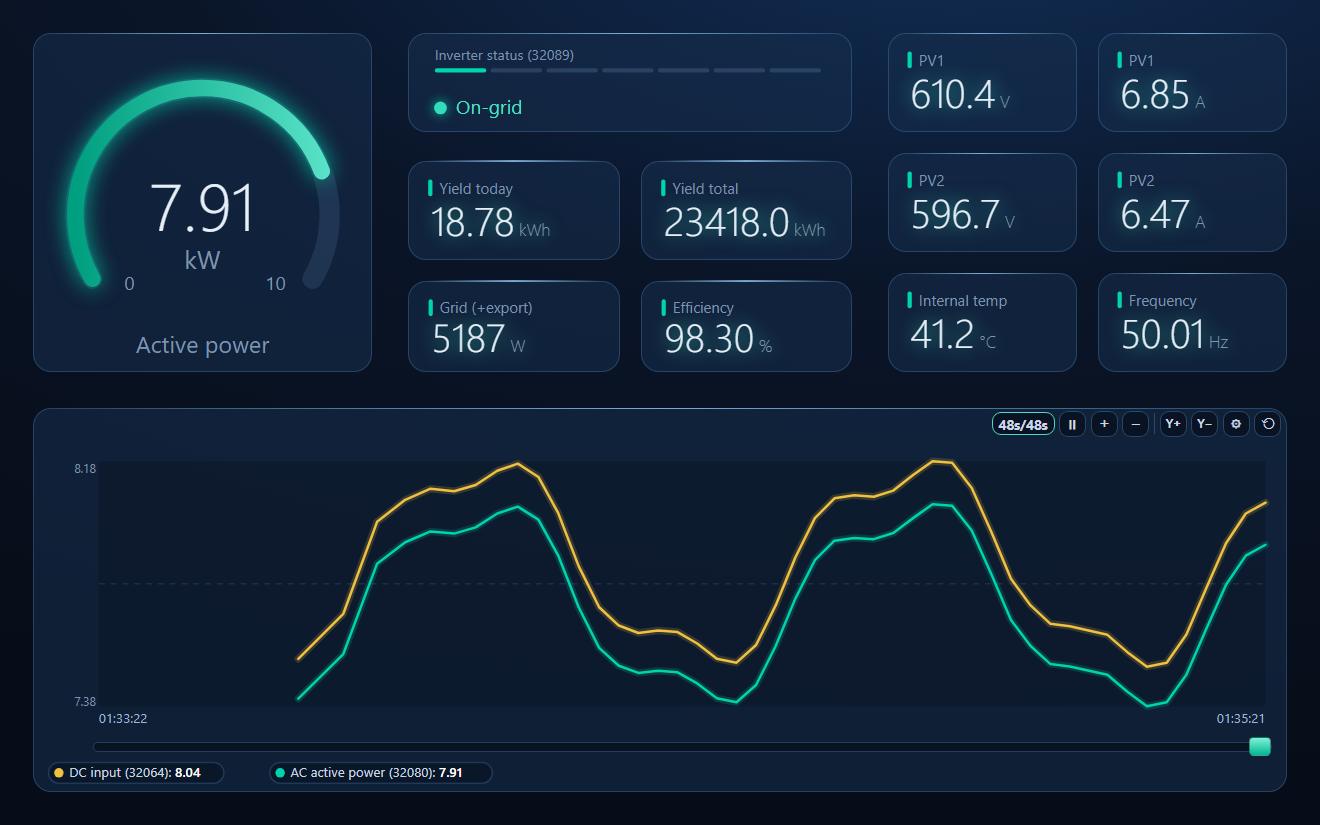
4 Build the overview — gauge, value cards, a status lamp on 32089 and a trend, then save the workspace. Or start from the one below.
Download a Ready-Made Workspace
The workspace in the screenshot above, ready to point at your inverter:
- Five FC03 poll windows on the defined blocks: PV strings, AC output, energy, DTSU666 meter, nameplate
- 22 register tags with data types and Scale from Huawei's table — active and DC power in kW, yield in kWh, voltages, currents, temperature, frequency, efficiency, meter power and energy
- A dashboard: active power gauge, status lamp with the 32089 values, yield, grid export, efficiency, PV1/PV2, and a DC-in vs AC-out trend
Huawei_SUN2000.json
SUN2000 inverter + DTSU666-H meter workspace. Open via Workspace › Open in ModbusManager Pro.
Try it with ModbusManager Pro
Scaled tags, dashboard and historian for your inverter. Free 14-day trial. No credit card. Windows 10/11.
Frequently Asked Questions
Which port does the SUN2000 use for Modbus TCP?
Through the SDongleA-05 it is port 502. On the inverter's built-in WLAN/FE port Huawei's documents give 502 in one issue and 6607 in another, depending on firmware; if 502 does not answer, try 6607.
What unit ID should I use?
For a direct connection, 0 (Huawei's default for the directly connected device) — many inverters also answer on 1. Through an SDongle, use the inverter's RS485 address, usually 1; ID 100 is the dongle itself.
Why do I get exception 02 (illegal data address)?
The request covers an address Huawei does not define, and the SUN2000 refuses the whole request. Read the defined blocks separately, e.g. 32064–32095 for the AC values and 32106–32117 for the energy counters.
Can two programs read the inverter at the same time?
Not through the SDongle: it serves one Modbus TCP client at a time, even in Unrestricted mode. Let one program poll and share the values — ModbusManager's gateway can republish them as a Modbus map for other systems.
Is this the same register map as through a SmartLogger?
No. A SmartLogger remaps each inverter into its own address block (51000 + 25 × (N − 1)) on unit 0. Use this page for a direct connection and the SmartLogger guide behind a logger.
Sources
Huawei, SUN2000MA V200R024C00SPC106 Modbus Interface Definitions (V3.0), Issue 06, 2025-06-12 (support.huawei.com, EDOC1100480297), cross-checked register by register with Huawei's generic Solar Inverter Modbus Interface Definitions, Issue 05, 2023-02-16, which covers the wider SUN2000 range; Huawei, SDongleA-05 Modbus TCP Guide, Issue 01, 2021-11-07, and SDongleA Modbus Interface Definitions, Issue 05, 2022-07-06. Register availability differs by model and firmware — check the issue of the document for your inverter before writing.