SunSpec Modbus for SMA, Fronius and SolarEdge
SMA, Fronius and SolarEdge inverters all speak SunSpec: one register layout, published by the SunSpec Alliance, in which every value travels with a scale factor and the data is organised in numbered models you find by walking a chain. Learn SunSpec once and you can read all three — provided you get each brand's own switch, unit ID and port right. This page covers the standard, the inverter model every one of them implements, and the brand-specific settings. Deye, Sunsynk or Growatt hybrid? See the hybrid inverter register map.
How a SunSpec Device Is Laid Out
- Holding registers, function code 03.
- The "SunS" marker. The map starts with the two registers
0x5375 0x6E53— the ASCII text "SunS". The preferred location is protocol address40000, which is register number40001in 1-based notation. SMA, Fronius and SolarEdge all say the same: request address 40000. The standard also allows 0 and 50000; a client tries 40000 first. - A chain of models. After the marker comes model 1 (the common model: manufacturer, model, serial). Each model starts with its ID and its length L (the number of registers that follow). The next model starts at
address + 2 + L. The chain ends with ID0xFFFF. - Walk the chain — do not hard-code addresses. The common model is 66 registers long in the specification, 65 on SolarEdge and Fronius; SMA inserts extra models before the inverter model; changing a Fronius setting moves everything after it. Reading the ID and L at each step tells you where the inverter model really is.
- Up to 125 registers per request, big-endian, 32-bit values high word first.
Scale Factors
A SunSpec value is an integer with a scale factor (type sunssf, a signed 16-bit power of ten) beside it:
value = raw × 10SF // raw 2071, SF -2 → 20.71
Read the value and its scale factor in the same request, and read the scale factor every time. Fronius states that its scale factors are not static: they can change with a firmware update and at runtime (auto-scaling). A program that caches the scale factor will one day be off by a factor of ten.
| Type | "Not implemented" value |
|---|---|
| int16, sunssf | 0x8000 |
| uint16, enum16, bitfield16 | 0xFFFF |
| int32 | 0x80000000 |
| uint32, enum32, bitfield32 | 0xFFFFFFFF |
| acc16 / acc32 / acc64 | 0 |
| float32 | NaN (0x7FC00000) |
A point a device does not implement reads one of these — on a single-phase device, for example, phase B and C. Treat them as "no data", not as a reading.
The Inverter Model (103, Three-Phase, Integer + SF)
Models 101, 102 and 103 are the single-, split- and three-phase inverter models with integer values and scale factors; all three have length 50 and the same point layout. Offsets count from the model's ID register. The absolute column is SolarEdge's layout, confirmed in SolarEdge's technical note, with the model ID at 40069.
| Offset | Point | Type | Units | SolarEdge address |
|---|---|---|---|---|
| 0 / 1 | Model ID (101/102/103) / length (50) | uint16 | — | 40069 / 40070 |
| 2 | A — total AC current | uint16 | A | 40071 |
| 3 / 4 / 5 | AphA / AphB / AphC | uint16 | A | 40072–40074 |
| 6 | A_SF | sunssf | — | 40075 |
| 7 / 8 / 9 | PPVphAB / BC / CA — line voltages | uint16 | V | 40076–40078 |
| 10 / 11 / 12 | PhVphA / B / C — phase voltages | uint16 | V | 40079–40081 |
| 13 | V_SF | sunssf | — | 40082 |
| 14 | W — AC power | int16 | W | 40083 |
| 15 | W_SF | sunssf | — | 40084 |
| 16 / 17 | Hz / Hz_SF | uint16 / sunssf | Hz | 40085 / 40086 |
| 18 / 19 | VA / VA_SF | int16 / sunssf | VA | 40087 / 40088 |
| 20 / 21 | VAr / VAr_SF | int16 / sunssf | var | 40089 / 40090 |
| 22 / 23 | PF / PF_SF | int16 / sunssf | % | 40091 / 40092 |
| 24–25 | WH — lifetime energy | acc32 | Wh | 40093–40094 |
| 26 | WH_SF | sunssf | — | 40095 |
| 27 / 28 | DCA / DCA_SF | uint16 / sunssf | A | 40096 / 40097 |
| 29 / 30 | DCV / DCV_SF | uint16 / sunssf | V | 40098 / 40099 |
| 31 / 32 | DCW / DCW_SF | int16 / sunssf | W | 40100 / 40101 |
| 33 / 34 / 35 / 36 | TmpCab / TmpSnk / TmpTrns / TmpOt | int16 | °C | 40102–40105 |
| 37 | Tmp_SF | sunssf | — | 40106 |
| 38 | St — operating state | enum16 | — | 40107 |
| 39 | StVnd — vendor state | enum16 | — | 40108 |
| 40–41 | Evt1 — event flags | bitfield32 | — | 40109–40110 |
Operating state (St)
| Value | State | Value | State |
|---|---|---|---|
| 1 | OFF | 5 | THROTTLED |
| 2 | SLEEPING (night) | 6 | SHUTTING_DOWN |
| 3 | STARTING | 7 | FAULT |
| 4 | MPPT (producing) | 8 | STANDBY |
Evt1 sets one bit per event: bit 0 ground fault, 1 DC over-voltage, 2 AC disconnect, 3 DC disconnect, 4 grid disconnect, 5 cabinet open, 6 manual shutdown, 7 over-temperature, 8 over-frequency, 9 under-frequency, 10 AC over-voltage, 11 AC under-voltage, 12 blown string fuse, 13 under-temperature, 14 memory loss, 15 hardware test failure.
Float models (111–113)
Models 111, 112 and 113 carry the same quantities as float32 values with no scale factors (length 60). Fronius lets you choose between "float" and "int + SF"; switching it changes which model is present and shifts every model after it. In model 113, W is at offset 22 and WH at offset 32.
Brand Settings
SMA (Sunny Boy, Sunny Tripower, Sunny Highpower)
- Modbus is off by default and a factory reset turns it off again. As Installer in the inverter's web interface: Device Parameters › External Communication › Modbus › TCP Server › Activated = Yes, port 502 (or through the installation assistant's network configuration).
- Two unit IDs: SMA's own register profile answers on unit ID
3by default; the SunSpec profile on unit ID + 123, i.e. 126. Asking SunSpec questions on unit 3 is the most common SMA mistake. - Which SunSpec profile you get depends on the country data set; the newer profile is dynamic, so models a device does not support are left out and addresses can differ between devices — walk the chain.
- SMA's own profile has its own register lists, for example
30775AC active power (S32, W) and30529total yield (U32, Wh). A missing value reads0x80000000, typically at night. - SMA's guidance is not to poll more often than every 10 seconds.
Fronius (Symo GEN24, Primo GEN24, Datamanager)
- GEN24: web interface › Communication › Modbus, enable the TCP server, choose the SunSpec model type (float or int + SF) and port (502 or 1502). The inverter answers on unit ID
1; smart meters start at an address offset of 200. - Datamanager (Symo, Primo, Eco): Settings › Modbus › Data output via Modbus = tcp, port 502. The inverter's unit ID is its inverter number; the smart meter is at 240.
- Optional "inverter control via Modbus" and an IP restriction for control.
- Allow time: Fronius asks for sequential queries and timeouts of at least 1 s (GEN24) or 10 s (Datamanager).
SolarEdge
- Modbus TCP is off by default. On SetApp inverters: Commissioning › Site Communication › Modbus TCP › Enable — the default port is 1502. On older inverters with an LCD menu: Communication › LAN Conf › Modbus TCP, default port 502.
- Unit (device) ID
1on Ethernet. - One connection only. The inverter accepts a single Modbus TCP connection and drops an idle one after two minutes. A second program polling at the same time locks the first out.
- Common model at 40000 (length 65), inverter model at 40069. Meters (models 201, 202, 203) follow the inverter model in the chain — their position depends on how many meters are configured, so walk the chain to find them.
- RS485: device ID 1–247, baud rate settable from 9600 to 115200.
Power Limiting (Model 123)
Model 123 (immediate controls) carries WMaxLimPct (offset 5, a percentage of rated power), WMaxLim_Ena (offset 9) and OutPFSet (offset 10), with WMaxLimPct_SF at offset 23. Each brand gates writes differently (SMA without a Grid Guard code in the current profiles, Fronius only with "inverter control via Modbus" enabled).
Common Mistakes
- Off by one: 40001 is the register number, 40000 the address to request.
- Hard-coded addresses copied from another brand — or from the same brand with a different setting. Walk the chain.
- Scale factor ignored or cached: values off by 10× or 100×, sometimes only after a firmware update.
- SMA on unit 3: SunSpec is on 126.
- SolarEdge on port 502: SetApp inverters default to 1502.
- Second client: SolarEdge serves one connection; the second is refused.
- Fronius float vs int + SF: reading model 103 offsets while the inverter presents model 113, or the reverse.
- 0x8000 / 0xFFFF taken as data: those are "not implemented".
Step-by-Step: Reading a SunSpec Inverter with ModbusManager
1 Connect — Modbus TCP with the brand's port and unit ID above.
2 Find the inverter model — an FC03 window at 40000 shows the "SunS" marker and model 1's length; the inverter model starts at 40002 + 2 + L.
3 Poll the model in one request — e.g. 40069, quantity 52, so every value arrives together with its scale factor.
4 Apply the scale factors (Pro) — tag the raw value and its SF, and let a Structured Text line compute the result every cycle: AC_Power := W_raw * Math.pow(10, W_SF) / 1000;. Because the SF is read each time, the value stays right when the inverter changes it. A fixed Scale on a register tag is fine for devices with constant gains, but not for SunSpec.
Download a Ready-Made Workspace
- FC03 windows on the inverter model (40069, 52 registers) and on the SunS marker and common model
- Register tags for the raw values and their scale factors — current, voltage, power, frequency, power factor, energy, DC values, temperature, state
- A Structured Text script that applies the scale factors every second, into kW, kWh, V, A, Hz, % and °C
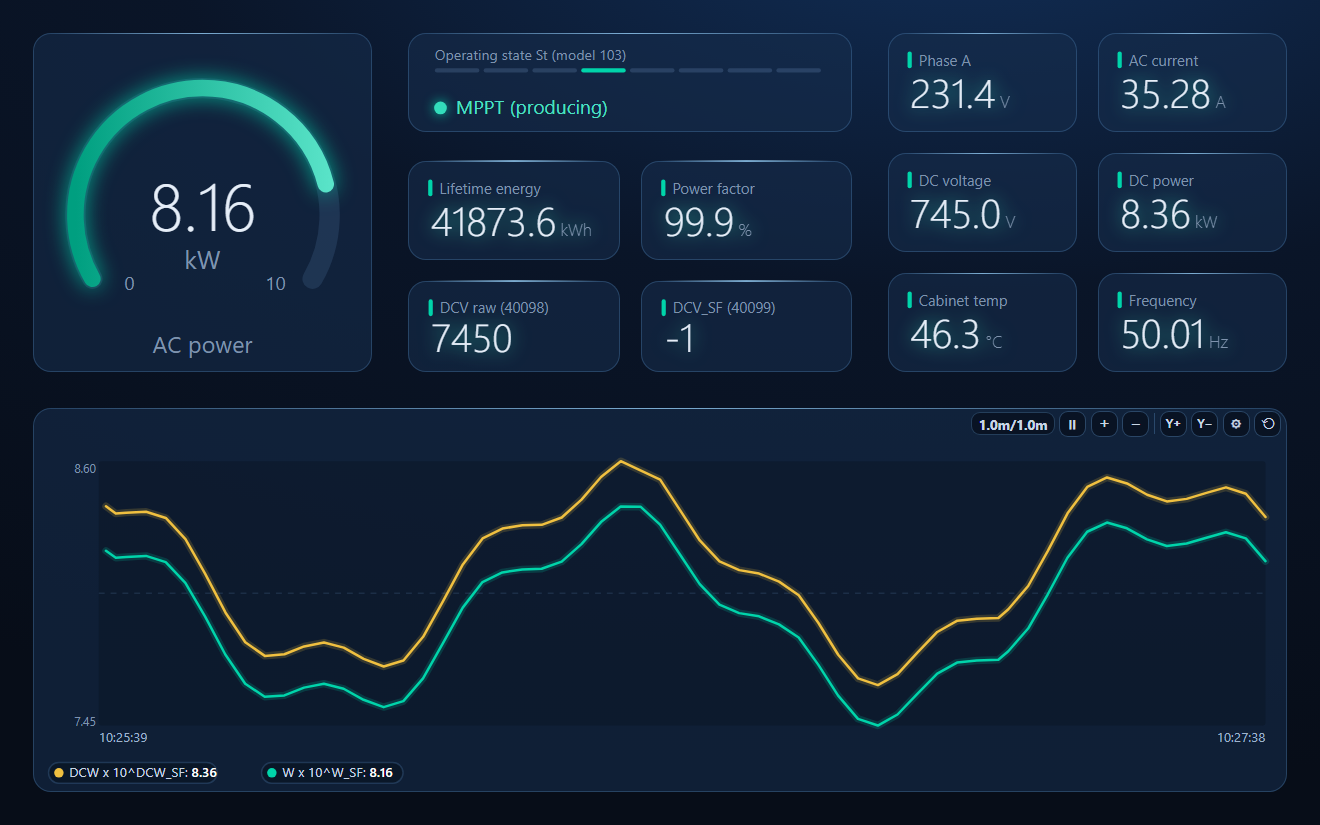
- A dashboard: AC power gauge, state lamp with the eight St values, energy, power factor, the raw DC voltage and its scale factor side by side, DC values and a DC vs AC power trend
SunSpec_Inverter.json
SunSpec three-phase inverter workspace with scale factors applied by script. Open via Workspace › Open in ModbusManager Pro.
Try it with ModbusManager Pro
Tags, Structured Text, dashboard and historian for your inverter. Free 14-day trial. No credit card. Windows 10/11.
Frequently Asked Questions
Is the SunSpec base address 40000 or 40001?
Both describe the same register: 40001 is the 1-based register number, 40000 the protocol address you put in the request. SMA, Fronius and SolarEdge all say to request 40000.
Why are my SunSpec values off by a factor of 10 or 100?
The scale factor was not applied, or was read once and cached. Every value is raw × 10SF, and the scale factor can change — read it in the same request as the value, every time.
Which unit ID does an SMA inverter use for SunSpec?
126 by default: SMA's own profile is on unit ID 3 and SunSpec on that ID plus 123.
Which port does SolarEdge use for Modbus TCP?
1502 by default on SetApp inverters, 502 on older inverters with an LCD menu. Modbus TCP is off until enabled, and only one connection is accepted at a time.
Where is the inverter model if the addresses differ from this table?
Walk the chain: read the ID and length at 40002, jump 2 + length, and repeat until you reach ID 101, 102, 103 (integer) or 111–113 (float). The offsets inside the model are the same on every brand.
Sources
SunSpec Alliance model definitions (models 1, 101–103, 111–113, 123, 201–203), github.com/sunspec/models; SMA, SunSpec Modbus technical information (SunSpecModbus-TI-en-11) and SMA and SunSpec Modbus Interface (SMA-Modbus-general-TI-en-10); Fronius, Fronius GEN24 Modbus TCP & RTU (42,0410,2649) and Fronius Datamanager Modbus TCP & RTU (42,0410,2049); SolarEdge, Technical Note – SunSpec Logging, versions 3.2 (June 2025) and 3.3 (October 2026). Model positions vary by brand, firmware and settings; the offsets within a model do not.