Sungrow Inverter Modbus Register Map
How to read a Sungrow SG string inverter or SH hybrid over Modbus TCP or RS485. Sungrow's protocol has three habits that trip up almost everyone the first time: the documented address is one more than the one you request, measurements are input registers (FC04) while the same numbers under FC03 mean something else, and 32-bit values come low word first. This page covers all three, then the registers you need for monitoring. SMA, Fronius or SolarEdge instead? They use SunSpec.
Connection Settings
| Path | Protocol / port | Unit ID | Notes |
|---|---|---|---|
| Built-in Ethernet (commercial CX / HX models) | Modbus TCP, 502 | 1 (in practice) | Default IP 192.168.1.100, subnet 255.255.0.0 per Sungrow's protocol document. |
| WiNet-S / WiNet-S2 dongle (residential RS / RT, SH hybrids) | Modbus TCP, 502 | 1 (in practice) | Modbus TCP has to be opened on the dongle first (below). Not through iHomeManager. |
| RS485 terminals | Modbus RTU, 9600 baud, 8N1 | 1–247 (SH default 1) | Two-wire RS485. Wait for each reply (up to about a second on SH) before the next request. |
The Three Rules
1. Request the documented address minus one
Sungrow's tables list addresses such as 5000, and the document itself says to subtract 1: register 5000 goes on the wire as 4999 (0x1387). Its worked example reads 01 04 13 87 00 02 to get documented registers 5000–5001. The addresses are plain numbers, not 3xxxx/4xxxx notation. If your tool adds the offset itself (1-based addressing), enter the document's number unchanged.
2. Measurements are input registers (FC04)
Sungrow uses both register types, and they reuse the same numbers. The running data — power, voltages, yield, state — is in the input registers, read with FC04 ("3x" in the document). The holding registers (FC03 to read, FC06/FC16 to write) are settings. At documented 5000–5005 the holding registers hold the system clock, so an FC03 read of "5000" returns the current year, not the device type.
3. 32-bit values are low word first
For U32/S32 values Sungrow sends the low word at the lower address (bytes within each word stay big-endian). Sungrow's own example: the two registers 0x2BF6, 0x000B combine to 0x000B2BF6 = 732 150. Read as high-word-first, the totals are wildly wrong.
0xFFFF (U16), 0x7FFF (S16), 0xFFFFFFFF or 0x7FFFFFFF (32-bit) — for example MPPT3 on a two-MPPT inverter. Treat those as "not available", not as data.
SG String Inverter Registers
Input registers, read with FC04. Doc is the address in Sungrow's table; wire is what you request.
| Doc | Wire | Parameter | Type | Scale | Unit |
|---|---|---|---|---|---|
| 4990 | 4989 | Serial number (10 registers) | UTF-8 | — | — |
| 5000 | 4999 | Device type code | U16 | code | — |
| 5001 | 5000 | Nominal active power | U16 | 0.1 | kW |
| 5002 | 5001 | Output type (0 two-phase, 1 3P4L, 2 3P3L) | U16 | enum | — |
| 5003 | 5002 | Daily yield | U16 | 0.1 | kWh |
| 5004 | 5003 | Total yield | U32 | 1 | kWh |
| 5006 | 5005 | Total running time | U32 | 1 | h |
| 5008 | 5007 | Internal temperature | S16 | 0.1 | °C |
| 5011 / 5012 | 5010 / 5011 | MPPT1 voltage / current | U16 | 0.1 | V / A |
| 5013 / 5014 | 5012 / 5013 | MPPT2 voltage / current | U16 | 0.1 | V / A |
| 5015 / 5016 | 5014 / 5015 | MPPT3 voltage / current | U16 | 0.1 | V / A |
| 5017 | 5016 | Total DC power | U32 | 1 | W |
| 5019 / 20 / 21 | 5018 / 19 / 20 | Phase A / B / C voltage (line voltage on 3P3L) | U16 | 0.1 | V |
| 5022 / 23 / 24 | 5021 / 22 / 23 | Phase A / B / C current | U16 | 0.1 | A |
| 5031 | 5030 | Total active power | U32 | 1 | W |
| 5033 | 5032 | Total reactive power | S32 | 1 | var |
| 5035 | 5034 | Power factor (>0 leading, <0 lagging) | S16 | 0.001 | — |
| 5036 | 5035 | Grid frequency | U16 | 0.1 | Hz |
| 5038 | 5037 | Work state (table below) | U16 | code | — |
| 5045 | 5044 | Fault / alarm code (valid in Fault or Alarm state) | U16 | code | — |
| 5071 | 5070 | Array insulation resistance | U16 | 1 | kΩ |
| 5113 | 5112 | Daily running time | U16 | 1 | min |
| 5128 | 5127 | Monthly yield | U32 | 0.1 | kWh |
| 5144 | 5143 | Total yield, higher resolution (newer models) | U32 | 0.1 | kWh |
| 5148 | 5147 | Grid frequency, higher resolution (newer models) | U16 | 0.01 | Hz |
5025–5030, 5037 and 5050–5070 are reserved. Read the defined ranges and split a request at a reserved gap if your inverter refuses it. A few common device type codes: SG10RT 0x2433, SG5.0RS 0x2606, SG50CX 0x2C02, SG110CX 0x2C06, SG250HX 0x2C0C.
Work State Values (doc 5038)
| Value | Decimal | Meaning |
|---|---|---|
| 0x0000 | 0 | Run |
| 0x8000 | 32768 | Stop |
| 0x1300 | 4864 | Key stop |
| 0x1500 | 5376 | Emergency stop |
| 0x1400 | 5120 | Standby |
| 0x1200 | 4608 | Initial standby |
| 0x1600 | 5632 | Starting |
| 0x9100 | 37120 | Alarm run |
| 0x8100 | 33024 | Derating run |
| 0x8200 | 33280 | Dispatch run |
| 0x5500 | 21760 | Fault |
| 0x2500 | 9472 | Communication fault |
SH Hybrid Inverters
The SH series has its own protocol document, and it is not a superset of the SG map. On SH, 5022–5030 is reserved (no phase currents or active power there), and documented 5004 is total output energy in 0.1 kWh, including battery discharge. Registers 5000–5003, 5008, 5011–5021 and 5033–5036 mean the same as on SG. The hybrid data sits at 13000 and up:
| Doc | Wire | Parameter | Type | Scale | Unit |
|---|---|---|---|---|---|
| 13000 | 12999 | Running state | U16 | code | — |
| 13001 | 13000 | Power flow (bit 0 PV, 1 charging, 2 discharging, 3 load, 4 feed-in, 5 import) | U16 | bits | — |
| 13002 | 13001 | Daily PV generation | U16 | 0.1 | kWh |
| 13003 | 13002 | Total PV generation | U32 | 0.1 | kWh |
| 13008 | 13007 | Load power | S32 | 1 | W |
| 13010 | 13009 | Export power | S32 | 1 | W |
| 13020 | 13019 | Battery voltage | U16 | 0.1 | V |
| 13023 | 13022 | Battery SOC | U16 | 0.1 | % |
| 13024 | 13023 | Battery SOH | U16 | 0.1 | % |
| 13025 | 13024 | Battery temperature | S16 | 0.1 | °C |
| 5214 | 5213 | Battery power (Sungrow recommends this over 13022) | S32 | 1 | W |
| 13034 | 13033 | Total active power | S32 | 1 | W |
| 5601 | 5600 | Meter active power (>0 buying from grid, <0 selling) | S32 | 1 | W |
| 13036 / 13037 | 13035 / 13036 | Import energy today / total | U16 / U32 | 0.1 | kWh |
| 13045 / 13046 | 13044 / 13045 | Export energy today / total | U16 / U32 | 0.1 | kWh |
Grid, load and export values are only valid when a smart meter is wired directly to the inverter. Only the meter register 5601 has a documented sign; check the sign of export and battery power against a known charge or export before relying on it.
Writable Registers
Holding registers: read with FC03, write with FC06 or FC16, again documented address minus one.
| Doc | Model | Parameter | Values |
|---|---|---|---|
| 5006 | SG | Start / stop | 0xCF start, 0xCE stop |
| 5007 | SG | Power limitation switch | 0xAA enable, 0x55 disable |
| 5008 | SG | Power limitation setting (needs 5007 enabled) | 0.1 % |
| 13000 | SH | Start / stop | 0xCF boot, 0xCE shutdown |
| 13050 | SH | EMS mode | 0 self-consumption, 2 compulsory, 3 external EMS |
| 13087 / 13074 | SH | Feed-in limitation enable / value | 0xAA/0x55 / W |
Common Mistakes
- Every value looks shifted: the documented address was requested without subtracting 1 — you are reading the next register.
- "Device type" reads 2026: FC03 was used. The device type is an input register: FC04.
- Total yield is a nonsense number: the 32-bit pair was combined high word first. Sungrow sends the low word first.
- 65535 or 32767 on some channels: the model does not have that input (e.g. MPPT3) — not a fault.
- SG addresses on an SH hybrid: 5022–5032 is reserved on SH; use the 13000 block.
- No connection to the WiNet-S: Modbus TCP not opened, or the whitelist excludes your PC.
- Fault code reads a stale value: 5045 only means something while the work state is Fault (0x5500) or Alarm run (0x9100).
Step-by-Step: Reading a Sungrow Inverter with ModbusManager
1 Connect — Modbus TCP to the inverter's or WiNet-S's IP address, port 502, slave ID 1; or Modbus RTU at 9600 8N1.
2 Poll input registers — a window with function code 04, start 4999 (documented 5000), quantity 50; a second at 5112 for the daily running time and monthly yield.
3 Make scaled tags (Pro) — register tags on the input registers at the wire address, data type U16/U32/S16, word order little for the 32-bit values, and Scale as in the table: 0.1 for daily yield and voltages, 0.001 on 5031 to get kW. The values then read in engineering units in the dashboard, trends, alarms and historian.
4 Build the overview — or start from the workspace below.
Download a Ready-Made Workspace
- Two FC04 poll windows: documented 5000–5049 and 5113–5148
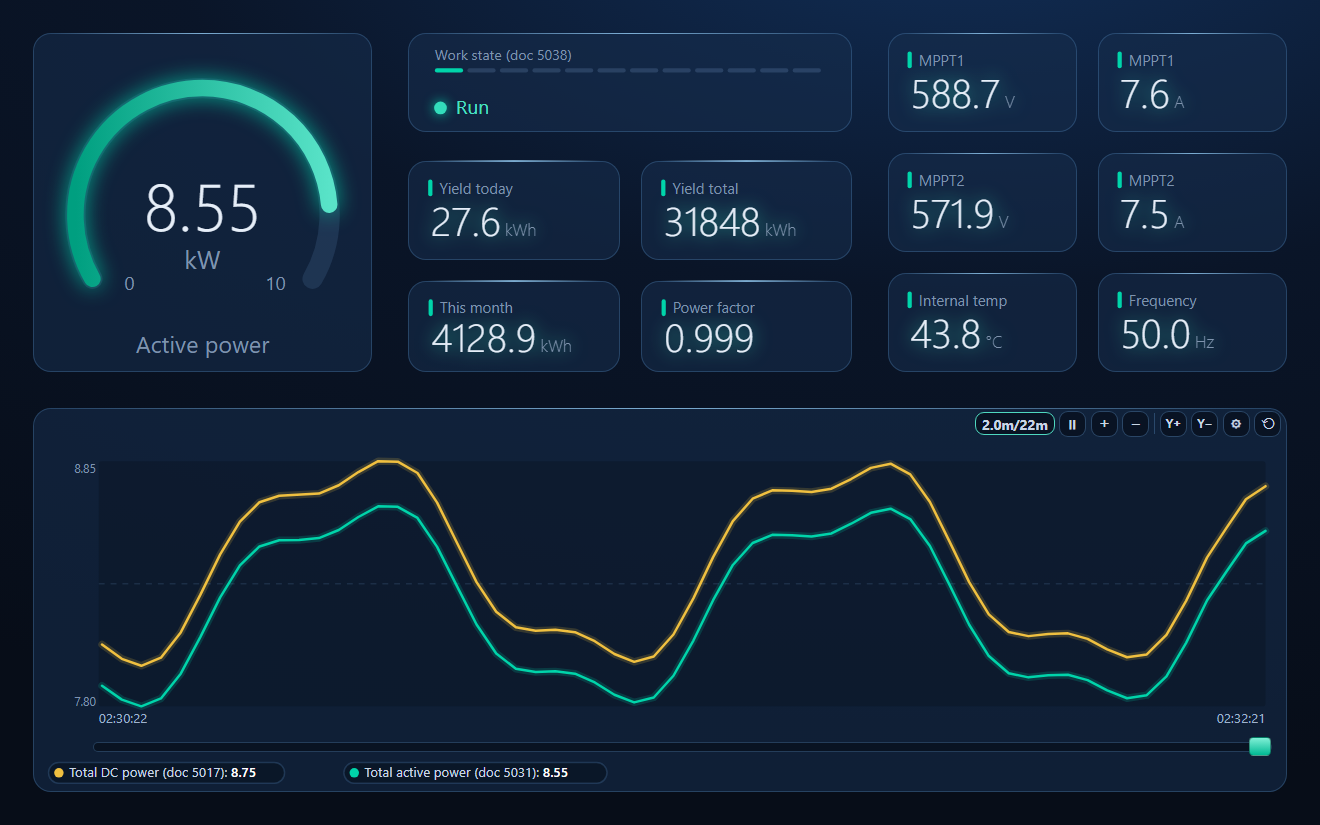
- 19 register tags with the wire address, data type, low-word-first order and Scale already set — active and DC power in kW, daily, monthly and total yield, MPPT voltages and currents, phase values, power factor, frequency, temperature and work state
- A dashboard: active power gauge, work-state lamp with all twelve state codes, yield cards, MPPT values and a DC-in vs AC-out trend
Sungrow_SG.json
Sungrow SG string inverter workspace. Open via Workspace › Open in ModbusManager Pro.
Try it with ModbusManager Pro
Scaled tags, dashboard and historian for your inverter. Free 14-day trial. No credit card. Windows 10/11.
Frequently Asked Questions
Why are all my Sungrow values off by one register?
Sungrow's documents list addresses one higher than the protocol address. Subtract 1 from every documented address: documented 5031 (total active power) is requested as 5030. A tool with 1-based addressing does this for you.
Should I use FC03 or FC04 for a Sungrow inverter?
FC04 (read input registers) for all running data. FC03 reads the holding registers, which are settings and reuse the same numbers — at 5000–5005 they are the system clock.
What is the Modbus TCP port and unit ID?
Port 502, on inverters with a built-in Ethernet port and through a WiNet-S/S2 dongle once Modbus TCP is opened on it. Unit ID 1 is what works in practice; Sungrow's documents state the RS485 address (default 1 on SH) but not a separate TCP unit ID.
Why does the total yield read a huge or tiny number?
Sungrow sends 32-bit values low word first. Combine the second register as the high word: value = second × 65536 + first.
Does the SG register map work for SH hybrids?
Partly. The PV, temperature and voltage registers match, but 5022–5030 is reserved on SH and the hybrid values (battery, load, export, meter) are in the 13000 block and around 5214 and 5601.
Sources
Sungrow, Communication Protocol of PV Grid-Connected String Inverters, V1.1.53 (change log to 2023-01-13), and Communication Protocol of Residential Hybrid Inverter, V1.1.11 (2025-11-17). Both are Sungrow documents; the copies used were obtained from a Sungrow distributor and an integrator forum, because Sungrow's download centre was not reachable. Sungrow asks that the documents not be redistributed — request the current issue for your model from Sungrow support or your distributor. The maximum number of registers per request is not stated in either document.