// five minutes, on a real meter
Watch it happen
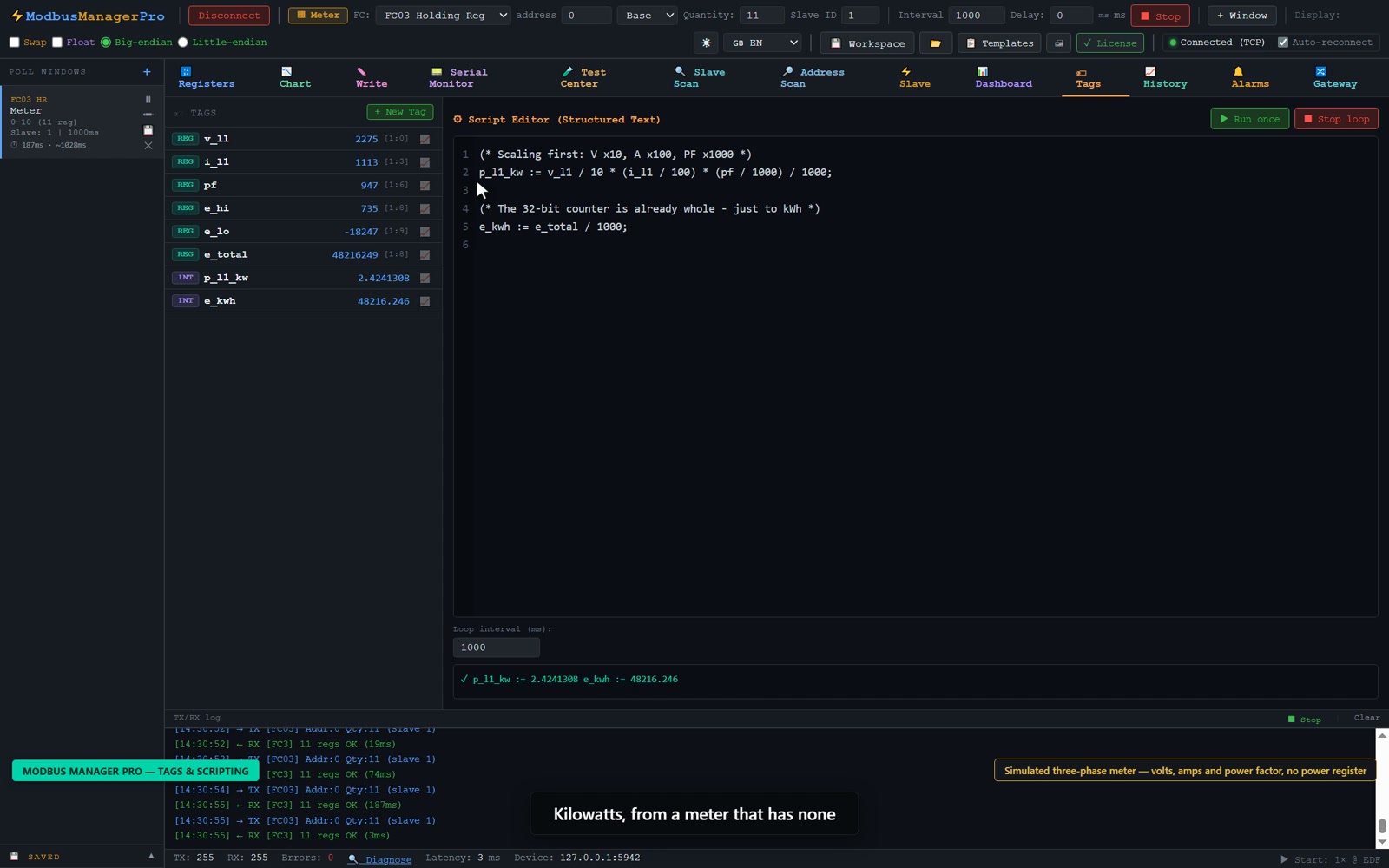
Nothing is requested from YouTube until you press play.
A three-phase meter will happily give you line voltage, current and power factor. Ask it for kilowatts and there is no register to ask — the number was never stored, so no amount of polling will find it. ModbusManager Pro lets you name the registers you do have, compute the one you want in IEC 61131-3 Structured Text, and then treat the result as if the device had reported it all along.
Windows 10/11 · Pro edition · one-time license · 14-day trial
Nothing is requested from YouTube until you press play.
A register map is a list of numbers, and numbers are a poor thing to build on. Holding register 3928 on slave 12 is correct and unmemorable; Line_Voltage is neither ambiguous nor forgettable. Tags put a name on the address once, and everything downstream — scripts, dashboard elements, the Historian, alarms — refers to the name.
Register tag. Bound to a real register by slave ID, register type and address. Its value tracks the live device, and it is read-only as far as a script is concerned — it is whatever the last poll returned.
Internal tag. Exists only inside the tool. It holds a computed or stored value and is normally written by a Structured Text script. This is where the kilowatts end up.
The division is the whole model: scripts read REG tags and write INT tags. An internal tag is then indistinguishable from a real one everywhere else in the application, which is the point — you can put computed kilowatts on a dashboard gauge, log them to the Historian, and raise an alarm on them, exactly as if the meter had a kW register.
Three registers you have, one number you want. Power is not stored on most meters because it is derivable, and the derivation is cheap — so the meter's designer left it to you.
Name the three inputs as REG tags, add Power_kW and Overload as INT tags, set a loop interval, and start the loop. From that moment Power_kW updates like any polled value.
Note the two operators that catch out anyone arriving from C or JavaScript: := assigns, a single = compares. That is correct Structured Text and the interpreter follows it, so A = B in an IF is a comparison, not a mistake.
The ELSIF at 60 rather than 75 is deliberate: a single threshold on a value that hovers around it produces an alarm that turns on and off several times a minute. Two thresholds with a gap between them is the same deadband idea as in logging intervals and deadbands, applied to a boolean.
Structured Text is a large language and this is a subset of it. Publishing the exact boundary is more useful than implying the whole standard is there and letting you find the edge with a script that silently fails, so here is the complete list.
| Construct | Status |
|---|---|
| (* comment *) | ✓ supported |
| := | ✓ assignment |
| = | ✓ equality (not assignment) |
| <> <= >= < > | ✓ comparisons |
| TRUE FALSE | ✓ supported |
| AND OR NOT | ✓ supported |
| IF / THEN / ELSIF / ELSE / END_IF | ✓ the full chain |
| FOR … TO … DO / END_FOR | ✓ supported |
| WHILE / END_WHILE | — not translated |
| REPEAT / UNTIL / END_REPEAT | — not translated |
| CASE / OF / END_CASE | — not translated |
| MOD XOR | — not translated |
| FOR … BY <step> | — step not translated |
The script box also accepts plain JavaScript, and the two mix freely in one script because Structured Text is translated into JavaScript before it runs. So a lower-case while loop, a switch, the % operator and the whole Math library all work, even though their ST spellings do not. If you need MOD, write %. If you need CASE, write switch. That is also why the reserved-word list below includes JavaScript keywords as well as ST ones.
Every script runs in a separate worker thread with a 2000 ms timeout. A loop whose exit condition is wrong gets terminated and reported as a timeout, and polling, the dashboard, the Historian and the user interface carry on untouched.
This is worth stating plainly because the obvious implementation does not behave that way. Running user script on the main thread means a bad loop blocks everything: polling stops, the connection to the interface dies, and the only way out is killing the process. Moving the script onto its own thread is what makes an endless loop a message in the log instead of a lost session.
Dangerous globals are also hidden from the script, which stops a formula from reaching out into the operating system by accident. Being straight about the limit: that is protection against mistakes, not a security sandbox, and it is not a reason to paste in a script from a stranger.
A tag name becomes a variable name in the compiled script, so it has to be a valid identifier: no spaces, no hyphens, not starting with a digit, and not one of the reserved words. Line Voltage and 3PH-Amps are rejected; Line_Voltage and Amps_3PH are fine.
The reserved list covers Structured Text keywords (AND, TRUE, END_IF…), JavaScript keywords, and a set of global names the sandbox hides. The reason the rule is enforced at the point of naming rather than at the point of running is worth knowing: a colliding name does not break the one script that uses it, it breaks every script. Compilation fails for all of them at once, and the resulting error points at generated code rather than anything you typed. Refusing the name is much kinder than explaining that later.
An internal tag is a first-class value everywhere else in the tool. The usual next steps:
Tags and Structured Text are part of the Pro edition. The trial is the full thing for 14 days — long enough to find out whether the number you need was derivable all along.
We use Google Analytics cookies to see how the site is used. You can accept or decline — declining keeps analytics off. See our Privacy Policy.