Huawei SUN2000 to Home Assistant over Modbus — No Cloud
Read a Huawei SUN2000 inverter and its DTSU666-H meter locally over Modbus TCP and publish the values to Home Assistant through MQTT. They appear by themselves, as one device with units and device classes, ready for the Energy dashboard — no FusionSolar cloud, no custom integration, no YAML. And because the SDongle serves only one Modbus client at a time, the same single connection can also feed a PLC, an EMS or a wallbox.
Why Not the Cloud, or a Second Modbus Client?
There are three usual ways to get a SUN2000 into Home Assistant, and each has a catch:
| Way | Catch |
|---|---|
| FusionSolar cloud | Values arrive minutes late and stop when the internet does. Not good enough to switch a heater or a battery on surplus. |
| Home Assistant reads the inverter itself | Works — until anything else needs the inverter too. Huawei's SDongleA-05 Modbus TCP Guide allows one client at a time, even in Unrestricted mode. A wallbox, an EMS or a PLC on the same dongle means dropped connections. |
| A gateway between them | Holds the one connection and shares the values. That is what this page sets up — on a Windows PC, with no Raspberry Pi and no Docker. |
How It Works
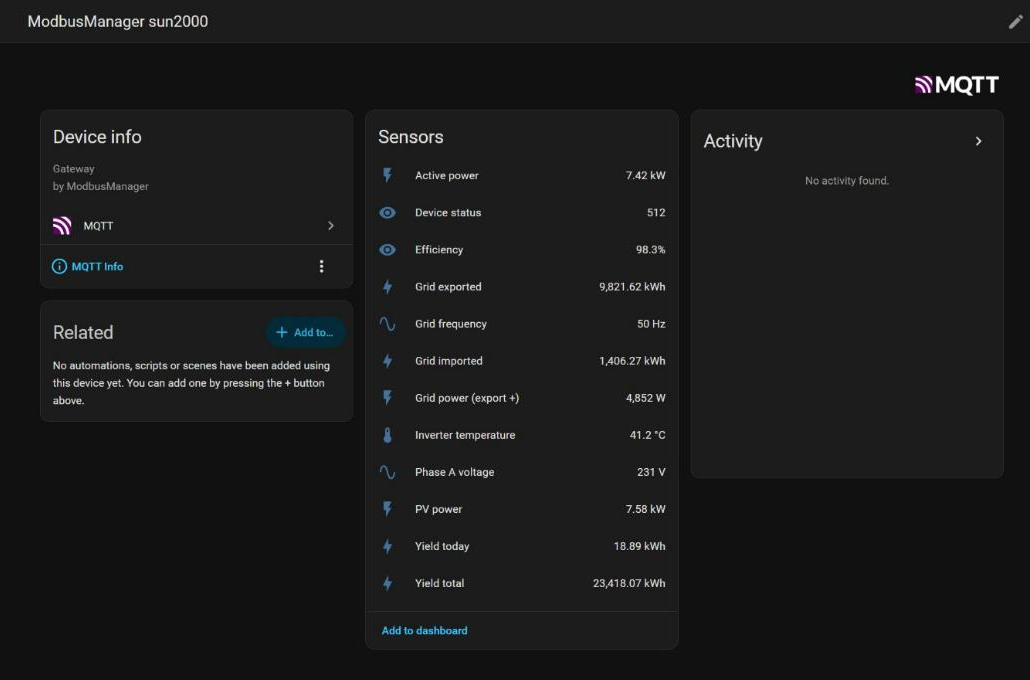
ModbusManager Pro's gateway polls the inverter on its own, in the background, with no window open. Each mapping row reads one register, applies Huawei's gain and publishes the result to sun2000/<name>/state. With Home Assistant discovery on, it also tells Home Assistant what each value is — power in kW, energy in kWh as a growing total — so the entities need no configuration. When the gateway stops, Home Assistant shows them as unavailable instead of keeping old numbers.
What You Need
- Home Assistant with the Mosquitto broker add-on and the MQTT integration (Settings › Add-ons › Mosquitto broker; Home Assistant then offers the MQTT integration by itself).
- A Windows 10/11 PC on the same network that stays on — an office PC, a mini PC, a virtual machine.
- ModbusManager Pro 1.9.5 or newer — the MQTT output is part of the gateway. The 14-day trial has everything.
- Modbus TCP enabled on the SDongle — in the FusionSolar app as installer, see Enabling Modbus TCP on the SDongle.
Step by Step
1 Download the workspace below and open it in ModbusManager Pro (Workspace › Open). Confirm when it asks to apply the gateway configuration.
2 Point it at the inverter — on the Gateway tab, set the SUN2000 endpoint's IP address to your dongle's (port 502). The rows use unit ID 1, the inverter's usual RS485 address behind the dongle.
3 Point it at Home Assistant — in the MQTT panel, enter Home Assistant's IP address as the broker (port 1883) and a Home Assistant user name and password. The password stays on this PC: it is not saved in the workspace.
4 Start the gateway. The MQTT panel says connected. Tick Start gateway automatically and it starts by itself whenever ModbusManager starts.
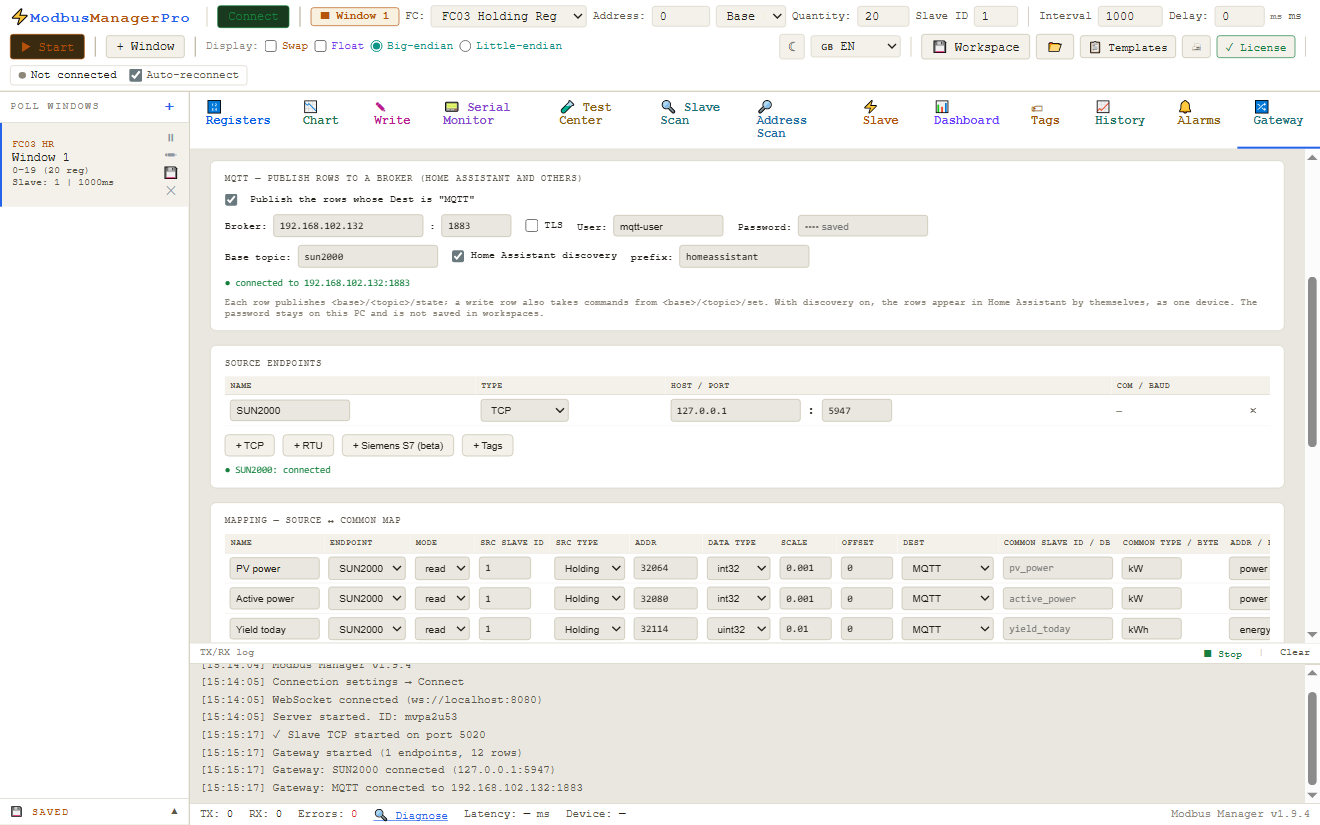
5 In Home Assistant, open Settings › Devices & services › MQTT: the device ModbusManager sun2000 is there with its entities.
What Appears in Home Assistant
| Entity | Register | Type, gain | Unit | Device class |
|---|---|---|---|---|
| PV power | 32064 | I32 ÷1000 | kW | power |
| Active power | 32080 | I32 ÷1000 | kW | power |
| Yield today | 32114 | U32 ÷100 | kWh | energy |
| Yield total | 32106 | U32 ÷100 | kWh | energy |
| Phase A voltage | 32069 | U16 ÷10 | V | voltage |
| Grid frequency | 32085 | U16 ÷100 | Hz | frequency |
| Inverter temperature | 32087 | I16 ÷10 | °C | temperature |
| Efficiency | 32086 | U16 ÷100 | % | — |
| Device status | 32089 | U16 | — | — (512 = on-grid) |
| Grid power (export +) | 37113 | I32 | W | power |
| Grid exported | 37119 | I32 ÷100 | kWh | energy |
| Grid imported | 37121 | I32 ÷100 | kWh | energy |
Energy entities are published as growing totals (total_increasing), which is what the Energy dashboard asks for. Registers, types and gains are Huawei's — the full map with the rest of the registers is on the SUN2000 Modbus register map page.
The Energy Dashboard
In Home Assistant, Settings › Dashboards › Energy:
| Energy dashboard field | Entity |
|---|---|
| Grid consumption | Grid imported |
| Return to grid | Grid exported |
| Solar production energy | Yield total |
| Solar production power | PV power |
Use Yield total rather than Yield today for the dashboard: Home Assistant works out the hours and days from the growing total itself. The first bars appear after the first full hour.
-1 and rename it.
Battery (LUNA2000)
The workspace has four battery rows switched off: state of charge (37760, ÷10, %), charge/discharge power (37765, W) and the total charged and discharged energy (37780 and 37782, ÷100, kWh). With a LUNA2000 fitted, tick them on the Gateway tab and they appear in Home Assistant on the next start — the totals fit the Energy dashboard's battery fields. Check the power sign on your system once; Huawei's document does not state it.
Share the Connection with a PLC, EMS or Wallbox
The dongle's one-client limit is where the gateway pays off. Add rows with Dest: Modbus map next to the MQTT ones and ModbusManager serves those values as an ordinary Modbus TCP slave on this PC — a PLC, an energy manager or a charger reads them there, in whatever register layout and data type it expects, while Home Assistant keeps its MQTT feed. A Siemens S7-1200/1500 can also GET them as a data block. Still one connection to the inverter.
Writing Back
A row in write mode becomes a number (or a switch for a coil) in Home Assistant, and what you set there is written to the register and read back. The workspace has none: SUN2000 control registers such as active power control (47415, 47416, 47418) change how the inverter feeds the grid, and Huawei's own app may need installer settings for them to take effect. Add them deliberately, one at a time, and check the result on the inverter.
Compared with the huawei_solar Integration
The huawei_solar custom integration (installed through HACS) reads the SUN2000 from inside Home Assistant and is free. Which one fits depends on what else is on the inverter:
| huawei_solar (HACS) | ModbusManager Pro gateway | |
|---|---|---|
| Runs on | Home Assistant itself | A Windows PC |
| Install | HACS custom integration | A Windows program, MQTT to Home Assistant's standard broker |
| Other systems on the same dongle | No — it is the one client | Yes — Modbus TCP map and S7 data block from the same connection |
| Other devices | Huawei only | Any Modbus RTU/TCP device, Siemens S7, BACnet (BACManager) |
| Battery control | Built in | Write rows you add yourself |
| Price | Free | One-time licence, 14-day free trial |
If Home Assistant is the only thing that will ever talk to the inverter, huawei_solar is the simpler choice. If a wallbox, an EMS, a PLC or a commissioning laptop needs the inverter too — or the same PC already reads meters and drives over Modbus — one gateway in front of everything is the setup that keeps working.
Deye, Sungrow, SMA and Other Inverters
Nothing in the gateway is Huawei-specific: any register a row can read can go to Home Assistant the same way. The register maps for Sungrow, Deye, Sunsynk and Growatt and SMA, Fronius and SolarEdge (SunSpec) give the addresses, types and gains to put in the rows. A Deye on RS485 needs an RS485 port on the PC or an RS485-to-Ethernet gateway — its Wi-Fi logger does not speak Modbus TCP.
Download the Workspace
- A gateway with one Modbus TCP endpoint for the SUN2000 (unit ID 1, port 502)
- 12 rows for the inverter and the DTSU666-H meter, with Huawei's types and gains, units and Home Assistant device classes
- 4 LUNA2000 battery rows, switched off
- MQTT on, base topic
sun2000, Home Assistant discovery on — only the broker address, user and password are left to fill in
Huawei_SUN2000_HomeAssistant.json
SUN2000 + DTSU666-H to Home Assistant over MQTT. Open via Workspace › Open in ModbusManager Pro 1.9.5 or newer.
Try it with ModbusManager Pro
Gateway, MQTT and Home Assistant discovery included. Free 14-day trial. No credit card. Windows 10/11.
Frequently Asked Questions
Does this need the FusionSolar cloud or an internet connection?
No. ModbusManager reads the inverter over your own network and publishes to Home Assistant's own broker. Nothing leaves the building, and it keeps working when the internet does not.
Can Home Assistant and another system read the SUN2000 at the same time?
Not both directly through the SDongle: it serves one Modbus TCP client at a time. Let ModbusManager's gateway be that client and share the values — MQTT for Home Assistant, a Modbus TCP map or an S7 data block for the rest.
Do I need to write YAML in Home Assistant?
No. The gateway announces each value through MQTT discovery with its name, unit, device class and state class, and Home Assistant creates the entities itself, all under one device.
What happens when the PC or the gateway stops?
The gateway's last will marks the device unavailable in Home Assistant, so no stale values are shown. When it starts again it reconnects and publishes fresh values; it also announces itself again whenever Home Assistant restarts.
Which ModbusManager edition do I need?
ModbusManager Pro 1.9.5 or newer (the gateway and the MQTT output are Pro features), or BACManager for BACnet and Modbus devices. The free 14-day trial includes everything.
Sources
Huawei, SUN2000MA V200R024C00SPC106 Modbus Interface Definitions (V3.0), Issue 06, 2025-06-12 (support.huawei.com, EDOC1100480297), and SDongleA-05 Modbus TCP Guide, Issue 01, 2021-11-07 — registers, gains and the one-client limit, as on the SUN2000 register map page. Home Assistant, MQTT integration and discovery. Register availability differs by model and firmware — check the document for your inverter.