Modbus TCP Security: Modbus over TLS on Port 802, Tested from Windows
Plain Modbus TCP has no authentication and no encryption: anyone who can reach port 502 can read and write. Modbus/TCP Security, published by the Modbus Organization in 2018, wraps the same Modbus TCP messages in TLS on port 802, and both sides prove who they are with X.509v3 certificates. This page explains what a device and a client need, how to make test certificates, and how to check a secure device from a Windows PC with ModbusManager before it goes on site.
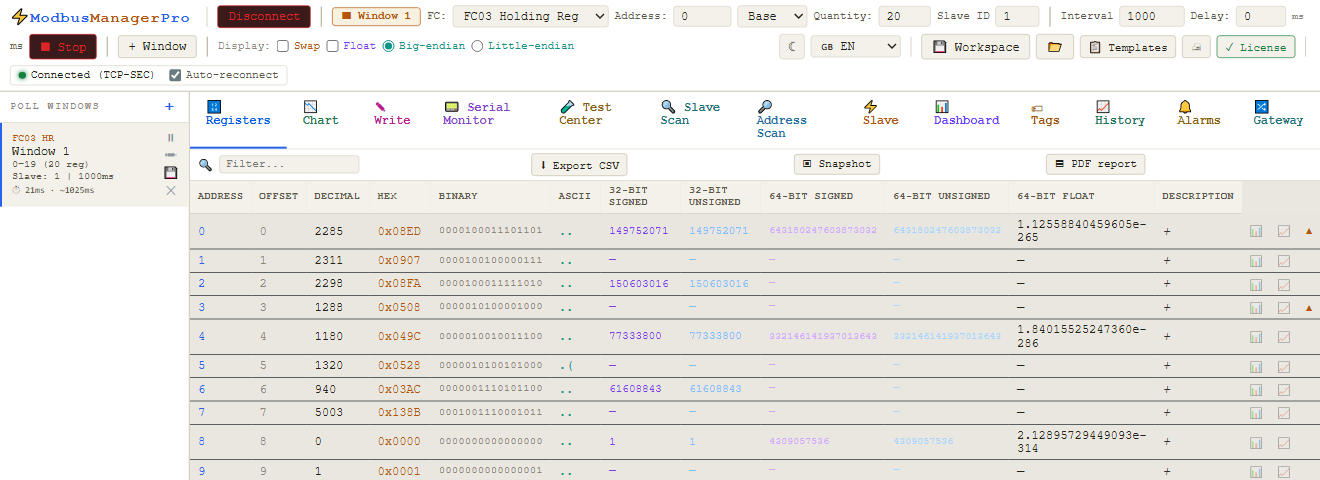
What Modbus/TCP Security Changes
| Modbus TCP | Modbus/TCP Security | |
|---|---|---|
| Port | 502 | 802 (IANA-registered) |
| Transport | TCP | TLS over TCP |
| Messages | MBAP header + request | The same MBAP header + request, inside TLS |
| Who is talking | Unknown | Server and client each present an X.509v3 certificate |
| Integrity, privacy | None | TLS: tampering is detected, traffic is encrypted |
| What a client may do | Everything | The device can authorise by a role carried in the client certificate |
The Modbus messages themselves do not change: function codes, addresses and data are exactly as in Modbus TCP. Everything new happens in the TLS handshake — which is why most problems with secure Modbus are certificate problems, not Modbus problems.
The Three Files a Client Needs
| File | What it is | Who issues it |
|---|---|---|
Client certificate (.crt/.pem) | Identifies your PC or tool to the device; may carry the role | The CA the device trusts — usually the plant's or the integrator's |
Private key (.key) | Proves the certificate is yours; never leaves the PC | Made together with the certificate request |
| CA certificate | Lets the client check that the device's certificate is genuine | The CA that signed the device certificate |
The device holds the mirror image: its own certificate and key, and the CA it trusts for clients. If the device does not trust the CA that signed your client certificate, it ends the handshake — there is no Modbus error, the connection simply closes.
Connect with ModbusManager
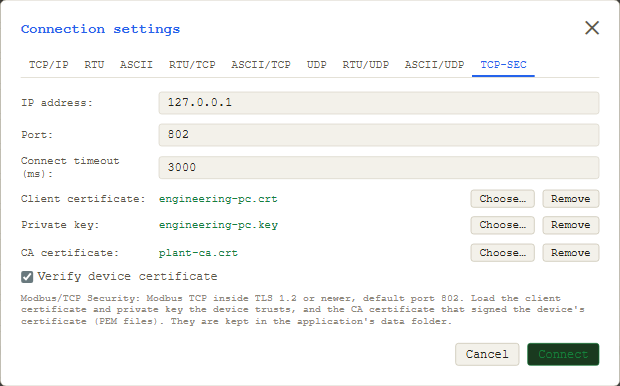
- Open Connect and choose the TCP-SEC tab.
- Enter the device's IP address; the port is 802 unless the device uses another.
- Load the client certificate, the private key and the CA certificate (PEM files). ModbusManager checks that each file is what it claims to be and keeps them in its data folder, not in workspaces.
- Leave Verify device certificate on. It checks the device's certificate against the CA, and its name against the address you typed.
- Connect and read as with any Modbus TCP device. ModbusManager requires TLS 1.2 or newer.
When the Connection Fails
| Symptom | Usual cause |
|---|---|
| Refused at once, the device's log mentions the client | No client certificate loaded, or it was signed by a CA the device does not trust |
| "Self-signed certificate" / "unable to verify" | The CA file is not the one that signed the device's certificate |
| Host name / IP mismatch | The device certificate's Subject Alternative Name does not contain the address you connect to |
| Certificate expired or not yet valid | Check the dates — and the device's clock |
| Connected, but writes return an exception | The role in your certificate does not allow writes on that device |
| Times out with no handshake | Wrong port, a firewall in between, or the device has secure Modbus switched off |
Switching Verify device certificate off shows whether the problem is on the device side of the handshake: if it then connects, the CA or the name is wrong. Use it for diagnosis only — without verification you are no longer sure who you are talking to.
Test Certificates with OpenSSL
To try secure Modbus on a bench before the plant's CA is involved, a test CA and two certificates are enough. These are the commands ModbusManager's own automated test uses:
# a test CA
openssl req -x509 -newkey rsa:2048 -nodes -keyout ca.key -out ca.pem -days 365 -subj "/CN=Test CA"

# the device: its address in subjectAltName, server use
echo "subjectAltName=IP:192.168.1.100" > dev.ext
echo "extendedKeyUsage=serverAuth" >> dev.ext
openssl req -newkey rsa:2048 -nodes -keyout dev.key -out dev.csr -subj "/CN=device"
openssl x509 -req -in dev.csr -CA ca.pem -CAkey ca.key -CAcreateserial -out dev.pem -days 365 -extfile dev.ext

# the client (ModbusManager): client use
echo "extendedKeyUsage=clientAuth" > cli.ext
openssl req -newkey rsa:2048 -nodes -keyout cli.key -out cli.csr -subj "/CN=engineering PC"
openssl x509 -req -in cli.csr -CA ca.pem -CAkey ca.key -CAcreateserial -out cli.pem -days 365 -extfile cli.ext
Load cli.pem, cli.key and ca.pem into ModbusManager; give the device dev.pem, dev.key and ca.pem. Role-based authorisation needs the role extension in the client certificate as the device vendor specifies it; the Modbus Organization's role OIDs sit under its private enterprise number 50316. For production, certificates come from the site's CA and the private keys stay on the machines they belong to.
Check a secure Modbus device from your PC
Modbus/TCP Security in both editions, from $49 one-time. Free 14-day trial. No credit card. Windows 10/11.
Frequently Asked Questions
Which port does Modbus TCP Security use?
Port 802, registered with IANA for Modbus over TLS. Plain Modbus TCP stays on 502.
Is Modbus over TLS a different protocol from Modbus TCP?
The Modbus messages are identical — same MBAP header, function codes and data. Modbus/TCP Security only puts them inside a TLS connection and adds certificate-based authentication of both sides.
What certificates do I need to connect?
A client certificate and its private key that the device's CA trusts, and the CA certificate that signed the device's certificate, so you can verify the device. ModbusManager loads all three as PEM files.
What is the role in a Modbus/TCP Security certificate?
An X.509v3 extension in the client certificate that the device can use to decide what that client may do, for example read only or read and write. The device enforces it; the client only presents the certificate it was issued.
Which ModbusManager edition supports TLS?
Both: ModbusManager Standard and Pro have the TCP-SEC connection, and so does BACManager for its Modbus side.
Sources
Modbus Organization, Modbus Security: New Protocol to Improve Control System Security (2018-10-29) and MODBUS/TCP Security Protocol Specification v2.1 (2018-07-24): TLS encapsulation, X.509v3 authentication of server and client, roles in an X.509v3 extension, port 802. Connection behaviour and certificate checks: ModbusManager's automated test test-net-framings against a TLS device that requires a client certificate.