Modbus to MQTT Gateway for Windows — RTU and TCP, No Code
Read Modbus RTU and Modbus TCP devices and publish every value you choose to an MQTT broker — Mosquitto, Home Assistant, Node-RED or a cloud broker. Each register becomes its own retained topic in engineering units, and with Home Assistant discovery switched on the values appear in Home Assistant by themselves, with units and device classes. No Python, no Node-RED flow, no ESP32 to flash: ModbusManager Pro's gateway does it from a Windows PC, and the same rows can still feed a PLC over Modbus TCP.
How Modbus to MQTT Works Here
The gateway is the Modbus master. It polls each device on its own connection — RS-485 ports and Modbus TCP addresses side by side — converts the raw registers into numbers (data type, word order, scale, offset), and hands each value to the broker:
| What | Where it goes |
|---|---|
| Value of a row | <base>/<topic>/state, retained, plain number (230.4, 1/0 for coils) |
| Gateway online / offline | <base>/status, retained; offline is the broker's last will, so it is right even after a crash or a pulled cable |
| Command to a write row | You publish to <base>/<topic>/set; the gateway writes the register or coil and publishes the new state |
| Home Assistant discovery | homeassistant/<component>/<base>/<topic>/config, retained |
A value is published when it changes, and again every 60 seconds if it does not, so a subscriber that joins late still gets the current state and a stuck value is never mistaken for a lost one. The topic is the row's name made safe for MQTT (Total power → total_power) unless you type your own.
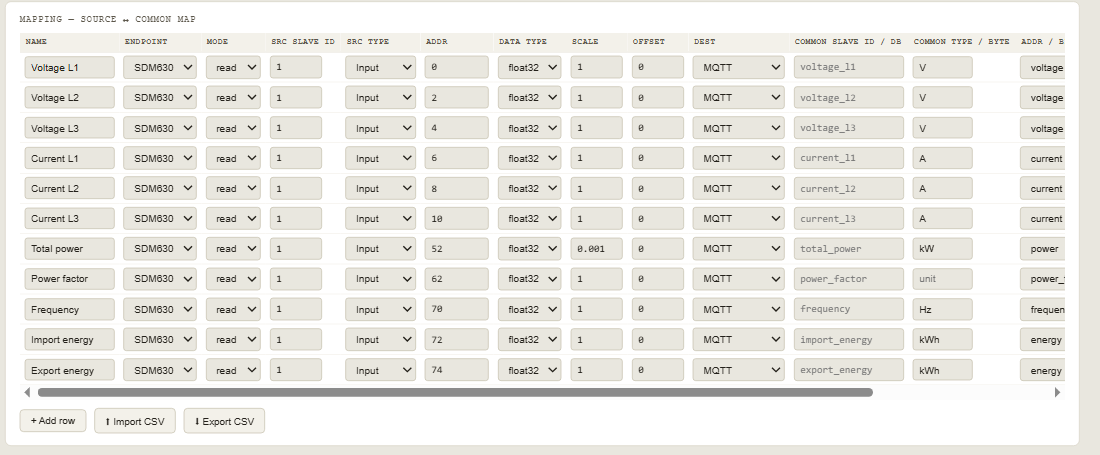
This is what a subscriber to sdm630/# received from the workspace below:
sdm630/status                online
sdm630/voltage_l1/state      227.8099
sdm630/voltage_l2/state      230.9261
sdm630/voltage_l3/state      231.2551
sdm630/current_l1/state      6.877405
sdm630/current_l2/state      11.54377
sdm630/current_l3/state      9.005434
sdm630/total_power/state     6.009131
sdm630/power_factor/state    0.9448161
sdm630/frequency/state       50.02688
sdm630/import_energy/state   18342.67
sdm630/export_energy/state   2291.4
Set It Up in Five Steps
- Add the device. On the Gateway tab add an endpoint with + RTU (COM port, baud, parity) or + TCP (IP and port). One endpoint per serial line or IP address; any number of slaves behind it.
- Add a row per value. Source side: endpoint, slave ID, register type, address, data type and scale. Destination: MQTT. In the destination columns type the topic (or leave it empty to use the name), the unit and, for Home Assistant, the device class.
- Point it at the broker. In the MQTT panel: broker address and port (1883, or 8883 with TLS), user and password, base topic. The password stays on this PC and is never written into a workspace file.
- Start the gateway. The panel turns green with connected to <broker>, and each endpoint shows connected.
- Check it. Subscribe to
<base>/#in MQTT Explorer ormosquitto_sub, or open Settings › Devices & services › MQTT in Home Assistant and find the device.

Home Assistant Discovery
With discovery on, each MQTT row announces itself the way Home Assistant expects, and all rows of one base topic land on one device:
| Row | Appears in Home Assistant as |
|---|---|
| Register, read | sensor with unit, device class and state class measurement |
| Register, read, device class energy | sensor with state class total_increasing — usable in the Energy dashboard |
| Coil or discrete input, read | binary_sensor (1 = on) |
| Register, write | number — what you set is written to the device |
| Coil, write | switch |
The discovery message for the import energy row, as sent:
{"name":"Import energy","unique_id":"sdm630_import_energy",
 "state_topic":"sdm630/import_energy/state",
 "availability_topic":"sdm630/status",
 "device":{"identifiers":["modbusmanager_sdm630"],"name":"ModbusManager sdm630",
           "manufacturer":"ModbusManager","model":"Gateway"},
 "unit_of_measurement":"kWh","device_class":"energy","state_class":"total_increasing"}
A deleted row is removed from Home Assistant (an empty retained config), and when Home Assistant restarts and says online on homeassistant/status, the gateway announces everything again.
Writing Back over MQTT
Set a row's mode to write. The gateway subscribes to its /set topic and accepts a number, or ON/OFF, true/false, 1/0 for coils. Scale and offset are reversed on the way in — a setpoint of 21.5 on a row with scale 0.1 is written as 215 — and 32-bit types are written as one two-register write. The row is read back at once and its new state published, so Home Assistant shows what the device actually accepted. A command for a topic that has no write row, or text that is not a number, writes nothing and leaves a line in the gateway log.
Example: Eastron SDM630 to Home Assistant
The SDM630 keeps its measurements as FLOAT32 input registers (function code 04), high word first — see the SDM630 register map. Eastron numbers them from 30001; the gateway takes the address on the wire, so register 30001 is address 0:
| Value | Register | Gateway address | Unit / class |
|---|---|---|---|
| Voltage L1, L2, L3 | 30001, 30003, 30005 | 0, 2, 4 | V / voltage |
| Current L1, L2, L3 | 30007, 30009, 30011 | 6, 8, 10 | A / current |
| Total active power | 30053 | 52 (scale 0.001) | kW / power |
| Total power factor | 30063 | 62 | — / power_factor |
| Frequency | 30071 | 70 | Hz / frequency |
| Import / export active energy | 30073, 30075 | 72, 74 | kWh / energy |
A single-phase SDM120 uses the same numbering for voltage (30001), current (30007), frequency (30071) and energy (30073, 30075), but has its active power at 30013 (address 12) and power factor at 30031 (address 30); drop the L2/L3 rows. Its default baud rate is 2400, not 9600.
Compared with Other Ways
| Way | Good at | Catch |
|---|---|---|
| Home Assistant Modbus integration | Free, inside Home Assistant | YAML per register; Home Assistant must reach the bus; nothing else can share the device |
| Node-RED flow | Free, flexible | You build and maintain the flow: polling, decoding, scaling, topics, discovery |
| Python script | Free, any logic | Code to write, run as a service and keep alive |
| Hardware IoT gateway (Teltonika, ESP32) | Small, always on | Per-device setup, limited data types, firmware to manage |
| ModbusManager Pro gateway | No code, many devices, discovery, writes, also a Modbus TCP map and an S7 data block | Needs a Windows PC that stays on; one-time licence |
Download the Workspace
- A gateway with one Modbus RTU endpoint for the SDM630 (COM3, 9600 8N1, slave ID 1 — change them to yours)
- 11 rows: three voltages, three currents, total power in kW, power factor, frequency, import and export energy, with units and Home Assistant device classes
- MQTT on, base topic
sdm630, Home Assistant discovery on — only the broker address, user and password are left to fill in
SDM630_MQTT_HomeAssistant.json
Eastron SDM630 to MQTT and Home Assistant. Open via Workspace › Open in ModbusManager Pro 1.9.6 or newer.
Try Modbus to MQTT with ModbusManager Pro
Gateway, MQTT and Home Assistant discovery included. Free 14-day trial. No credit card. Windows 10/11.
Frequently Asked Questions
Can ModbusManager read Modbus RTU and publish it to MQTT?
Yes. Add an RTU endpoint for the RS-485 port (a USB adapter is fine), add a row per register with MQTT as the destination, enter the broker and start the gateway. Modbus TCP devices work the same way, and both can run at once.
What does the MQTT payload look like?
A plain number per topic, in engineering units after scale and offset: 230.4, 18342.67, or 1/0 for coils. Each row has its own retained topic <base>/<topic>/state, and <base>/status says online or offline.
Does it work with Home Assistant without YAML?
Yes. With Home Assistant discovery on, every row is announced with its name, unit, device class and state class, and Home Assistant creates the entities itself under one device. Energy rows are total_increasing, ready for the Energy dashboard.
Can I write to a Modbus device from MQTT?
Yes. A row in write mode subscribes to <base>/<topic>/set; a number written there goes to the register (scale reversed), ON/OFF to a coil. In Home Assistant it appears as a number or a switch.
Does it support TLS and broker authentication?
Yes: user name and password, and TLS (port 8883 by default). The password is kept on the PC, not in workspace files.
Which edition do I need?
ModbusManager Pro 1.9.6 or newer — the gateway and MQTT are Pro features. For BACnet devices, BACManager publishes BACnet objects to MQTT the same way. The free 14-day trial includes everything.
Sources
Topic layout, payloads and discovery messages: captured from ModbusManager Pro's gateway against a broker, as shown above. SDM630 registers: Eastron SDM630 Modbus Protocol, as on the SDM630 register map page. Home Assistant, MQTT integration and discovery.