Alfen Eve Modbus TCP: Licence, Unit IDs 200 and 1, FLOAT32 and the Mode 3 String
Alfen's Eve chargers (the NG9xx platform: Eve Single, Eve Single Pro-line, Eve Double) have a Modbus TCP server for energy management systems: read the meter of each socket, the charging state, and write a maximum current for load balancing. Before it answers you need a licence; once it answers, the unit ID picks station or socket, values are FLOAT32 pairs, and the charging state is a string. And Alfen's own guide and the chargers in the field disagree on two details — this page shows how to find out which one your charger follows.
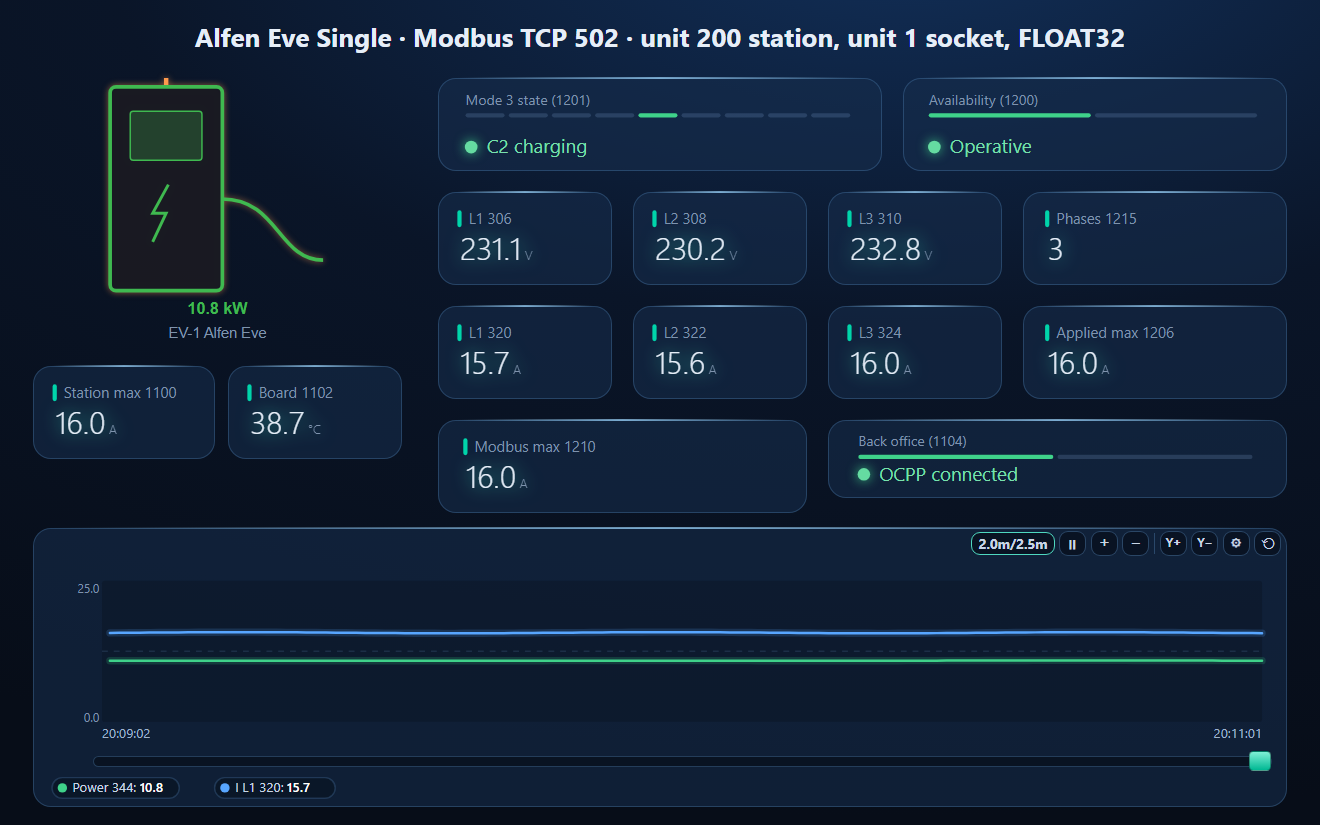
Before It Answers
- Licence: Modbus is part of Alfen's Active Load Balancing, which needs a paid licence key from Alfen, entered with the ACE Service Installer (service account 4.0 or later).
- Two switches, off by default: “Allow reading” and “Allow writing maximum currents” in the ACE Service Installer.
- Port 502, at most two clients at the same time, no UDP. If an EMS and a home automation system are already connected, a third client is refused.
- Find the charger: DHCP by default; mDNS service _alfen._tcp.local gives its name (for example NG920-61001-ACE0012345).
Unit ID Picks Station or Socket
| Unit ID | Registers |
|---|---|
| 200 | Station: identification 100–178, status 1100–1105, smart charging network (SCN) 1400–1431 |
| 1 | Socket 1: meter 300–425, status and max current 1200–1215 |
| 2 | Socket 2 on an Eve Double (left / right) |
All registers are holding registers: FC03 to read, FC06 / FC16 to write, at most 125 registers per read. A 32-bit value must be read in one request. Unavailable values read 0xFFFF (NaN).
Minus One? Low Word First? Check on Your Charger
Alfen's 2025 configuration guide says to always subtract 1 (register 360 = address 359) and that 32-bit words are little endian (low word first). The widely used open-source Home Assistant integration for Alfen chargers reads the register numbers as listed and decodes FLOAT32 high word first — and works on real chargers. The workspace on this page follows the field practice. To check yours:
- Read unit 1, address 1200, one register: availability must be 0 or 1. If it is not, try 1199.
- Read unit 1, address 306, two registers as FLOAT32: about 230 V. If you get a tiny or enormous number, swap the words.
Key Registers
| Unit | Register | Value | Type |
|---|---|---|---|
| 200 | 1100 | Station active max current, A | FLOAT32 |
| 200 | 1102 | Board temperature, °C (not the ambient) | FLOAT32 |
| 200 | 1104 / 1105 | Back office (OCPP) connected / number of sockets | U16 |
| 1 | 300 | Meter state: 1 initialised, 2 updated, 4 warning, 8 error | bits |
| 1 | 306 / 308 / 310 | Voltage L1 / L2 / L3-N, V | FLOAT32 |
| 1 | 320 / 322 / 324 | Current L1 / L2 / L3, A | FLOAT32 |
| 1 | 336 | Frequency, Hz | FLOAT32 |
| 1 | 344 | Real power sum, W | FLOAT32 |
| 1 | 374–377 | Real energy delivered sum, Wh | FLOAT64 |
| 1 | 1200 | Availability: 1 operative, 0 inoperative | U16 |
| 1 | 1201–1205 | Mode 3 state (IEC 61851) | STRING |
| 1 | 1206 | Actual applied max current, A | FLOAT32 |
| 1 | 1210 | Modbus slave max current, A (read / write) | FLOAT32 |
| 1 | 1215 | Charge with 1 or 3 phases (read / write) | U16 |
Chargers built with an ABB meter (before 2021) fill every meter register; those with a Reallin meter (after 2021) a subset — the rest read NaN.
The Mode 3 State Is a String
Registers 1201–1205 hold the IEC 61851 state as ASCII text, two characters per register: A not connected, B1 / B2 connected, C1 connected, C2 charging, D1 / D2 with ventilation (D2 charging), E and F error. Read as a number, the first register tells you the state: “C2” is 0x4332 = 17202, “A” is 0x4100. The workspace names these values and derives connected and charging from them.
Writing a Max Current
For load balancing an EMS writes the Modbus max current (1210, FLOAT32 A) — and must write it again within the validity time (60 s by default), or the charger falls back to its safe current. It works only with the licence, “Allow writing maximum currents” on, the station in Energy Management System mode, and a safe current set. 1215 switches between 1-phase and 3-phase charging.
Common Mistakes
- Connection refused: no licence, “Allow reading” off, or two clients already connected.
- No answer to a register: the wrong unit ID — 200 for the station, 1 or 2 for a socket.
- Garbage instead of 230 V: the word order (or the minus one) — see the check above.
- Energy that jumps or is tiny: it is FLOAT64 in four registers, read in one request.
- The current falls back after a minute: the max current was not rewritten within the validity time.
Step-by-Step: Reading an Alfen Eve with ModbusManager
- Have the licence entered and “Allow reading” switched on.
- In ModbusManager choose TCP, the charger's address, port 502.
- Read FC03, unit 1, from 1200, quantity 16: availability, Mode 3 state, applied max current, phases.
- Read unit 1 from 300, quantity 46, with Float on: voltages, currents, power. Or open the workspace below.
Download a Ready-Made Workspace
- Three FC03 polls: station 1100–1105 (unit 200), socket meter 300–345 and socket status 1200–1215 (unit 1)
- 16 register tags (FLOAT32 high word first) and a script that reads connected, charging and fault out of the Mode 3 state
- A dashboard: the EV charger element, Mode 3 state, availability, voltages and currents per phase, phases, applied and Modbus max current, station max current, board temperature, back office, and a power / current trend
Alfen_Eve.json
Alfen Eve (NG9xx) EV charger workspace (Modbus TCP). Open via Workspace › Open in ModbusManager Pro, or from the in-app Device library.
Try it with ModbusManager Pro
EV charger element, historian for charging sessions, alarms on error states, and MQTT to Home Assistant. Free 14-day trial. No credit card. Windows 10/11.
The rest of the home energy system: Victron Cerbo GX, GoodWe ET, NIBE heat pumps. All guides: Modbus device guides.
Frequently Asked Questions
Does an Alfen Eve need a licence for Modbus?
Yes. Modbus TCP is part of Active Load Balancing, which needs a paid licence key from Alfen. "Allow reading" and "Allow writing maximum currents" must also be switched on in the ACE Service Installer.
Which unit ID does an Alfen charger use?
200 for the station registers (identification, status, smart charging network), 1 for socket 1 and 2 for socket 2 on an Eve Double.
Do I subtract 1 from Alfen Modbus register numbers?
Alfen's 2025 guide says yes, and that 32-bit words are low word first. The widely used Home Assistant integration reads the numbers as listed with the high word first. Check on your charger: register 1200 (unit 1) must read 0 or 1, and 306 must read about 230 V as FLOAT32.
How do I read the charging state of an Alfen Eve?
Registers 1201-1205 (unit 1) hold the IEC 61851 Mode 3 state as text: A not connected, B connected, C2 charging, E or F error. The first register alone tells you the state: "C2" is 0x4332.
Why does the Alfen max current reset after a minute?
A written max current is valid for the validity time, 60 seconds by default. The energy management system must write it again before that, or the charger falls back to its safe current.
Sources
Alfen ICU B.V., Configuration guide — Modbus for ACE, version 1.0 (05/2025), alfen.com, valid from ACE Service Installer 3.4.10-130 / firmware 4.10. Field practice on addressing and word order from the open-source Home Assistant integration for Alfen chargers. Tested against a simulator, not against a physical charger.