Schneider Altivar ATV320 / ATV630 Modbus: Address OFF, Scanner and ETA
The Schneider Altivar Machine ATV320 and Altivar Process ATV630 have a Modbus RTU port on an RJ45 socket — and both leave the factory with their Modbus address set to OFF, so they answer nothing until you change it. Schneider's addresses go on the wire exactly as printed, the drives speak CiA402 (DRIVECOM) state words, and their communication scanner gives you status and speed in two consecutive registers. This page covers all of it from Schneider's Modbus serial link manuals.
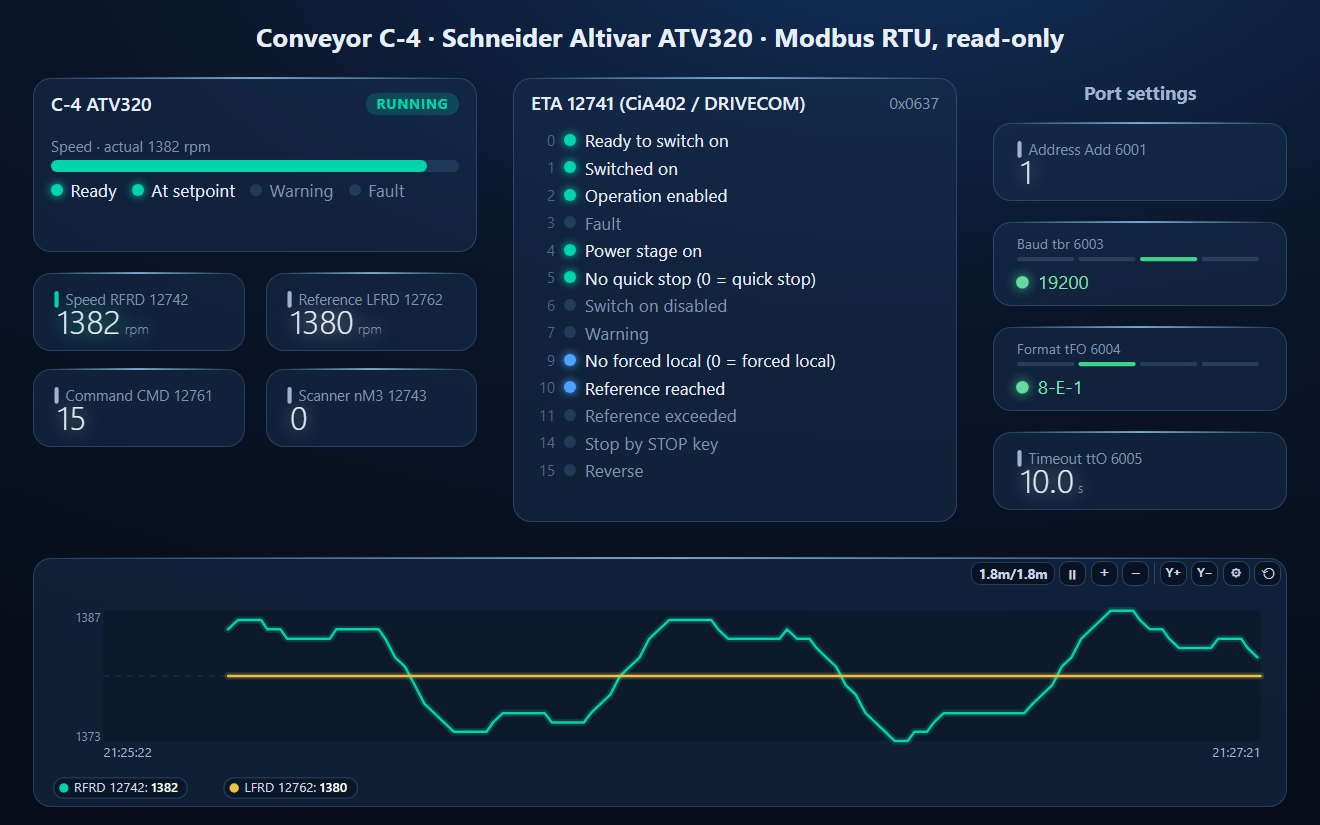
Port Settings (Communication Menu)
| Parameter | Code | Address | Factory setting |
|---|---|---|---|
| [Modbus Address] | Add | 6001 | OFF (no address: the drive does not answer) |
| [Modbus baud rate] | tbr | 6003 | 19.2 kbps (code 32; 24 = 4.8k, 28 = 9.6k, 36 = 38.4k) |
| [Modbus format] | tFO | 6004 | 8E1 (code 3; 2 = 8O1, 4 = 8N1, 5 = 8N2) |
| [Modbus timeout] | ttO | 6005 | 10 s (0.1–30 s, in 0.1 s) |
Set them in Communication (COM-) on the drive. Changes take effect after a power cycle. The RJ45 socket carries D1 on pin 4, D0 on pin 5 and common on pin 8 (pin 7 is a 10 V supply for a converter or remote terminal — do not connect it to the bus). If no request reaches the drive's address for the timeout, it trips with SLF1, Modbus communication interruption.
Addresses Go on the Wire as Printed
Unlike most 4xxxx documentation, Schneider's "Modbus address" is the protocol address itself. The manual's own example reads "starting at Modbus address 12741 (31C5 hex)" — 0x31C5 is 12741 in the frame. Do not subtract 1. If your master numbers from 1, enter 12742 to get 12741.
The Communication Scanner
Instead of hunting through hundreds of parameter addresses, read the scanner: up to eight drive values copied into consecutive registers, and eight more for writing. The defaults already give you the essentials.
| Address | Name | Default content |
|---|---|---|
| 12741 | nM1 | ETA, status word |
| 12742 | nM2 | RFRD, output speed (rpm) |
| 12743–12748 | nM3–nM8 | 0 until you choose a source in nMA3…nMA8 (12703…12708) |
| 12761 | nC1 | CMD, command word |
| 12762 | nC2 | LFRD, speed reference (rpm) |
| 12763–12768 | nC3–nC8 | free, set in nCA3…nCA8 (12723…12728) |
Fast-read sources include output frequency (RFR), current (LCR), torque (OTR), thermal state (ETI), mains voltage (ULN), motor voltage (UOP) and power (OPR). A master can write the outputs and read the inputs in one telegram with function 23 (Read/Write Multiple Registers). The scanner addresses are the same on the ATV320 and the ATV630.
ETA and CMD: the CiA402 State Machine
| ETA & 0x006F | State |
|---|---|
| 0x0040 | 2 – Switch on disabled |
| 0x0021 | 3 – Ready to switch on |
| 0x0023 | 4 – Switched on |
| 0x0027 | 5 – Operation enabled (running) |
| 0x0007 | 6 – Quick stop active |
| 0x0008 | 8 – Fault |
Mask ETA with 0x006F before comparing: the other bits carry extra information — 10 reference reached, 11 reference out of LSP…HSP, 9 = 0 forced local, 14 stop by the STOP key, 15 reverse. A running drive at its reference reads 0x0637.
To start from Modbus, step the command word through the states: 0x0006 shutdown (→ ready to switch on), 0x0007 switch on, 0x000F enable operation — the motor runs forward to the reference in LFRD. Bit 7 resets a fault on its rising edge, bit 11 reverses by default. The drive also needs the command channel set to Modbus in its control menu, or it ignores CMD.
Common Mistakes
- The drive never answers: [Modbus Address] Add is still OFF — the factory setting.
- Settings changed, nothing different: no power cycle since.
- Every value is from the neighbouring register: 1 subtracted from an address that was already the wire address.
- SLF1 after a while: nothing polled the drive within ttO (10 s).
- CMD 0x000F written, motor stays still: the state machine was not stepped through 0x0006 and 0x0007, or the command channel is not Modbus.
- nM3…nM8 read 0: no source assigned in nMA3…nMA8.
- Pin 7 wired to the bus: it is a 10 V supply.
Step-by-Step: Reading an ATV320 with ModbusManager
- On the drive set Communication › [Modbus Address] Add to 1 (or any free address), check 19.2 kbps and 8E1, power cycle.
- Connect an RS-485 adapter to RJ45 pins 4 (D1), 5 (D0) and 8 (common).
- In ModbusManager choose RTU, 19200, Even, 1 stop bit.
- Read FC03 address 12741, quantity 2: ETA and the speed in rpm.
- Open the workspace below.
Download a Ready-Made Workspace
- Four FC03 polls: scanner inputs 12741–12748, scanner outputs 12761–12762, address 6001 and baud / format / timeout 6003–6005
- 9 tags: ETA, RFRD, CMD, LFRD, nM3 and the four port settings
- A dashboard: drive faceplate, ETA bit by bit, speed and reference, port settings as text, and a speed trend
Schneider_ATV320_monitor.json
Schneider Altivar ATV320 / ATV630 read-only workspace. Open via Workspace › Open in ModbusManager Pro.
Try it with ModbusManager Pro
Drive faceplate, status bits, historian and alarms. Free 14-day trial. No credit card. Windows 10/11.
The ATV630 on BACnet: bacmanager.com ATV600 page. Other drives: Danfoss FC 102, ABB ACH580, and the VFD speed reference guide.
Frequently Asked Questions
Why does my Altivar ATV320 not answer Modbus?
Its Modbus address leaves the factory as OFF. Set [Modbus Address] Add in the Communication menu to 1–247 and power cycle the drive; the defaults are then 19.2 kbps and 8E1.
Do I subtract 1 from Schneider Altivar Modbus addresses?
No. Schneider's Modbus addresses are protocol addresses: 12741 goes in the frame as 31C5 hex. Only a master that counts from 1 needs 12742 entered to read 12741.
Where are the ATV320 status word and speed on Modbus?
In the communication scanner: 12741 is the ETA status word and 12742 the output speed RFRD in rpm by default. The command word and speed reference are written at 12761 and 12762.
How do I start an Altivar over Modbus?
Write the command word 0x0006, then 0x0007, then 0x000F (CiA402 shutdown, switch on, enable operation) with the speed reference in LFRD, and set the drive's command channel to Modbus.
What is the ETA value of a running Altivar?
Masked with 0x006F, 0x0027 is "operation enabled". A drive running at its reference typically reads 0x0637 unmasked, with reference reached (bit 10) and no forced local (bit 9).
Sources
Schneider Electric, Altivar Machine 320 Modbus Serial Link Manual NVE41308 (04/2016) and Altivar Process ATV600 Modbus Serial Link Manual EAV64325 (11/2014), from se.com. The full list of parameter addresses is in Schneider's separate communication parameters file for each drive; this page uses only the addresses given in the two manuals. Tested against a simulator built from them, not a physical drive.