Danfoss AK-CC 350 Modbus: Parameter Numbers Minus One, Case Temperatures and Alarm Bits
The Danfoss AK-CC 350 controls a refrigerated display case or a small cold room — compressor or liquid-line valve, defrost, fan, alarm and light relays — and has Modbus RTU built in. Danfoss publishes its full Modbus parameter list. This guide covers the parameter-number addressing, the temperatures (which the list calls “Float” but are not), the controller state, the alarm bits, and the one thing Danfoss leaves out for this model: the serial settings.
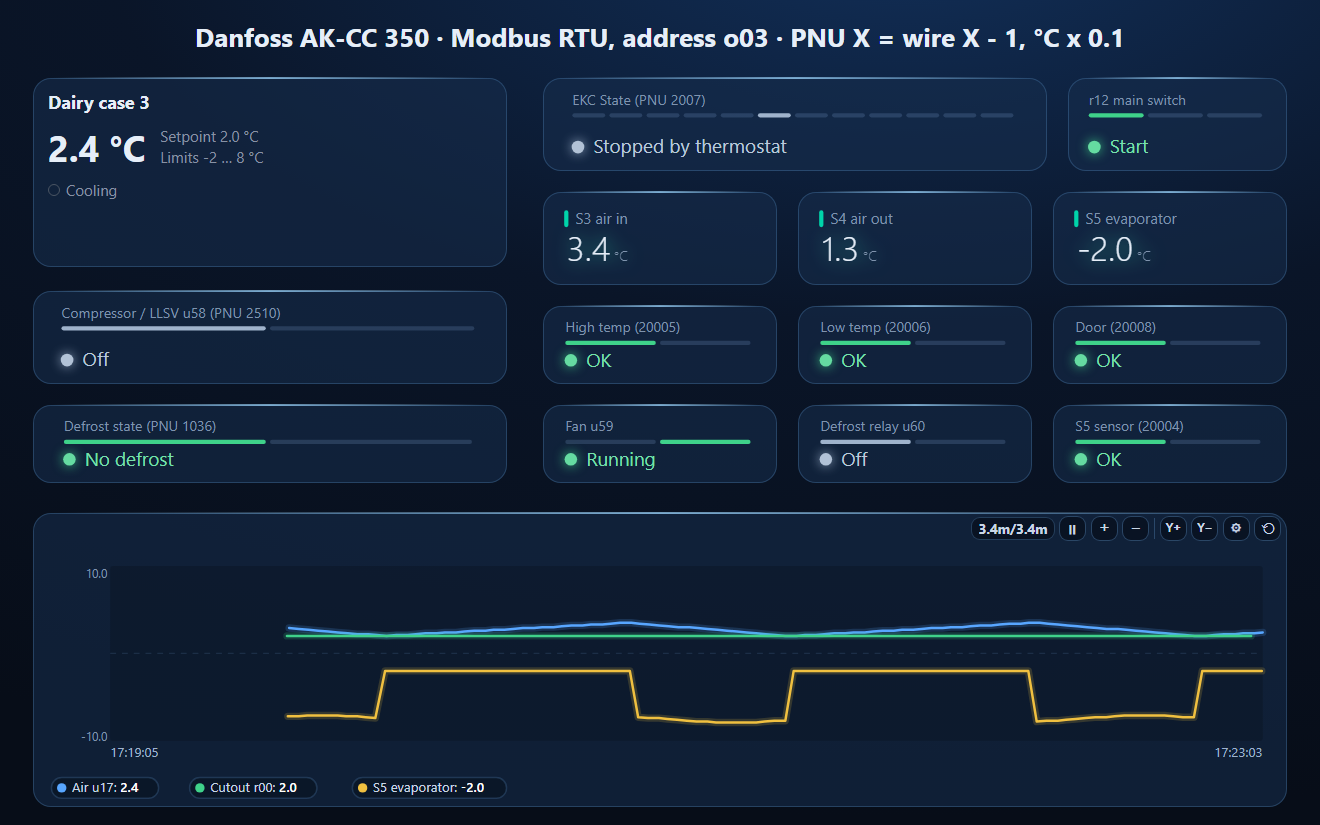
Connection
- Address: parameter o03, 1–240. 0 means off — a controller straight from the box does not answer until o03 is set.
- Function codes: FC03 to read, FC06 to write one register. FC16 is not listed.
- Baud rate and parity: not documented for the AK-CC 350. Neither its Modbus parameter list nor its user guide states them. Other Danfoss documents do: the AK-SM 800A system manager runs its Danfoss channel at 38400 baud, even parity (lowerable to 19200), and the AK-CC55 list says auto-detected baud, 8 data bits, even parity, 1 stop. Start at 38400 8E1, then try 19200 and 9600. This is the one setting on this page that does not come from an AK-CC 350 document.
PNU X Is Wire Address X − 1
Danfoss lists every value by its parameter number (PNU), and its Modbus design guide says the register number is the PNU, sent as PNU − 1: the air temperature u17 is PNU 2532, on the wire 2531; the main switch r12 is PNU 117, address 116. Read the PNU itself and you get the neighbouring parameter.
Key Parameters
| Code | PNU | Value | Scale |
|---|---|---|---|
| u17 | 2532 | Thermostat air temperature | 0.1 °C |
| u56 | 2576 | Display air temperature | 0.1 °C |
| u12 / u16 | 2530 / 2531 | S3 air in / S4 air out | 0.1 °C |
| u09 | 1011 | S5 evaporator (defrost sensor) | 0.1 °C |
| r00 | 100 | “Cutout °C” — the set point (read / write, −50.0…50.0) | 0.1 °C |
| u28 | 2546 | Actual temperature reference (with night offset) | 0.1 °C |
| u00 | 2007 | EKC State (table below) | — |
| 1036 | Defrost state 0 / 1 | — | |
| 1013 | Defrost start (write 1) | — | |
| r12 | 117 | Main switch: 1 start, 0 stop, −1 manual control of outputs | — |
| u58 / u59 / u60 / u62 | 2510 / 2511 / 2512 / 2583 | Relays: compressor or LLSV, fan, defrost, alarm | 0 / 1 |
| A13 / A14 | 10019 / 10020 | High / low alarm limit | 0.1 °C |
“Float” is not a float. The list types the temperatures as Float, but each is one signed 16-bit register in tenths of a degree: its range −2000…2000 is the user guide's −200.0…200.0 °C. −30.0 °C arrives as 0xFED4 = −300. Read two registers as an IEEE float and you get nonsense.
EKC State (u00, PNU 2007)
| Code | State | Code | State |
|---|---|---|---|
| 0 | Regulating | 14 | Defrost |
| 1 | Waiting for end of coordinated defrost | 15 | Fan delay after defrost |
| 2 / 3 | Min ON / min OFF time | 17 | Door open |
| 4 | Drip-off | 20 | Emergency cooling |
| 10 | Stopped by main switch | 25 | Manual control |
| 11 | Stopped by thermostat | 29 | Case cleaning |
Alarm Bits
One register per alarm, 0 or 1, from PNU 20000: 20000 EKC error, 20002–20004 S3 / S4 / S5 sensor error, 20005 high temperature, 20006 low temperature, 20007 HACCP, 20008 door, 20009 / 20010 DI1 / DI2, 20011 max defrost time, 20012 max hold time, 20013 case cleaning, 20014 standby. These numbers are the AK-CC 350's: the AK-CC55 Compact puts high temperature at 20007 and door at 20009. Never copy an alarm map between models.
Common Mistakes
- No answer: o03 is 0 (off), or the baud rate / parity differ — see Connection.
- The wrong parameter: the PNU sent without the minus one.
- Temperatures in the millions: two registers read as a float; it is one register × 0.1.
- Looking for “setpoint”: it is r00, “Cutout °C”.
- An “off” button that stops the case: r12 = 0 stops refrigeration and raises the standby alarm. Writing the relays needs r12 = −1 (manual) — not for a monitoring panel.
- A light relay that is not there: the application (o61, 1–10) decides which outputs exist; u63 light and u61 rail heat are in some applications only.
Step-by-Step: Reading an AK-CC 350 with ModbusManager
- Set o03 to the controller's address.
- In ModbusManager choose RTU, 38400, even parity, 1 stop bit (then 19200 / 9600 if it does not answer).
- Read FC03 from address 2529, quantity 3: S3, S4 and the air temperature u17, × 0.1.
- Read 2006 for the EKC state and 19999, quantity 15, for the alarm bits. Or open the workspace below.
Download a Ready-Made Workspace
- Nine FC03 polls over parameters that exist in every application, PNU − 1 on the wire: cutout, main switch, evaporator, defrost, EKC state, relays, S3 / S4 / air, alarm relay, alarm bits
- 16 register tags with × 0.1 on the temperatures
- A dashboard: the display-case element (air, cutout, cooling, defrost, alarm), compressor and defrost state, EKC state, main switch, S3 / S4 / S5, high / low temperature, door and sensor alarms, fan and defrost relays, and an air / cutout / evaporator trend
Danfoss_AKCC350.json
Danfoss AK-CC 350 case controller workspace (Modbus RTU). Open via Workspace › Open in ModbusManager Pro, or from the in-app Device library.
Try it with ModbusManager Pro
Display-case and cold-room elements, HACCP-style historian, alarms on case temperature, and MQTT to Home Assistant. Free 14-day trial. No credit card. Windows 10/11.
Temperature control on a process line: Omron E5CC. Drives on the same site: Danfoss VLT FC 102 / FC 302. All guides: Modbus device guides.
Frequently Asked Questions
What are the Modbus settings of a Danfoss AK-CC 350?
The address is parameter o03 (1-240, 0 = off). Danfoss' AK-CC 350 documents do not state the baud rate or parity; Danfoss' AK-SM 800A uses 38400 8E1 on its Danfoss channel, so start there, then try 19200 and 9600.
How do I convert a Danfoss PNU to a Modbus address?
Subtract one: PNU 2532 (air temperature u17) is wire address 2531, PNU 117 (main switch r12) is 116. In 4xxxx notation PNU 2532 is 42532.
Why does the AK-CC 350 temperature read as nonsense when read as a float?
The parameter list calls it Float, but each temperature is one signed 16-bit register in tenths of a degree: 24 is 2.4 °C, -300 is -30.0 °C.
Where is the set point of an AK-CC 350?
Parameter r00, "Cutout °C", PNU 100 (wire 99), signed 0.1 °C, -50.0 to 50.0. The actual reference with night offset is u28, PNU 2546.
Which register shows defrost on an AK-CC 350?
Defrost state, PNU 1036 (0/1), and EKC State PNU 2007 = 14 during defrost. The defrost relay u60 is PNU 2512.
Sources
Danfoss, Programming guide — Modbus parameter list, AK-CC 350, SW 1.1x, AU451945704197en-000101 (2023.05); User guide AK-CC 350, RS8EQ302 (2015-12); Data communication Modbus RS485 RTU design guide, AJ260040756410en-000101 (2015.10), all assets.danfoss.com. The serial settings come from Danfoss' AK-SM 800A and AK-CC55 documents, not the AK-CC 350's. Tested against a simulator built from these documents, not against a physical controller.