Grundfos MAGNA3 Modbus (CIM 200 / CIM 500): Registers Minus One, Remote Access and the Setpoint in Percent
A Grundfos MAGNA3 circulator — like the CRE, TPE and other E-pumps — speaks Modbus through a CIM module: CIM 200 for Modbus RTU on RS-485, CIM 500 for Modbus TCP. Grundfos publishes one functional profile for all of them. It is clear once you know three things: register numbers go on the wire minus one, the pump ignores commands until the bus asks for remote access, and the setpoint is a percentage of a range, not a head in metres.
CIM 200 and CIM 500 Settings
| CIM 200 (Modbus RTU) | CIM 500 (Modbus TCP) | |
|---|---|---|
| Address | 1–247 on two hex rotary switches (SW6 high, SW7 low) | Unit ID not used |
| Speed | DIP SW4/SW5: 19200 default, 9600, 38400 or software-defined | — |
| Framing | SW3: even parity, 1 stop bit default; ON = no parity, 2 stop | — |
| Wiring | D1+, D0− and Common; termination SW1+SW2, off by default | Ethernet |
| First step | — | Protocol switch to position 1 = Modbus TCP — the factory setting 0 is PROFINET. Set the Modbus TCP address in the web server (default 192.168.1.100); it must differ from the web server's own. |
Function codes 03, 04, 06, 16 and 08 — no coils. FC03 and FC04 return the same data. One request reads at most 125 registers.
Register X Is Wire Address X − 1
Grundfos numbers its registers 00001, 00101, 00201… and says it in the profile: registers numbered X are addressed as X − 1. The setpoint 00104 goes on the wire as 103, the status word 00201 as 200. Values over 65 535 use two registers, high then low.
Key Registers
| Register | Value | Scale |
|---|---|---|
| 00101 | Control bits: 0 RemoteAccessReq, 1 OnOffReq, 2 ResetAlarm (rising edge) | bits |
| 00102 | Control mode: 0 const. speed, 3 const. head, 5 const. diff. pressure, 6 proportional pressure, 7 const. flow, 128 AUTOADAPT, 129 FLOWADAPT | — |
| 00103 | Operation mode: 0 auto, 4 min, 6 max | — |
| 00104 | Setpoint, % of the setpoint range (0–10000) | 0.01 % |
| 00201 | Status bits: 6 rotation, 8 remote access, 9 on, 10 alarm, 11 warning, 13 at max speed, 15 at min speed | bits |
| 00202 | Process feedback | 0.01 % |
| 00205 / 00206 | Alarm code / warning code (0 = none) | — |
| 00209–00211 | Feedback sensor unit, min, max | — |
| 00215 / 00216 | Setpoint range min / max, % of sensor max | 0.01 % |
| 00301 | Head | 0.001 bar |
| 00302 | Volume flow (estimated, for monitoring only) | 0.1 m³/h |
| 00303 / 00304 | Relative performance / speed | 0.01 % / rpm |
| 00308 | Actual setpoint | 0.01 % |
| 00312–00313 | Power (U32, high then low) | W |
| 00322 | Pumped liquid temperature | 0.01 K |
| 00326 | Specific energy | Wh/m³ |
| 00327–00328 / 00332–00333 / 00334–00335 | Operating hours / energy / starts (U32) | h / kWh / — |
“A data value of 0xFFFF indicates not available” — the profile has a MAGNA3 column, and registers such as motor voltage or torque are not available on it. Temperatures are given in 0.01 K with no offset stated; the workspace reads them as absolute kelvin (− 273.15), so check the first reading against the pump's display.
Remote Access and the Setpoint
- Commands need remote access. The pump ignores 00102–00104 until the master sets bit 0 of 00101 (RemoteAccessReq). Status bit 8 (00201) shows whether the bus is in control. A watchdog (00012) can drop it back to local when the master goes quiet.
- The setpoint is a percentage. 00104 = 0–10000 is 0–100.00 % of the setpoint range given by 00215/00216 of the sensor's range (00209–00211). Grundfos' own example: a MAGNA3 40-100 with a 20 m sensor and a range of 5–50 % gives a setpoint range of 1–10 m.
- Reset alarm on the rising edge of 00101 bit 2 — it stays set until you clear it.
Common Mistakes
- Every value one register off: the minus one not applied (or applied twice by a 1-based tool).
- CIM 500 never answers Modbus: the protocol switch is still on 0 (PROFINET).
- Writes accepted, nothing happens: RemoteAccessReq (00101 bit 0) not set.
- A setpoint written in metres: 00104 is a percentage of the range.
- 65 535 on the dashboard: not available on this pump model, not a reading.
- Heating flow used for billing: MAGNA3 flow is estimated; Grundfos says monitoring only.
Step-by-Step: Reading a MAGNA3 with ModbusManager
- Set the CIM 200 address on the rotary switches (or put the CIM 500 on position 1).
- In ModbusManager choose RTU, 19200, even parity, 1 stop bit, that address — or TCP for the CIM 500.
- Read FC03 from address 200, quantity 26: the status block 00201–00226.
- Read FC03 from address 300, quantity 36: head, flow, speed, power, temperatures, energy. Or open the workspace below.
Download a Ready-Made Workspace
- Two FC03 polls: status 00201–00226 (wire 200) and data 00301–00336 (wire 300), every 2 s
- 18 register tags with Grundfos' scaling, plus a script that takes running, remote and alarm out of the status word and turns 0.01 K into °C
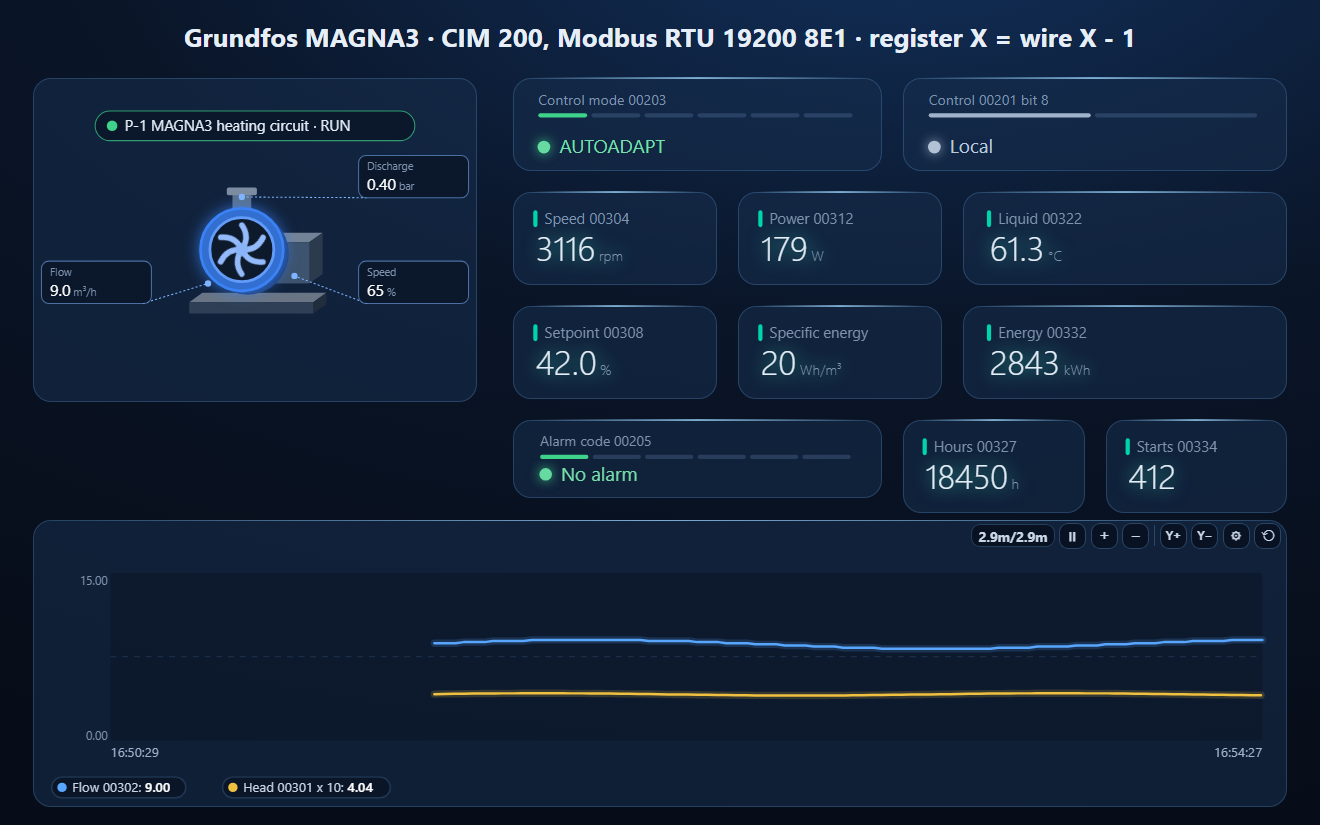
- A dashboard: the pump element with flow, head and performance and its fault state from the alarm bit, control mode, local / remote, speed, power, liquid temperature, setpoint, specific energy, energy, alarm code, hours and starts, and a flow / head trend
Grundfos_MAGNA3_CIM.json
Grundfos MAGNA3 workspace (CIM 200 / CIM 500). Open via Workspace › Open in ModbusManager Pro, or from the in-app Device library.
Try it with ModbusManager Pro
Pump element with fault state, alarms on Grundfos alarm codes, historian, and MQTT to Home Assistant. Free 14-day trial. No credit card. Windows 10/11.
The same pump over BACnet: Grundfos CIM on BACnet (bacmanager.com). Heat source next to it: NIBE S-series heat pumps. All guides: Modbus device guides.
Frequently Asked Questions
What are the default Modbus settings of a Grundfos CIM 200?
19200 baud, even parity, 1 stop bit, set with DIP switches; the address (1–247) is set on two hex rotary switches. A CIM 500 must be switched to position 1 for Modbus TCP, and it ignores the unit ID.
Why are my Grundfos Modbus values one register off?
Grundfos register X is addressed as X − 1: status 00201 is wire address 200, the setpoint 00104 is 103. A tool that adds 1 itself needs the number as written.
Why does the MAGNA3 ignore my setpoint over Modbus?
The bus must first take control: set bit 0 (RemoteAccessReq) of register 00101. Status bit 8 of 00201 shows remote access. The setpoint 00104 is then a percentage (0.01 %) of the setpoint range, not a head in metres.
What does 65535 mean in a Grundfos register?
Not available. The functional profile lists which registers each pump family has; a MAGNA3 has no motor voltage or torque, for example.
Is the MAGNA3 flow reading accurate?
It is estimated from the pump's operating point. Grundfos says to use it for monitoring only.
Sources
Grundfos, Modbus for Grundfos pumps — SoftCIM, CIM/CIU 200 Modbus RTU, CIM/CIU 500 Ethernet for Modbus TCP, functional profile and user manual, 98367081 05.2025 (api.grundfos.com, literature 6012947). The kelvin offset of the 0.01 K temperatures is not stated in it. Tested against a simulator built from this document, not against a physical pump.