Victron Cerbo GX Modbus TCP: Unit-IDs, Registers and Scale Factors
A Victron GX device — Cerbo GX, Color Control GX, Venus GX or the GX built into a MultiPlus-II — is a Modbus TCP gateway to everything connected to it: inverter/chargers, solar chargers, batteries, meters. The Unit-ID picks the device, the register picks the value, and nearly every first attempt fails on the Unit-ID. This page covers enabling the server, the Unit-IDs, the system registers, the scale factors and the error codes, from Victron's own manual and register list.
Enable the Modbus TCP Server
Modbus TCP is disabled by default. On the GX go to Settings → Integrations → Modbus TCP server (on older firmware Settings → Services → Modbus-TCP) and enable it. The server listens on TCP port 502. The same menu lists Available services — every connected device with its Unit-ID — and shows the last error, which is the fastest way to see why a request failed.
Unit-ID Selects the Device
The GX answers for every device behind it; the Unit-ID in the request says which one. Victron's preferred IDs:
| Unit-ID | Device |
|---|---|
| 100 | com.victronenergy.system — the whole-system values (0 maps to the same; use 100) |
| 227 | Cerbo GX VE.Bus port: MultiPlus / Quattro |
| 228 | MultiPlus-II GX / EasySolar-II GX VE.Bus port |
| 242 | Venus GX VE.Bus port |
| 246 | Color Control GX VE.Bus port |
| 223 / 224 / 226 | Cerbo GX VE.Direct ports (solar chargers, battery monitors) |
| 225 | CAN-bus BMS |
Since Venus OS 2.60 Unit-IDs are assigned dynamically: the table gives the preferred ones, but the Available services list on your GX is the truth. They do not change after a reboot. Units in a parallel or three-phase system are not addressed one by one — read the totals.
System Registers (Unit-ID 100)
Function code 3 or 4 — Victron says there is no difference. Addresses go on the wire as listed. Scale is Victron's scale factor: divide the raw value by it.
| Register | Value | Type | Scale |
|---|---|---|---|
| 808–810 | PV AC-coupled on output L1–L3 | uint16 | 1 (W) |
| 817–819 | AC consumption L1–L3 | uint16 | 1 (W) |
| 820–822 | Grid L1–L3 (+ import, − export) | int16 | 1 (W) |
| 826 | Active input: 0 unknown, 1 grid, 2 generator, 3 shore, 240 none | uint16 | — |
| 840 | Battery voltage | uint16 | 10 (V) |
| 841 | Battery current | int16 | 10 (A) |
| 842 | Battery power (+ charging) | int16 | 1 (W) |
| 843 | State of charge | uint16 | 1 (%) |
| 844 | Battery state: 0 idle, 1 charging, 2 discharging | uint16 | — |
| 850 / 851 | PV DC-coupled power / current | uint16 / int16 | 1 (W) / 10 (A) |
| 860 | DC system power | int16 | 1 (W) |
| 884…906 | PV and consumption again as 32-bit | uint32 / int32 | 1 (W) |
The 16-bit power registers stop at 65 535 W (32 767 W signed). For a larger system use the 32-bit copies from 868 and 884 onwards.
Inverter/Charger (VE.Bus, e.g. Unit-ID 227)
| Register | Value | Scale |
|---|---|---|
| 3–5 | AC input voltage L1–L3 | 10 (V) |
| 9 | AC input frequency | 100 (Hz) |
| 12–14 | AC input power L1–L3 | 0.1 → raw × 10 W |
| 15–17 / 23–25 | AC output voltage / power | 10 (V) / 0.1 |
| 22 | Active input current limit (writable) | 10 (A) |
| 26 / 27 | Battery voltage / current | 100 (V) / 10 (A) |
| 31 | VE.Bus state: 3 bulk, 4 absorption, 5 float, 8 passthru, 9 inverting… | — |
| 32 | VE.Bus error (0 = none) | — |
| 33 | Switch: 1 charger only, 2 inverter only, 3 on, 4 off | — |
| 37 | ESS power setpoint phase 1 (writable) | 1 (W) |
Victron's own example: Unit-ID 246, register 3, the reply 2302 ÷ 10 = 230.2 V AC. Watch the power registers with scale 0.1 — dividing by 0.1 multiplies by 10.
Error Codes
| Code | Meaning on a GX |
|---|---|
| 0x01 | Function not supported (only 3, 4, 6, 16 are) |
| 0x02 | Unit-ID fine, but a requested register does not exist for that device — including a gap inside a block |
| 0x03 | Invalid quantity of registers |
| 0x0A | Unit-ID in the mapping list, but no device on that port |
| 0x0B | Unit-ID not in the mapping list at all |
Reading 1–100 in one go fails because registers 1 and 2 do not exist; reading 840–850 fails because 847–849 are reserved. Read gap-free blocks, as the workspace does.
Common Mistakes
- Connection refused: the Modbus TCP server is not enabled on the GX.
- Exception 0x0B or 0x0A: the wrong Unit-ID; check Available services.
- Exception 0x02 on a block: the block contains a register the device does not have.
- Battery 526 V: scale factor 10 not applied (52.6 V).
- Inverter power ten times too small: scale 0.1, so multiply by 10.
- Trying to write absorption voltage: configuration settings of a Multi cannot be changed over Modbus.
Step-by-Step: Reading a Cerbo GX with ModbusManager
- Enable the Modbus TCP server on the GX and note the Unit-IDs under Available services.
- In ModbusManager choose TCP, the GX's IP address, port 502.
- Read FC03, Unit-ID 100, address 840, quantity 7: battery voltage, current, power, SOC and state.
- Open the workspace below; change 227 to your VE.Bus Unit-ID if it differs.
Download a Ready-Made Workspace
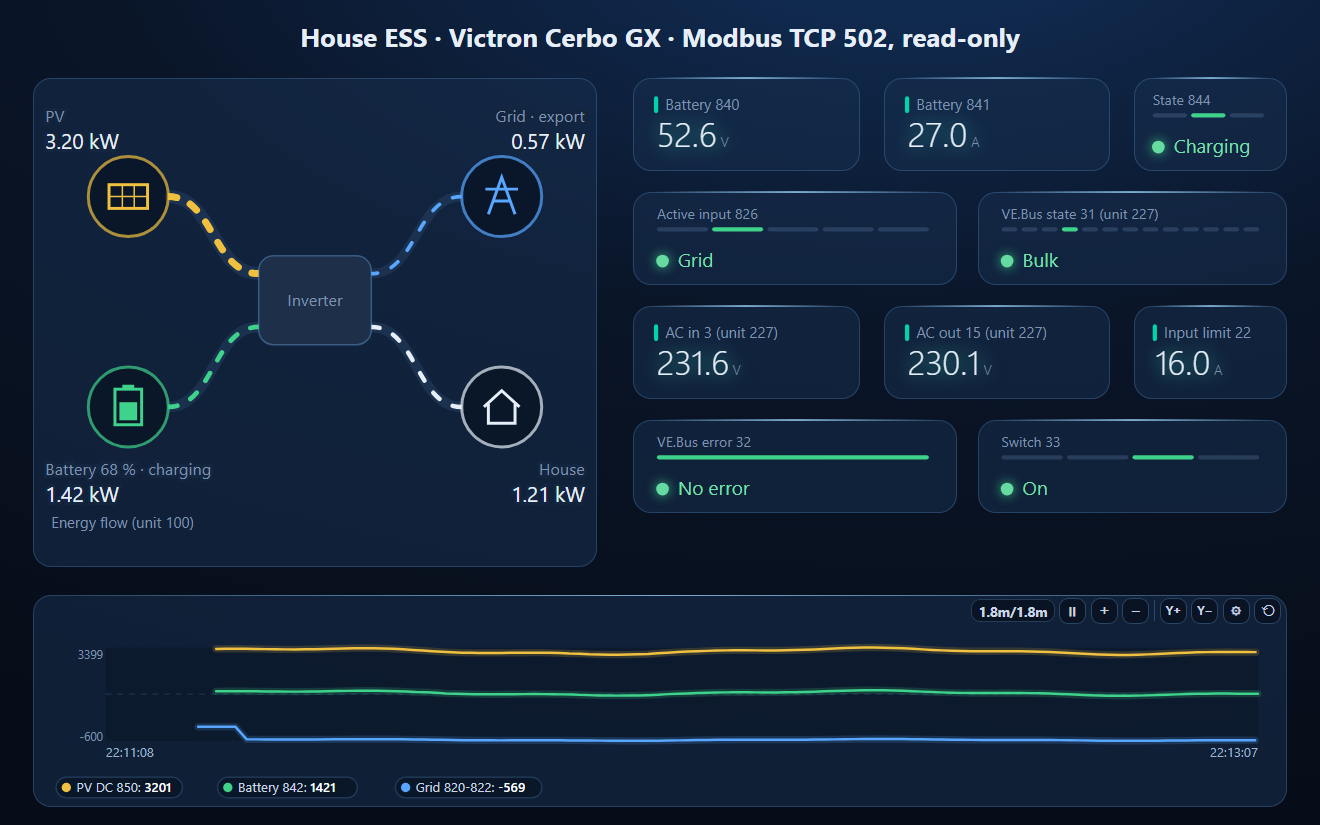
- Four FC03 polls without gaps: system 817–826, 840–846, 850–851 on Unit-ID 100 and VE.Bus 3–33 on Unit-ID 227
- 22 register tags with Victron's scale factors applied, plus a script that sums grid and consumption over the phases
- A dashboard: energy-flow diagram (PV, battery with SOC, grid, house), battery values, active input, VE.Bus state, AC voltages, input limit, error and switch, and a power trend
Victron_CerboGX.json
Victron Cerbo GX workspace (Unit-ID 100 + 227). Open via Workspace › Open in ModbusManager Pro.
Try it with ModbusManager Pro
Energy-flow element, historian, alarms on SOC, and MQTT to Home Assistant. Free 14-day trial. No credit card. Windows 10/11.
The grid meter on a Victron system is often a Carlo Gavazzi EM24 or EM340. Other solar systems: Deye / Sunsynk, Huawei SUN2000, Modbus to MQTT.
Frequently Asked Questions
Which Unit-ID does a Victron Cerbo GX use for system data?
Unit-ID 100 for com.victronenergy.system: battery 840–846, PV 850, grid 820–822, consumption 817–819. Unit-ID 0 maps to the same data, but Victron recommends 100.
How do I enable Modbus TCP on a Victron GX?
It is disabled by default. Enable the Modbus TCP server under Settings → Integrations (older firmware: Settings → Services). The same menu lists the Unit-ID of every connected device.
What does exception 0x0B mean from a Victron GX?
The Unit-ID is not in the GX's mapping list. 0x0A means it is mapped but no device answers on that port, and 0x02 means the Unit-ID is right but a requested register does not exist.
How are Victron Modbus values scaled?
Divide by the scale factor in Victron's register list: battery voltage 840 has factor 10 (526 = 52.6 V); VE.Bus power has factor 0.1, so the raw value is multiplied by 10.
What is the Unit-ID of the MultiPlus on a Cerbo GX?
Victron's preferred ID for the Cerbo GX VE.Bus port is 227 (CCGX 246, Venus GX 242, MultiPlus-II GX 228). Since Venus OS 2.60 IDs are assigned dynamically; check Available services on your GX.
Sources
Victron Energy, GX Modbus-TCP Manual (victronenergy.com), and CCGX-Modbus-TCP-register-list-3.60.xlsx (field list, Unit ID mapping and document versions). Tested against a simulator built from these documents, not a physical GX.