Schneider PM3250 / PM3255 Modbus Register Map (PM3200 Series)
How to read a Schneider Electric PM3200-series DIN-rail power meter over Modbus RTU. Only two of the four models have Modbus at all, the documented register is one more than the address on the wire, the meter knows FC03 and FC16 only, and energy comes twice — as an exact 64-bit integer and as a 32-bit float that quietly loses precision on a big feeder. This page covers all of it, from Schneider's current user manual.
Which PM3200 Models Have Modbus
| Model | Modbus | Other I/O |
|---|---|---|
| PM3200 | no | display only |
| PM3210 | no | pulse output |
| PM3250 | RS-485, Modbus RTU | — |
| PM3255 | RS-485, Modbus RTU | 2 digital inputs, 2 digital outputs, demand and energy logs |
All four measure through CTs (1 A or 5 A secondaries) and optionally VTs. If the front says PM3200 or PM3210, no Modbus setting will make it answer — it has no port.
Connection Settings
| Setting | Values | Notes |
|---|---|---|
| Terminals | D0 (A / Rx-, Tx-), D1 (B / Rx+, Tx+), 0 V | Two-wire RS-485, one port, 4 kV isolated |
| Baud rate | 9600, 19200, 38400 | Set on the meter's display |
| Parity | Even, Odd, None | Always 1 stop bit — with None that is 8N1, not 8N2 |
| Address | 1–247 | Set on the display |
| Function codes | 03, 16, 43/14, 20 | Read holding, write multiple, device identification, read file record (logs) |
Register = Address + 1
Schneider's register tables give both numbers, and the manual states the rule outright: the address (hex) is what goes in the Modbus frame, and register = address + 1. Phase-1 current is register 3000 at address 0x0BB7 = 2999. A tool that takes 0-based addresses wants 2999; one with 1-based addressing wants 3000. Ask a 0-based tool for 3000 and every Float32 comes back as half of one value and half of the next.
The values are IEEE-754 Float32 in two registers. The manual does not spell out the word order; on this meter, as on other Schneider meters, the high word comes first — a phase voltage reading near 230 confirms it, a value like 1.2e-38 means the words are swapped.
Measurement Registers
All FC03, Float32 (two registers) unless noted. Wire is the 0-based address.
| Register | Wire | Value | Unit |
|---|---|---|---|
| 3000 / 3002 / 3004 | 2999 / 3001 / 3003 | Current I1 / I2 / I3 | A |
| 3006 | 3005 | Neutral current In | A |
| 3010 | 3009 | Current average | A |
| 3020 / 3022 / 3024 | 3019 / 3021 / 3023 | Voltage L1-L2 / L2-L3 / L3-L1 | V |
| 3028 / 3030 / 3032 | 3027 / 3029 / 3031 | Voltage L1-N / L2-N / L3-N | V |
| 3054 / 3056 / 3058 | 3053 / 3055 / 3057 | Active power phase 1 / 2 / 3 | kW |
| 3060 | 3059 | Total active power | kW |
| 3068 | 3067 | Total reactive power | kVAR |
| 3076 | 3075 | Total apparent power | kVA |
| 3078–3084 | 3077–3083 | Power factor phase 1–3, total (−2…+2 format) | — |
| 3108 | 3107 | Tan phi (reactive factor) | — |
| 3110 | 3109 | Frequency | Hz |
| 3132 | 3131 | Meter temperature | °C |
| 3012–3018, 3038–3052 | 3011–, 3037– | Current and voltage unbalance | % |
| 3766 / 3770 | 3765 / 3769 | Active power present / peak demand | kW |
Power Factor: the −2 to +2 Register
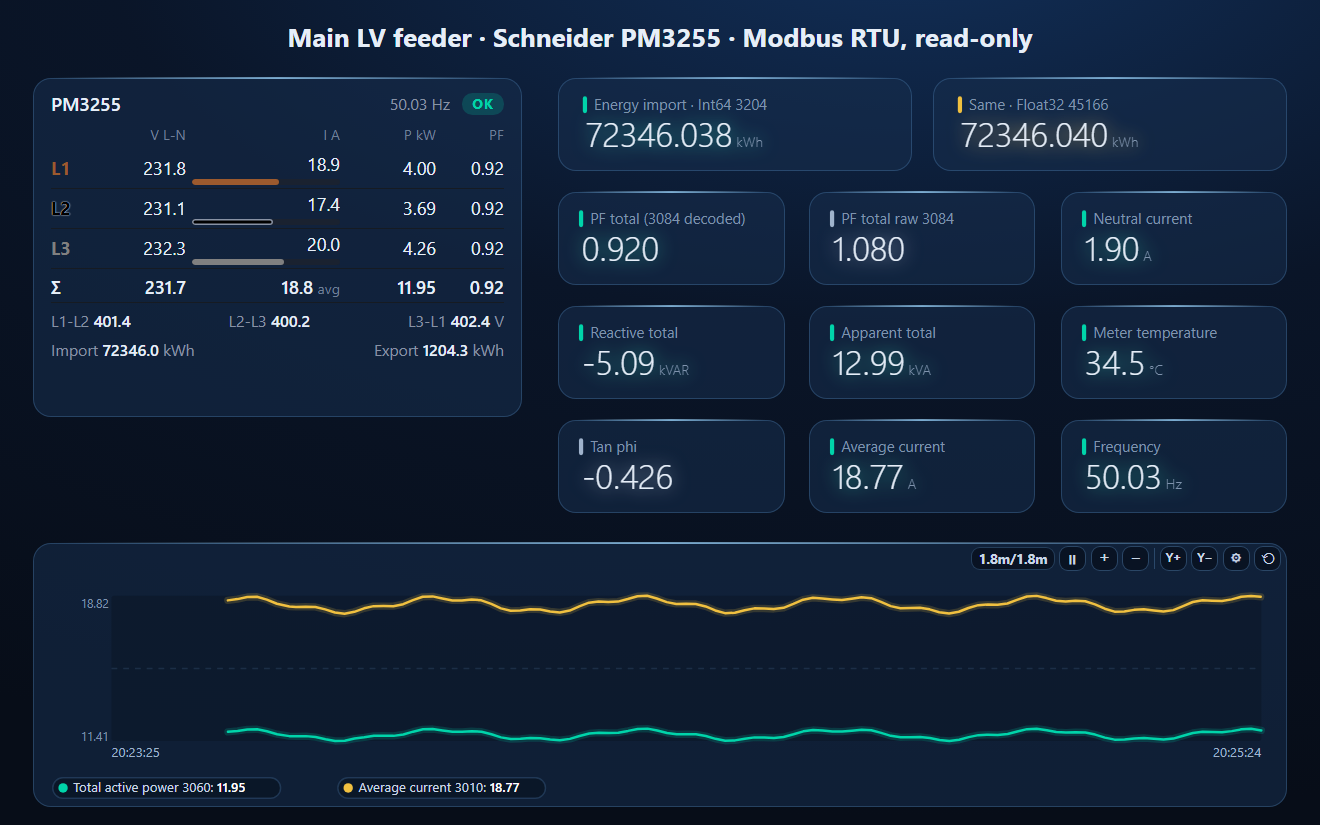
Registers 3078–3084 do not hold a plain power factor. Schneider encodes the quadrant into the number: between 0 and +1 is Q1 (active power positive, inductive), between +1 and +2 is Q4 (positive, capacitive), between −1 and 0 is Q3 and between −2 and −1 is Q2 (active power negative). A reading of 1.08 is a 0.92 capacitive power factor: PF = 2 − 1.08. Below −1 it is −2 − x. Show the raw register on an HMI and a perfectly good 0.92 leading load looks like an impossible 1.08.
Energy: Int64 or Float32
The PM3200 gives every energy counter twice, both in Wh (not kWh):
| Counter | Int64 register (4 words) | Float32 register |
|---|---|---|
| Active energy import | 3204 | 45166 |
| Active energy export | 3208 | 45168 |
| Reactive import / export | 3220 / 3224 | 45170 / 45172 |
| Apparent import / export | 3236 / 3240 | 45174 / 45176 |
| Partial active import | 3256 | 45178 |
| Tariff 1–4 active import | 4196 / 4200 / 4204 / 4208 | 45206–45212 |
The Int64 value is exact. The Float32 has a 24-bit mantissa, so above 224 Wh — 16.8 MWh, a few months on a busy feeder — it can no longer count single watt-hours, and the step grows as the counter does: 2 Wh steps from 16.8 MWh, 4 Wh from 33.6 MWh, 64 Wh around a gigawatt-hour. For billing or sub-metering read the Int64. ModbusManager has no 64-bit data type, so the workspace reads the four words as UInt16 and combines them in its script: ((w0 × 65536 + w1) × 65536 + w2) × 65536 + w3.
Writing: the Command Interface
Settings are not written into their own registers. The meter has a command interface: write the command number to 5250 and its parameters from 5252 with one FC16, then read the result at 5376 (0 = valid; 3000 invalid command, 3001 invalid parameter, 3002 wrong number of parameters, 3007 not performed). Examples from the manual: 1003 sets date and time, 2060 selects the multi-tariff mode (1 = controlled over communication), 2008 sets the active tariff 1–4 — only when the tariff is under communication control. The active tariff can be read at 4191. Wiring, CT and VT ratios are set on the display; they are not in the Modbus list.
PM3255 Extras
- Digital input status at 8905 (bitmap, 2 registers): DI1 and DI2, open / closed. Digital output status at 9667.
- Logs (power demand, energy per day / week / month) through function 20 (0x14) Read File Record, file number 1.
- Input metering: pulse counters on DI1 / DI2 at 3558 / 3562 (Int64) or 45202 / 45204 (Float32), e.g. a water or gas meter.
Common Mistakes
- No answer at all: it is a PM3200 or PM3210 — no Modbus port. Or 8N2 on the master: the meter always uses one stop bit.
- Values look like 1e-38 or 4e+9: the read started on the wrong register (3000 instead of 2999 on a 0-based tool), or the words are swapped.
- "Illegal function": FC04 or FC06. Use FC03 and FC16.
- Power factor above 1: the four-quadrant format; 2 − x.
- Energy a thousand times too big: it is Wh, not kWh.
- Energy that moves in steps of 2 or 4: Float32 above 16.8 MWh; read the Int64 at 3204.
- A tariff write is ignored: the multi-tariff mode is not set to communication control (command 2060).
Step-by-Step: Reading a PM3250 with ModbusManager
- On the meter's display set the address, baud rate and parity (one stop bit is fixed).
- Wire a USB–RS-485 adapter to D0, D1 and 0 V; terminate the line at both ends.
- In ModbusManager choose RTU, the COM port and the same baud rate and parity.
- Poll FC03 from address 2999, quantity 8, as Float32: I1, I2, I3 and In in amps.
- Open the workspace below to get all values named and scaled, the power factor decoded and the exact energy counter.
Download a Ready-Made Workspace
- Seven FC03 polls over gap-free blocks of documented registers, including both energy formats
- 36 tags: currents, phase and line voltages, powers, power factors, tan phi, frequency, temperature, the four Int64 energy words and the Float32 energy
- A script that turns the −2…+2 power factors into plain ones and combines the Int64 energy into kWh
- A dashboard: three-phase meter, Int64 and Float32 energy side by side, decoded and raw PF, neutral current, Q, S, temperature and a power and current trend
SchneiderPM3200_workspace.json
Schneider PM3250 / PM3255 workspace. Open via Workspace › Open in ModbusManager Pro.
Try it with ModbusManager Pro
Scaled tags, three-phase meter, historian and energy reports for your meters. Free 14-day trial. No credit card. Windows 10/11.
The panel-mount PowerLogic PM5100 / PM5300 uses the same measurement registers — see the PM5000 Modbus guide. Eastron meters work differently (input registers, FC04): SDM630.
Frequently Asked Questions
Does the Schneider PM3200 have Modbus?
Only the PM3250 and PM3255 do, on RS-485 (Modbus RTU). The PM3200 and PM3210 have no communication port; the PM3210 has a pulse output.
What is the Modbus address of the PM3250 total active power?
Register 3060, which is address 3059 on the wire (FC03, Float32, kW). Schneider's rule is register = address + 1, so phase-1 current, register 3000, is address 2999.
Why does the PM3250 power factor read more than 1?
Registers 3078–3084 use a four-quadrant format from −2 to +2. A value between 1 and 2 is a capacitive power factor of 2 minus the value: 1.08 means 0.92 leading.
Should I read PM3200 energy as Int64 or Float32?
Int64 at 3204 for anything you bill or compare. Both are in Wh, but the Float32 copy at 45166 stops resolving single watt-hours above 16.8 MWh.
Why does my master get "illegal function" from the PM3250?
The meter supports FC03, FC16, 43/14 and 20 only. FC04 reads and FC06 single-register writes are refused; use FC03 to read and FC16 with a quantity of 1 to write one register.
Sources
Schneider Electric, PM3200 series – User manual, DOCA0006EN-09 (07/2026): main characteristics (pp. 13–14), wiring (p. 23), Modbus communication and register list (pp. 49–67), power factor register format (pp. 80–81), specifications (p. 87). Public download from se.com. The word order of the 32- and 64-bit values is not stated in the manual; the high-word-first order used here is the one Schneider meters use. The workspace was tested against a simulator built from this manual, not a physical meter.