Janitza UMG 96-PA Modbus: the 19000 Block and the +32768 Trick
Janitza's UMG power analysers hold hundreds of Modbus values, but the ones nearly everybody needs sit in one block: the "frequently required measured values" from address 19000, all Float32. Janitza also lets you choose the byte order by address — the same value read 32768 higher comes back little-endian. This page covers the block, the settings and the traps from Janitza's own address list for the UMG 96-PA.
RS-485 Settings
| Setting | Range | Default |
|---|---|---|
| Device address | 1–250 | 1 |
| Baud rate | Auto, 9600–115200 | Auto |
| Data frame | 1 stop no parity, even, odd, 2 stop no parity | 8N1 |
With baud rate on Auto the meter detects the master's speed from the traffic — convenient, but on a quiet or mixed line set a fixed rate. Note the address range runs to 250, beyond the 247 most masters accept. Function codes: 03 and 04 read, 06 and 16 write, 23 read/write, 02 digital inputs, 08 diagnostics.
The Frequently Required Values from 19000
All Float32 (two registers). The address list gives plain addresses — no 4xxxx notation and no offset mentioned — so request 19000. If the first value comes out as half a float, your master counts from 1: enter 19001.
| Address | Value | Unit |
|---|---|---|
| 19000 / 19002 / 19004 | Voltage L1-N / L2-N / L3-N | V |
| 19006 / 19008 / 19010 | Voltage L1-L2 / L2-L3 / L3-L1 | V |
| 19012 / 19014 / 19016 | Current L1 / L2 / L3 | A |
| 19018 | Vector sum IN = I1 + I2 + I3 | A |
| 19020 / 19022 / 19024 | Real power L1 / L2 / L3 | W |
| 19026 | Real power sum Psum3 | W |
| 19034 / 19042 | Apparent Ssum3 / reactive Qsum3 | VA / var |
| 19044 / 19046 / 19048 | cos φ (fundamental) L1 / L2 / L3 | — |
| 19050 | Frequency | Hz |
| 19052 | Rotation field: 1 right, 0 none, −1 left | — |
| 19054–19060 | Real energy L1, L2, L3, L1..L3 | Wh |
| 19068 | Real energy consumed, rate 1 | Wh |
| 19076 | Real energy delivered L1..L3 | Wh |
| 19084 / 19092 | Apparent / reactive energy L1..L3 | VAh / varh |
| 19110–19114 | THD voltage L1-N, L2-N, L3-N | % |
| 19116–19120 | THD current L1, L2, L3 | % |
Powers are in watts and energies in watt-hours — a 400 A incomer reads 120 000, not 120. The block has cos φ per phase but no total; divide Psum3 by Ssum3 for that. The same quantities also exist from address 1000 in a different order; use one block, not a mix. Values are refreshed every 200 ms.
Byte Order: Add 32768
Everything in the address list is big-endian at the listed address. Janitza serves the same data little-endian at the address plus 32768: voltage L1-N at 19000 is also at 51768, low byte first. Use that only if your master cannot swap bytes itself — and never mix the two in one poll.
Common Mistakes
- No answer at first, then fine: baud rate Auto still locking on; set a fixed rate.
- Power 1000 times too big: W and Wh, not kW and kWh.
- Garbage floats: started at 19001 on a master that does not count from 1, or the reverse.
- Byte-swapped nonsense: a little-endian master reading 19000 instead of 51768, or a big-endian one reading 51768.
- Address 248–250 unreachable: the master stops at 247.
Step-by-Step: Reading a UMG 96-PA with ModbusManager
- On the meter set the device address and a fixed baud rate; leave 8N1.
- In ModbusManager choose RTU with the same settings, or TCP for an Ethernet variant.
- Poll FC03 from 19000, quantity 54, displayed as Float32: voltages, currents, powers, cos φ, frequency.
- Open the workspace below for everything scaled to kW and kWh on a dashboard.
Download a Ready-Made Workspace
- Three FC03 polls: 19000–19053, the energies 19060–19093 and THD 19110–19121
- 28 Float32 tags, powers and energies scaled to kW and kWh, plus a script for the total power factor
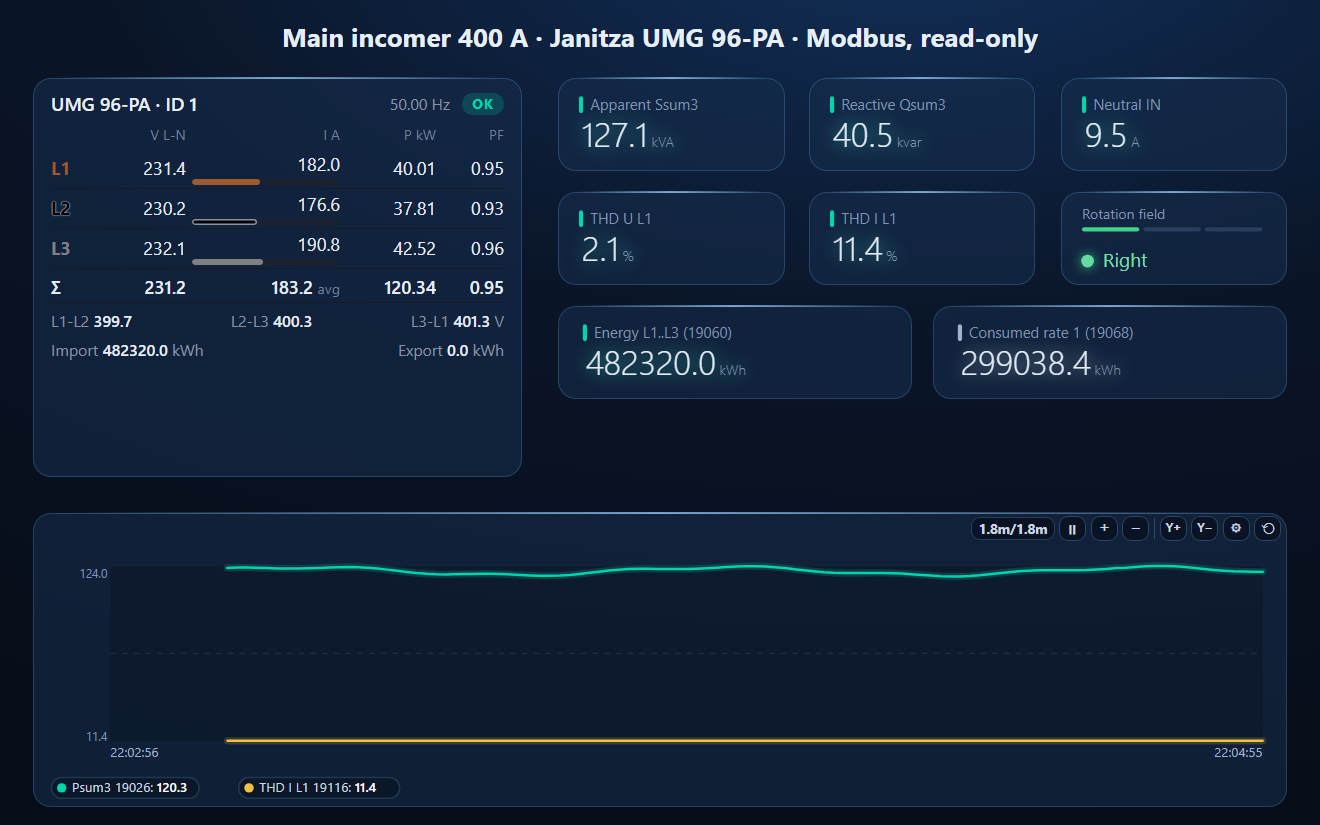
- A dashboard: three-phase meter, S, Q, neutral current, THD, rotation field, energy counters and a power / THD trend
Janitza_UMG96PA.json
Janitza UMG 96-PA workspace. Open via Workspace › Open in ModbusManager Pro.
Try it with ModbusManager Pro
Three-phase meter, historian, energy reports and alarms on THD. Free 14-day trial. No credit card. Windows 10/11.
Other meters: Schneider PM3250, Carlo Gavazzi EM340, Eastron SDM630.
Frequently Asked Questions
Where are the main values in a Janitza UMG 96-PA?
In the "frequently required measured values" block from 19000: voltages 19000–19010, currents 19012–19016, powers 19020–19026, cos phi 19044–19048, frequency 19050 and energies from 19054, all Float32 big-endian.
How do I read Janitza values in little-endian?
Add 32768 to the address: Janitza serves the same data little-endian there. Voltage L1-N is 19000 big-endian and 51768 little-endian.
Why is the Janitza power value so large?
The 19000 block is in base units: power in W and energy in Wh. Divide by 1000 for kW and kWh.
What baud rate does the UMG 96-PA use?
The default is Auto, which detects the master's speed; fixed choices are 9600 to 115200. The default frame is 8 data bits, no parity, 1 stop bit, and the device address 1 (range 1 to 250).
Does the UMG 96-PA give a total power factor?
The 19000 block has cos phi per phase only. Divide Psum3 (19026) by Ssum3 (19034) for the total, as the workspace's script does.
Sources
Janitza, Modbus-address list and Formulary UMG 96-PA / UMG 96-PA-MID+ (from firmware 3.54), doc. no. 2.061.029.3.e (12/2025), and User manual UMG 96-PA / -MID / -MID+ (firmware 2), both from janitza.com. Other UMG models have their own address lists; check the 19000 block in yours. Tested against a simulator built from these documents, not a physical device.