Lufft WS Weather Sensor Modbus: Switch from UMB, Reg. No. vs Reg. Addr., 65535 = Not Fitted
Lufft's WS smart weather sensors — WS200-UMB to WS600-UMB, now sold by OTT HydroMet — measure wind, temperature, humidity, pressure, radiation and precipitation in one head, and are common on PV plants and roads. They can speak Modbus RTU, but they ship speaking Lufft's own UMB protocol, their register table has two number columns, and a sensor your model does not have reads 65535. This guide covers all three.
Switch the Sensor to Modbus
- Factory setting: device ID 1, 19200 baud, RS-485 protocol “Binary” (UMB). Modbus is not on.
- Switch with the UMB Config Tool (Windows, over the RS-485 line): choose Modbus RTU (or ASCII). The tool then preselects 19200 baud, even parity; 8E1, 8N1 and 8N2 at 19200 / 9600 / 4800 or lower are possible.
- Address = UMB device ID (factory 1); IDs above 247 become 247.
- Poll every 10 s or slower, as Lufft suggests: most values update at 10 s or slower anyway, and min / max / average are over the averaging interval you set (holding registers 2–6, 1–10 min).
Reg. No. or Reg. Addr.?
Lufft's table gives each value twice: a Reg. No. counted from 1 and a Reg. Addr. counted from 0. The address is what goes on the wire: wind speed (act.) is Reg. Addr. 42, Reg. No. 43, or 30043 in 3xxxx notation. Pick the wrong column and every value is its neighbour. Measurements are input registers (FC04); the few settings are holding registers (FC03 / FC06).
Key Input Registers (FC04)
| Reg. Addr. | Value | Type | Factor |
|---|---|---|---|
| 0 / 1 | Identification (WS type, software) / device status | U16 | — |
| 2–7 | Sensor status, 4 bits per sensor (0 OK, 3 measurement error, 5 over / underrange …) | U16 | — |
| 10 | Relative humidity (act.) | U16 | ÷ 10 % |
| 14 | Relative air pressure (act.) | U16 | ÷ 10 hPa |
| 18 / 21 / 22 | Wind direction act. / vector / fast | U16 | ÷ 10 ° |
| 25 | Precipitation type: 0 none, 40 unspecified, 60 rain, 70 snow | U16 | — |
| 27–30 | Global radiation act. / min / max / avg (WS301 and up) | U16 | ÷ 10 W/m² |
| 31–34 | Air temperature act. / min / max / avg | S16 | ÷ 10 °C |
| 35 / 39 | Dew point / wind chill | S16 | ÷ 10 °C |
| 42–47 | Wind speed act. / min / max / avg / vector / fast | U16 | ÷ 10 m/s |
| 48 / 49 / 50 | Precipitation absolute / difference / intensity | U16 | ÷ 100 mm, mm/h |
All values are 16-bit integers with a factor — no floats, no register pairs, no word-order question. Registers 51–70 hold the same values in US units (°F, mph, in), and further on are km/h, knots, absolute humidity and air density. The table is arranged so that one read of 0–50 gets everything a dashboard needs.
65535 Means Not There
The same map is used for every WS model. A value your model does not measure — or a sensor in error — reads 65535 (unsigned) or 32767 (signed). A WS501 has no precipitation sensor, so 25 and 48–50 read 65535: show it as “not fitted”, not as 655.35 mm/h. The absolute rain counter (48) wraps at 655.34 mm; use the difference register (49) for totals.
Common Mistakes
- No answer at all: the sensor still speaks UMB binary — switch it with the UMB Config Tool.
- Garbled frames after the switch: 8N1 set in the master; the tool preselects 8E1.
- Every value is its neighbour: the Reg. No. column used instead of Reg. Addr.
- Rain 655.35 mm/h or radiation 6553.5 W/m²: that sensor is not fitted on this model.
- Temperature 6550 °C in winter: the signed register read as unsigned.
- Temperatures in °F: the US block (51–70) read instead of the metric one.
Step-by-Step: Reading a Lufft WS with ModbusManager
- Switch the sensor to Modbus RTU with the UMB Config Tool and note the device ID.
- In ModbusManager choose RTU, 19200, even parity, 1 stop bit, that ID.
- Read FC04 from address 0, quantity 51, every 10 s.
- Apply the factors — or open the workspace below.
Download a Ready-Made Workspace
- One FC04 poll of the input registers 0–50, every 10 s
- 12 register tags with Lufft's factors (temperatures signed), and a script that turns 65535 on the rain registers into a “not fitted” flag
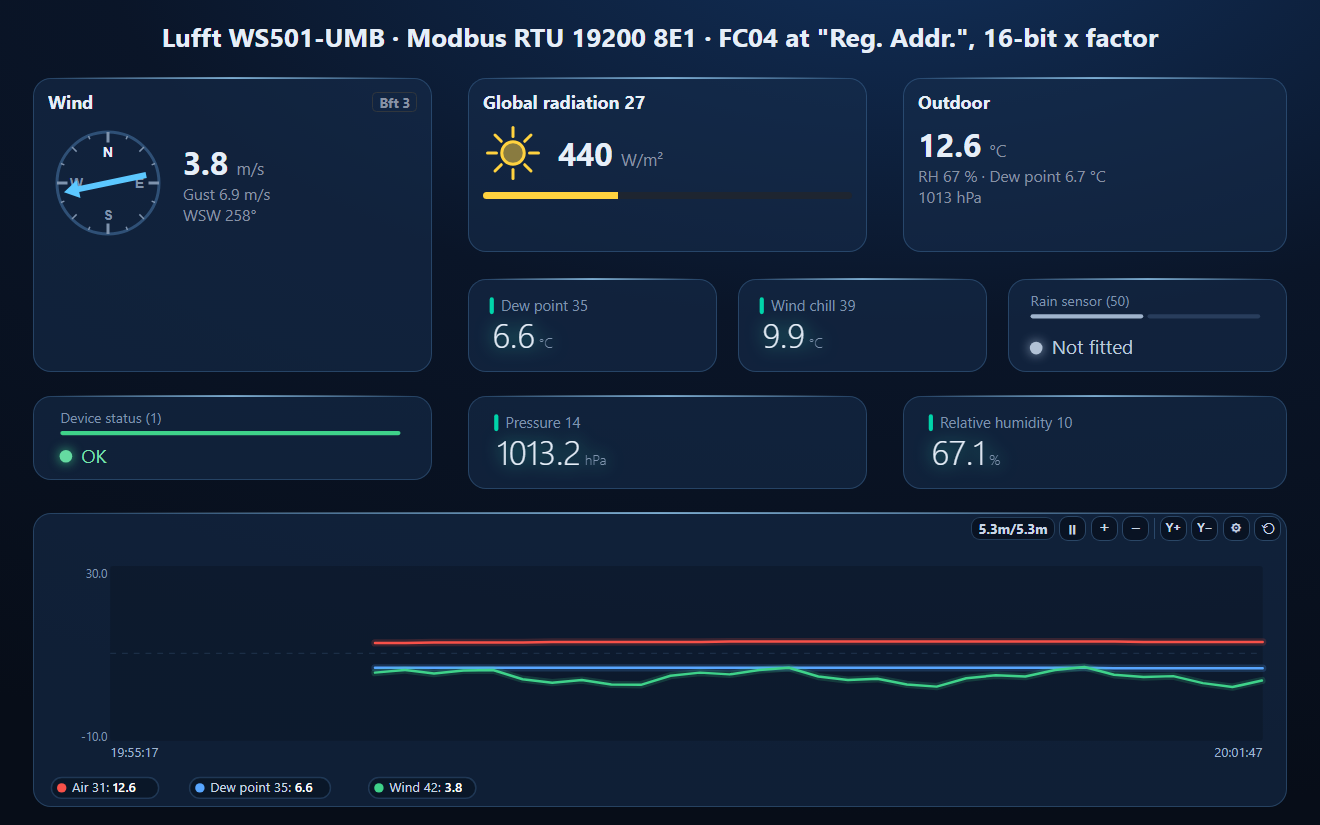
- A dashboard: the wind compass (direction, speed, gust), global radiation, outdoor temperature with humidity and pressure, dew point, wind chill, rain-sensor state, device status, and a temperature / dew point / wind trend
Lufft_WS501.json
Lufft WS501-UMB weather sensor workspace (Modbus RTU). Open via Workspace › Open in ModbusManager Pro, or from the in-app Device library.
Try it with ModbusManager Pro
Wind compass, irradiance and outdoor elements, historian for radiation and wind, alarms on wind speed, and MQTT to Home Assistant. Free 14-day trial. No credit card. Windows 10/11.
Radiation next to the inverters: Huawei SUN2000, Sungrow, SunSpec inverters. All guides: Modbus device guides.
Frequently Asked Questions
How do I enable Modbus on a Lufft WS weather sensor?
The sensor ships with the UMB binary protocol. Switch it to Modbus RTU (or ASCII) with Lufft's UMB Config Tool over the RS-485 line; it then runs at 19200 baud, even parity, with the Modbus address equal to the UMB device ID.
Which address is wind speed on a Lufft WS sensor?
Input register address 42 (Reg. No. 43, 30043 in 3xxxx notation), wind speed act. in m/s x 10. Direction is at 18 in degrees x 10.
Why does my Lufft WS read 65535?
65535 (unsigned) or 32767 (signed) means the sensor is not fitted on this model or is in error. A WS501 has no precipitation sensor, so its rain registers read 65535.
Are Lufft WS Modbus values floats?
No. Every value is one 16-bit integer with a factor: temperature signed x 10, humidity, pressure, wind and radiation x 10, precipitation x 100.
How often should I poll a Lufft WS sensor?
Every 10 seconds or slower, as Lufft suggests. Most values update at that rate, and min, max and average are over the averaging interval set in the holding registers.
Sources
G. Lufft Mess- und Regeltechnik GmbH, Operating Manual Smart Weather Sensor, 48.7230-WSX-E, document version V26 (10/2014), chapter 19.7 (Modbus), as a reseller copy. Newer firmware may differ. Tested against a simulator built from this manual, not against a physical sensor.