Carlo Gavazzi EM340 and EM24 Modbus: Registers, Scaling, Word Order
Carlo Gavazzi meters — the EM340 on RS-485 and the EM24 with Ethernet are among the most common — share one register map and one set of habits: values are integers with a fixed weight (volts × 10, amps × 1000), 32-bit values come low word first, and FC03 and FC04 return the same thing. This page covers the map, the scaling and the settings from Carlo Gavazzi's own protocol documents, plus a register that changes meaning depending on how you read it.
Connection Settings
| Setting | EM340 (RS-485, RTU) | EM24-DIN E1 (Ethernet, TCP) |
|---|---|---|
| Address / IP | 1 (1–247), register 2000h | 192.168.1.10 / 255.255.255.0, DHCP off |
| Baud / port | 9600 (up to 115200), 2001h | TCP port 502 (210Ch) |
| Parity / stop | none, 1 stop (2002h / 2003h) | — |
| Termination | bridge A− to T on the last meter | — |
On the EM24 E1, IP changes written to 2100h–210Dh only apply after writing 1 to 210Eh (apply TCP/IP changes). Two stop bits on the EM340 are only possible with even parity.
Addresses: Modicom and Physical
Gavazzi lists every value twice: a six-digit "Modicom" address such as 300001 and a "physical" address such as 0000h — the physical one is what goes in the frame. Physical = Modicom − 300001. With FC03 the Modicom address starts with 4 instead of 3, and FC03 and FC04 have exactly the same effect: use whichever your master prefers.
Measurement Registers (EM340, EM24 alike)
| Physical | Value | Type | Weight |
|---|---|---|---|
| 0000h / 0002h / 0004h | V L1-N / L2-N / L3-N | INT32 | V × 10 |
| 0006h / 0008h / 000Ah | V L1-L2 / L2-L3 / L3-L1 | INT32 | V × 10 |
| 000Ch / 000Eh / 0010h | A L1 / L2 / L3 | INT32 | A × 1000 |
| 0012h / 0014h / 0016h | W L1 / L2 / L3 | INT32 | W × 10 |
| 0028h | W system | INT32 | W × 10 |
| 002Ah / 002Ch | VA system / var system | INT32 | × 10 |
| 002Eh–0031h | PF L1, L2, L3, system | INT16 | PF × 1000, negative = export |
| 0032h | Phase sequence | INT16 | 0 = L1-L2-L3, 1 = L1-L3-L2 |
| 0033h | Frequency | INT16 | Hz × 10 |
| 0034h | kWh (+) total | INT32 | kWh × 10 |
| 004Eh | kWh (−) total | INT32 | kWh × 10 |
| 0038h / 003Ah | kW demand / peak | INT32 | W × 10 |
| 0040h–0044h | kWh (+) L1, L2, L3 | INT32 | kWh × 10 |
Low word first
"In INT32, UINT32 and UINT64 formats, the word order is LSW → MSW." V L1-N at 230.5 V is 2305 = 0x00000901, sent as 0901 0000. Read high word first and you get 151 060 480 — or, more often, a voltage that looks fine at first and jumps wildly as soon as the value passes 6553.5. Most Modbus tools call this "word swap", "little-endian words" or "CDAB".
An overflowing value (display "EEE") reads FFFF 7FFF in the frame — 0x7FFFFFFF.
One address, two meanings: 000Bh
000Bh is the high word of V L3-L1 (000Ah–000Bh) — and also the meter's identification code, which the protocol says is read "limited to a word at a time": 341 for an EM340, 345 for an ET340, 332 for an EM330. A one-word read of 000Bh returns the code; a block read across 000Bh returns the voltage word. If your master merges requests, the code can come back as 0. The workspace reads it alone, with FC03.
Easy connection or bidirectional
Models ending PF A count in "easy connection" mode: current and power always positive, kWh always increasing whatever the direction — the right choice when a CT may be fitted backwards. PF B models are bidirectional: negative power is export and goes to kWh (−) at 004Eh. On a PV or battery circuit you need the PF B variant.
Common Mistakes
- Values in the millions: INT32 read high word first. The EM340 sends the low word first.
- 230.5 V reads 2305: the weight; divide by 10. Current is × 1000, so 14200 is 14.2 A.
- Power always positive on a PV feed: a PF A meter in easy connection mode.
- ID code reads 0: 000Bh read inside a block; read it as a single word.
- Reflections on a long line: no A− to T bridge on the last meter.
- EM24 E1 IP change ignored: 210Eh (apply) was not written.
Step-by-Step: Reading an EM340 with ModbusManager
- Wire A−, B+ and GND; bridge A− to T on the last meter of the line.
- In ModbusManager choose RTU, 9600, no parity, 1 stop bit, unit 1 (the defaults).
- Poll FC04 from address 0, quantity 18, display Int32 with swapped words, and divide by 10 for volts.
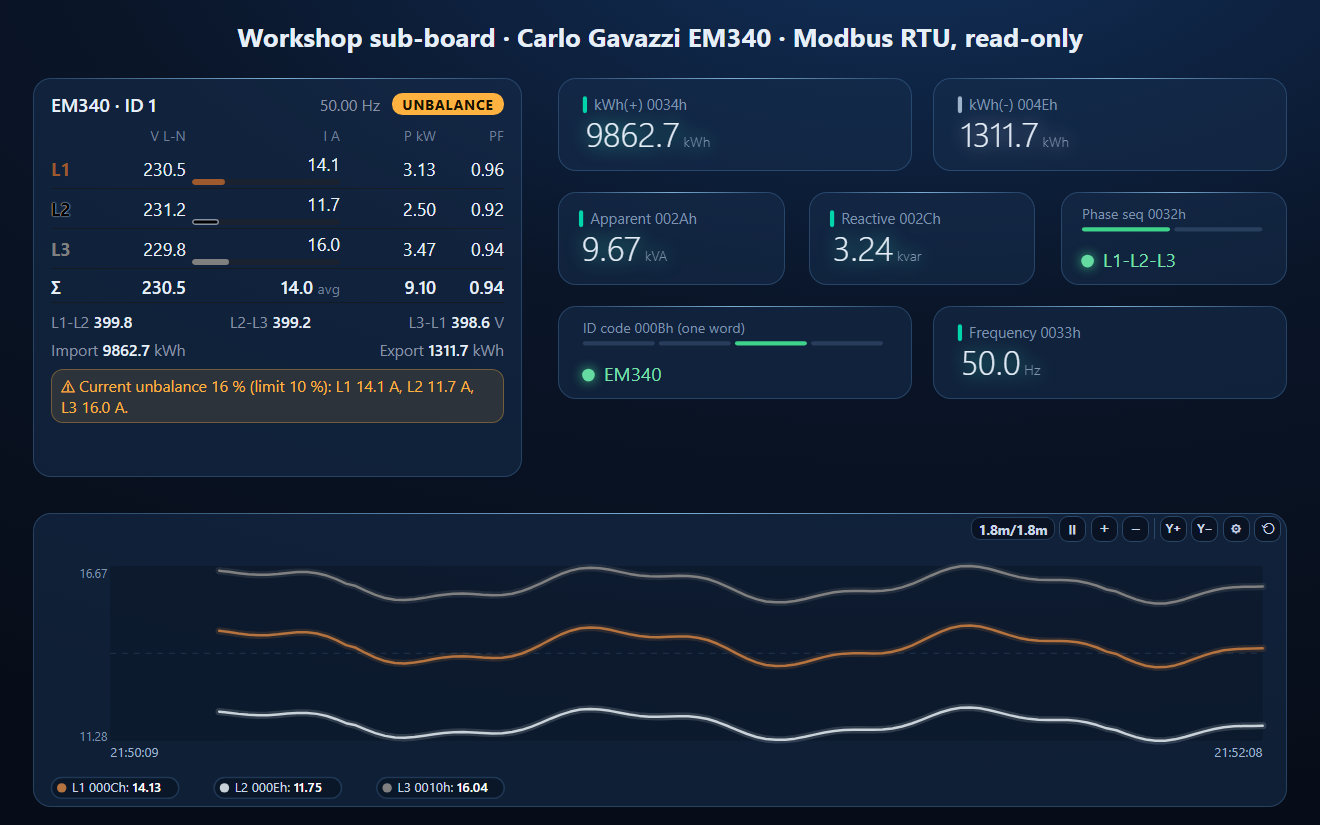
- Open the workspace below for all values scaled and the three-phase meter.
Download a Ready-Made Workspace
- Five polls of 18 registers or less: voltages and currents, powers per phase, system values with PF, Hz and kWh, kWh export, and the ID code on its own
- 24 tags with Int32 low word first and the weights already applied
- A dashboard: three-phase meter, kWh import / export, VA, var, phase sequence, ID code, frequency and the three phase currents
CarloGavazzi_EM340.json
Carlo Gavazzi EM340 / EM24 workspace. Open via Workspace › Open in ModbusManager Pro.
Try it with ModbusManager Pro
Three-phase meter element, historian and energy reports. Free 14-day trial. No credit card. Windows 10/11.
Other meters: Eastron SDM630 (Float32, FC04), Schneider PM3250 (Float32, FC03), Eastron SDM230 / SDM72.
Frequently Asked Questions
What is the word order of Carlo Gavazzi EM340 registers?
Low word first. The protocol says INT32, UINT32 and UINT64 values are sent LSW to MSW, with each word big-endian — often called word swap or CDAB.
How are EM340 values scaled?
They are integers with a fixed weight: voltage × 10, current × 1000, power × 10 (W), power factor × 1000, frequency × 10 and energy × 10 (kWh).
Should I use FC03 or FC04 with Carlo Gavazzi meters?
Either: the protocol says functions 03h and 04h have exactly the same effect. The physical address is the Modicom address minus 300001, so V L1-N 300001 is address 0.
What is the default IP address of the Carlo Gavazzi EM24 Ethernet?
The EM24-DIN E1 is set to 192.168.1.10, mask 255.255.255.0, gateway 192.168.1.1, DHCP off, Modbus TCP port 502. After changing them, write 1 to register 210Eh to apply.
Why does the EM340 identification code read 0?
Address 000Bh is also the high word of V L3-L1. The code (341 for an EM340) is returned only when 000Bh is read as a single word, not inside a block.
Sources
Carlo Gavazzi, EM300 Series and ET300 Series Communication Protocol, Version 2 Revision 17 (2021-07-05), and EM24-DIN E1 (Ethernet) Communication Protocol, Version 0 Revision 1.3, both from Carlo Gavazzi's download server. The RS-485 EM24-DIN has its own protocol document, which is not on the Carlo Gavazzi server; check it for your model. Tested against a simulator built from these documents, not a physical meter.