Eastron SDM230 and SDM72 Modbus Registers: One Line, Two Meters
The Eastron SDM230-Modbus (single-phase, 100 A direct) and the SDM72 (three-phase, 100 A direct) are the meters most often found next to a heat pump, a wallbox or a PV inverter. Both use Eastron's familiar input-register map — but the SDM72 exists in versions with very different register sets, Eastron's current manuals contain no register list at all, and the meters refuse requests with an odd number of registers. This page covers what Eastron's own documents say, and how to read both meters on one RS-485 line.
Connection Settings
| Setting | SDM230-Modbus | SDM72D-M (2025 manual) |
|---|---|---|
| Protocol | Modbus RTU, RS-485 | Modbus RTU, RS-485, half duplex |
| Baud rate | 1200–38400, default 9600 | 2400–38400, default 9600 |
| Parity | None / Even / Odd | None (default) / Odd / Even |
| Stop bits | 1 or 2 | 1 or 2 |
| Address | 1–247, default 1 | 1–247, default 1 |
Both meters ship as address 1. Two meters on one line will not answer until one of them is renumbered — on the display, or by writing holding register 40021 (FC16, Float32). The older protocol documents list baud codes only up to 9600 in register 40029 (0 = 2400, 1 = 4800, 2 = 9600, 5 = 1200); the current meters offer 19200 and 38400 on the display.
Three Rules for Every Eastron Meter
1. Input registers, address minus 30001
Measurements are input registers, read with FC04. Eastron writes them as 30001, 30007… and also gives the hex start address: 30001 is 00 00, 30007 is 00 06. On the wire the address is the number minus 30001. Settings are holding registers: FC03 to read, FC16 to write.
2. Always an even number of registers
Every value is a Float32 in two registers, and Eastron's protocol says read and write requests must ask an even number of registers — an odd count is answered with an exception. (A single-register read gets an "instrument type specific value" for old SCADA systems, which is not a measurement.) Ask for 2, 4, 40… never 1, 3 or 41.
3. At most 30 values per request
The SDM230 protocol limits one request to 30 values — 60 registers; more is an exception. (Another section of the same document says 40 parameters; stay at 60 registers and it works either way.) Reading 30001–30080 needs two requests.
SDM230-Modbus Registers
FC04, Float32, two registers each. Wire is the 0-based address.
| Register | Wire | Value | Unit |
|---|---|---|---|
| 30001 | 0 | Voltage | V |
| 30007 | 6 | Current | A |
| 30013 | 12 | Active power | W |
| 30019 | 18 | Apparent power | VA |
| 30025 | 24 | Reactive power | VAr |
| 30031 | 30 | Power factor | — |
| 30037 | 36 | Phase angle | degrees |
| 30071 | 70 | Frequency | Hz |
| 30073 / 30075 | 72 / 74 | Import / export active energy | kWh |
| 30077 / 30079 | 76 / 78 | Import / export reactive energy | kVArh |
| 30343 / 30345 | 342 / 344 | Total active / reactive energy | kWh / kVArh |
| 30385 / 30387 | 384 / 386 | Resettable total active / reactive energy | kWh / kVArh |
| 34877 / 34879 | 4876 / 4878 | Total active energy, tariff 1 / 2 | kWh |
Power is in W, energy in kWh. "Total" (30343) is import plus export — on a PV or battery circuit it grows in both directions, so use 30073 and 30075 separately. The SDM230 has two pulse outputs: pulse 1 configurable (energy type in 40087, width in 40013), pulse 2 fixed at 1000 imp/kWh import.
SDM72: Which One Do You Have?
"SDM72" covers meters with very different Modbus maps, and the label on the front does not always tell you which:
| Version | Input registers (FC04) | Source |
|---|---|---|
| SDM72D-M (protocol V1.1) | Nine only: 30053 total power W, 30073 import kWh, 30075 export kWh, 30343 total kWh, 30385 / 30389 / 30391 resettable total / import / export kWh, 31281 / 31283 import / export power W | "SDM72D-M Modbus P V1.1" |
| SDM72DM-V2 | Full map like the SDM630: voltages, currents, powers, power factors per phase, line voltages, neutral current, frequency, energies | "SDM72DM-V2 User Manual V1.1" |
| SDM72D-M (2025 hardware) | Not in the 2025/2026 user manual | Ask Eastron for the protocol of your firmware |
Test it: read 30001 (wire 0, FC04, quantity 2). A V2 answers with the phase-1 voltage, around 230. The original SDM72D-M documents nothing there — if you see 0 or an exception, you have the nine-register meter, and only power and energy are available. Plan the panel before you buy: an SDM72D-M cannot give you per-phase currents, whatever the master asks.
SDM72DM-V2 main registers
| Register | Wire | Value | Unit |
|---|---|---|---|
| 30001 / 30003 / 30005 | 0 / 2 / 4 | Voltage L1 / L2 / L3 to N | V |
| 30007 / 30009 / 30011 | 6 / 8 / 10 | Current L1 / L2 / L3 | A |
| 30013 / 30015 / 30017 | 12 / 14 / 16 | Active power L1 / L2 / L3 | W |
| 30031 / 30033 / 30035 | 30 / 32 / 34 | Power factor L1 / L2 / L3 | — |
| 30053 | 52 | Total system power | W |
| 30063 | 62 | Total system power factor | — |
| 30071 | 70 | Frequency | Hz |
| 30073 / 30075 | 72 / 74 | Import / export active energy | kWh |
| 30201 / 30203 / 30205 | 200 / 202 / 204 | Line voltages L1-L2 / L2-L3 / L3-L1 | V |
| 30225 | 224 | Neutral current | A |
| 30397 | 396 | Net kWh (import − export) | kWh |
Changing Settings over Modbus
Holding registers, one parameter (two registers, Float32) per FC16 message: 40019 parity and stop bits (0 = none / 1 stop, 1 = even, 2 = odd, 3 = none / 2 stop), 40021 address, 40029 baud rate. On the SDM72 the protected settings need the password first, written to 40025 (default 1000). The resettable energy is cleared by writing 0003 to 461457 on the SDM72. A new address or baud rate applies to the next request — change the master straight after.
Common Mistakes
- Exception on a request that looks right: an odd register count (1, 3, 41) or more than 60 registers.
- Nothing answers on a two-meter line: both are still address 1.
- Voltage reads 0 on an SDM72: it is an SDM72D-M with nine registers, not a V2.
- Power 1000 times too big: it is W, not kW.
- Total energy grows while exporting: 30343 is import + export; use 30073 / 30075, or 30397 net on the V2.
- FC03 reads nonsense: measurements are input registers, FC04.
Step-by-Step: Two Meters on One Line with ModbusManager
- Give the second meter address 2 on its display (or write 2.0 to 40021 while it is alone on the line).
- Wire A to A and B to B, terminate both ends of the line.
- In ModbusManager choose RTU, 9600 baud, no parity, 1 stop bit (the defaults).
- Poll FC04 from address 0, quantity 40, unit 1 and then unit 2. Voltage at register 0 confirms each meter.
- Open the workspace below for both meters on one dashboard.
Download a Ready-Made Workspace
- Seven FC04 polls, each an even number of registers and at most 60: three for the SDM230 (unit 1), four for the SDM72DM-V2 (unit 2)
- 29 tags with the wire address and Float32 set, powers scaled to kW
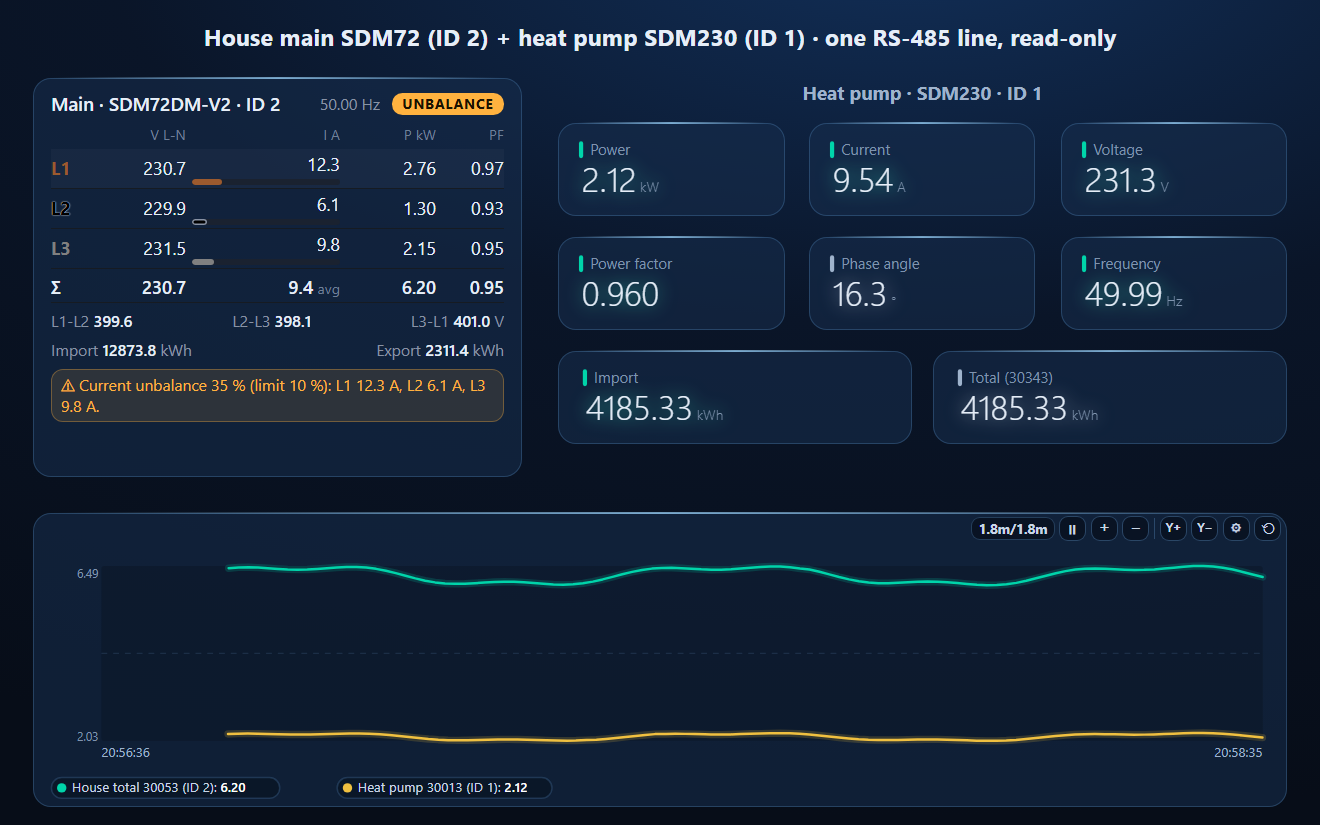
- A dashboard: the SDM72 as a three-phase meter, the SDM230 values beside it and a trend of house total against heat pump power
Eastron_SDM230_SDM72.json
Eastron SDM230 (ID 1) + SDM72DM-V2 (ID 2) workspace. Open via Workspace › Open in ModbusManager Pro.
Try it with ModbusManager Pro
Several meters on one line, a three-phase meter element, historian and energy reports. Free 14-day trial. No credit card. Windows 10/11.
Related: the SDM120 (single-phase, 45 A) and SDM630 (three-phase, full map) use the same register layout.
Frequently Asked Questions
What are the Modbus registers of the Eastron SDM230?
Input registers read with FC04, Float32: 30001 voltage, 30007 current, 30013 active power in W, 30031 power factor, 30071 frequency, 30073 import kWh and 30075 export kWh. On the wire the address is the register minus 30001, so voltage is address 0.
Why does my Eastron meter return an exception?
Eastron meters require an even number of registers in every request, because each value is a Float32 in two registers, and at most 60 registers (30 values). A request for 1, 3 or 61 registers is refused.
Why does my SDM72 not show voltage or current?
The original SDM72D-M documents only nine registers: total power, import, export and total energy, resettable energies and import / export power. Voltages and currents per phase need the SDM72DM-V2. Read 30001 to tell them apart.
Can an SDM230 and an SDM72 share one RS-485 line?
Yes, with different addresses: both ship as address 1, so change one on its display or by writing register 40021 with FC16 while it is alone on the line. Same baud rate and parity on both.
What is the SDM72 password for Modbus settings?
The protected holding registers need the password written to 40025 first; Eastron's protocol gives 1000 as the default.
Sources
Eastron, SDM230-Modbus User Manual V1.9 (2026) and SDM72D-M user manual V1.1 (2026-04-07), both from eastrongroup.com; neither contains a register list. Registers from Eastron's SDM230 Modbus Protocol V1.1 (from Eastron Europe), SDM72D-M Modbus P V1.1 and SDM72DM-V2 User Manual V1.1 (2021), the last two as published by distributors. Check the protocol for your meter's firmware with Eastron. The workspace was tested against a simulator built from these documents, not physical meters.