CoolMasterNet VRF Modbus: Virtual Addresses, Unit ID 80 and the 16-Address Block
A CoolAutomation CoolMasterNet sits on the VRF bus of a Daikin, Mitsubishi Electric, Samsung, LG, Toshiba or other system and gives every indoor unit the same Modbus block: on/off, mode, fan speed, setpoint, room temperature and the malfunction code. One map for every brand — once you know how the Virtual Address turns into a register number, which is where most integrations go wrong by one.
Before Modbus Answers
- Give the indoor units Virtual Addresses (VA). Nothing has a Modbus address until it has a VA. va auto assigns them all — and deletes the previous assignment, so the numbers can change; va + L1.102 0004 assigns one by hand. va lists them, for example L1.100 --> 0001 [Hex: 0x0011 | Dec: 00017].
- Modbus TCP is off by default. modbus IP enable, then reboot. Port 502 (changeable with modbus server port). The server starts only once Ethernet has a link and an IP address.
- Modbus RTU runs on a CoolMaster line set to line type L3 CG5: default 9600 8N1, slave address 0x50 = 80. line myid L3 51 changes the address — the value is hex. Every change needs a reboot.
Several RTU and TCP masters can be connected at the same time.
Virtual Address to Register
CoolAutomation gives the base of each indoor unit as VA × 16 + 1: VA1 = 17, VA2 = 33. Each unit has a 16-address block, and the same base applies to the holding, input, coil and discrete-input tables.
The Indoor-Unit Block
| Offset | Table | Value |
|---|---|---|
| +0 | holding (FC03/06) | Mode: 0 Cool, 1 Heat, 2 Auto, 3 Dry, 4 HAUX, 5 Fan, 6 HH |
| +1 | holding | Fan speed: 0 Low, 1 Med, 2 High, 3 Auto, 4 Top, 5 Very low |
| +2 | holding | Setpoint × 10 °C |
| +3 | holding | On / off (0 / 1) |
| +4 | holding | Filter sign |
| +5 | holding | Swing: 0 vertical … 4 horizontal, 5 auto, 6 off |
| +6 | holding (read) | Room temperature × 10 °C |
| +7 | holding (read) | Malfunction code: 0 none, 65535 (0xFFFF) = indoor unit lost |
| +8 | holding | Wall-controller lock bits: b0 on/off, b1 mode, b2 setpoint, b7 all |
| +9 | holding | Setpoint limits: high byte = high × 2, low byte = low × 2 (0x4020 = 32 / 16 °C) |
| +1 / +4 | input (FC04) | Room temperature / setpoint × 10 |
| +2, +3 | input | Malfunction as four ASCII characters (“OK ” = 0x4F4B 0x2020) |
| +0 / +3 | coil (FC01/05) | On / off; Inhibit (a window contact: forces the unit off after about 8 s) |
| +0 / +1 | discrete input (FC02) | Thermo-on (demand); indoor communication failure |
The same quantity is in more than one table — on/off is holding +3 and coil +0, room temperature holding +6 and input +1. Pick one and stay with it.
Malfunction Codes
Holding +7 is 0 with no fault and 0xFFFF when the gateway has lost the indoor unit (discrete input +1 says the same). Any other value is the brand's own code, as a number to translate: on Daikin 0x11 = A1, 0x30 = E0, 0x40 = H0; Mitsubishi Electric codes read as four decimal digits; LG as two. For a display, the two ASCII input registers give the code as text.
Common Mistakes
- No answer at all: unit id 1 instead of 80; Modbus IP not enabled (or not rebooted); no VAs assigned yet.
- Every value one register off: the 17-versus-16 question above.
- The map changed after adding units: va auto renumbered them. Assign VAs by hand on a finished installation.
- Setpoint 240 °C: the × 10 not applied.
- A mode that means something else: CoolMaster's 0 is Cool; Intesis gateways use 0 = Auto, 4 = Cool. A template from one gateway does not fit the other.
- A fault code of 65535 treated as a brand code: it means the indoor unit is not talking to the gateway.
Step-by-Step: Reading a CoolMasterNet with ModbusManager
- Assign VAs (va), enable Modbus IP and reboot.
- In ModbusManager choose TCP, the gateway's address, port 502, slave ID 80.
- Read FC03 from 16 × VA, 12 registers: mode, fan, setpoint × 10, on/off … room × 10, malfunction.
- Open the workspace below and change the VAs or add units by copying a poll window.
Download a Ready-Made Workspace
- Four FC03 polls, one per indoor unit (VA1–VA4), unit ID 80
- 32 tags: mode, fan, setpoint and room temperature scaled ÷ 10, on/off, malfunction — and a script that turns the malfunction code into a fault flag and an offline flag (65535)
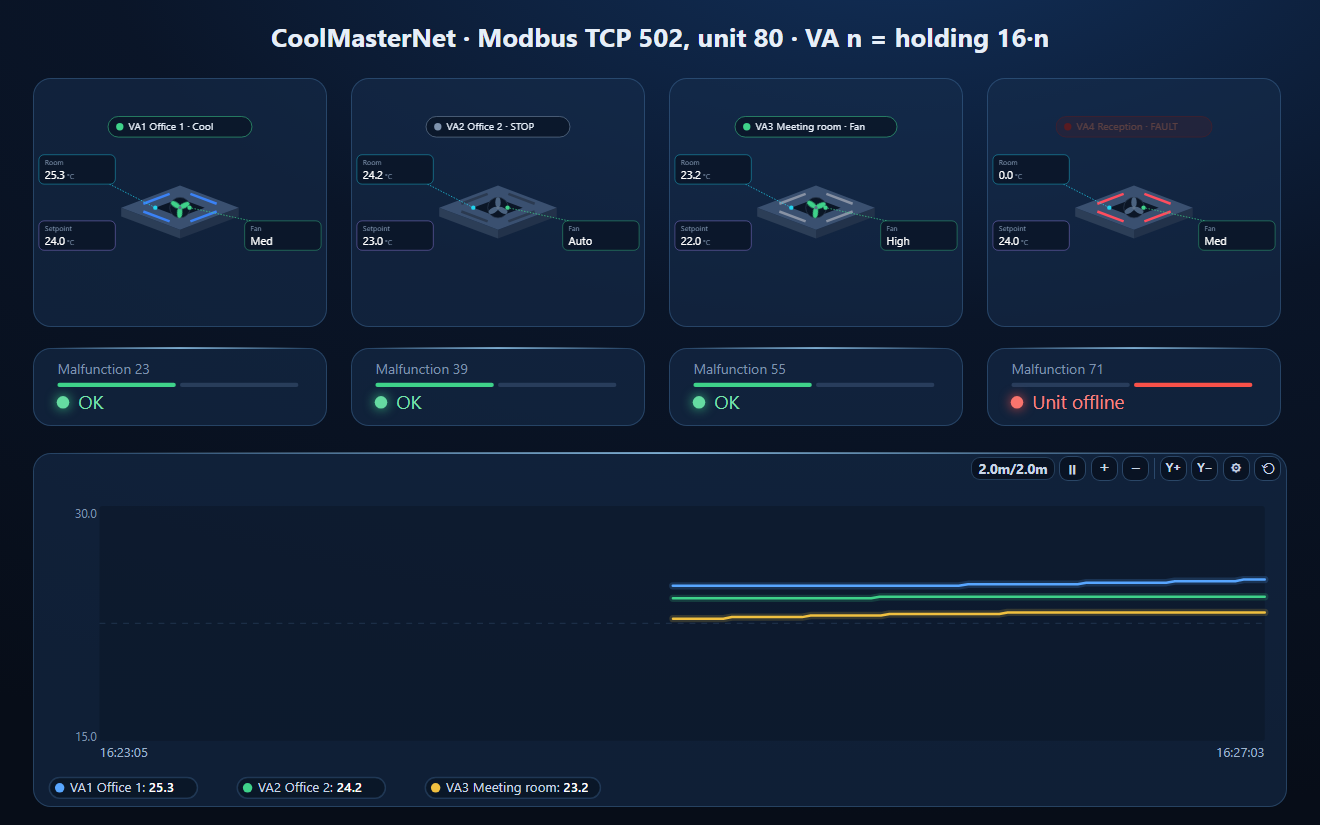
- A dashboard: four VRF indoor-unit elements with room temperature, setpoint, mode and fan speed, the malfunction state of each unit, and a room temperature trend
CoolMasterNet_VRF.json
CoolMasterNet workspace, four VRF indoor units (Modbus TCP, unit 80). Open via Workspace › Open in ModbusManager Pro, or from the in-app Device library.
Try it with ModbusManager Pro
VRF and indoor-unit faceplates, alarms on malfunction codes, historian, and MQTT to Home Assistant. Free 14-day trial. No credit card. Windows 10/11.
The same VRF over BACnet: Mitsubishi AE-200 and Daikin iTM on bacmanager.com. A heat pump for the hot water: NIBE S-series.
Frequently Asked Questions
What is the default Modbus address of a CoolMasterNet?
Slave address 80 (0x50) on RS-485, 9600 8N1. It is changed with line myid, and the value is given in hex. Modbus TCP uses port 502 and is off until you enable it and reboot.
How do I find the Modbus register of a VRF indoor unit on a CoolMasterNet?
Give the unit a Virtual Address (va command). Its 16-address block starts at VA × 16 + 1 in CoolAutomation's numbering, which is VA × 16 on the wire: VA1 mode is holding 16 (17 in 1-based tools). Check on your gateway which one yours answers.
What does malfunction code 65535 mean on a CoolMasterNet?
The gateway has lost communication with that indoor unit. 0 means no fault; any other value is the brand's own code (Daikin numbers translate to A1, E0, H0 and so on).
Why does the setpoint read 240?
Setpoint and room temperature are multiplied by 10: 240 is 24.0 °C.
Can I use an Intesis template on a CoolMasterNet?
No. The mode numbers differ (CoolMaster 0 = Cool, Intesis 0 = Auto and 4 = Cool), and so do the addresses. Each gateway has its own map.
Sources
CoolAutomation, Modbus Integration Guidelines — CoolMaster, CooLinkBridge, CooLinkHub, CooLinkNet, revision 1.3 (2025-07-17), and CoolMaster Product Line PRM, revision 0.10 (2024-11-01), support.coolautomation.com; the Loxone integration guide hosted there for the wire address of VA1. Tested against a simulator built from these documents, not against a physical gateway.