NIBE S-series Modbus TCP: Register IDs, Degree Minutes and the 20-Register Limit
NIBE's S-series heat pumps — S1155, S1255, S1156, S1256 and the SMO S40 controller with an S2125 outdoor unit — have Modbus TCP built in. No MODBUS 40 card (that was the F-series RTU accessory): switch it on in the menu and read the heat pump on port 502. NIBE publishes the register list; this guide covers switching it on, the IDs a monitoring dashboard needs, the 32-bit word order, and the limits that make a too-big read fail.
Switch On Modbus TCP
On the heat pump open menu 7.5.9 “Modbus TCP/IP” and activate it; the network settings are in menu 5.2. NIBE requires software 2.2.1 or later. The server listens on TCP port 502.
- Private networks only: the heat pump accepts Modbus clients from 10.0.0.0/8, 172.16.0.0/12 and 192.168.0.0/16. A client on a public address is refused. NIBE warns against exposing the port to the internet.
- Optional locks in 7.5.9: an IP address restriction (one trusted client) and “Reading Modbus only”, which refuses every write.
- The real list for your unit: menu 7.5.9 exports the “most used” or “all” registers as a CSV file to a USB stick — only the registers your product and its accessories actually have.
Function Codes, IDs and Word Order
| What | NIBE S-series |
|---|---|
| Measurements | FC04 input registers |
| Settings | FC03 read, FC06 write single, FC16 write multiple |
| Address | The ID in NIBE's table goes on the wire as it is. The USB export writes 30002 or 40012 — that is ID + 30001 / 40001. |
| 16-bit values | s16 / u16; temperatures ÷ 10. u8 and s8 values still take a whole register. |
| 32-bit values | Low word first: NIBE shows holding 11–12 as “register 12 and register 11”. 32-bit values are written with FC16. |
| Limits | At most 20 registers per query and 100 registers per second. |
The same ID means different things in the two tables: input 11 is brine out BT11, holding 11 is degree minutes. The function code is part of the address.
Key Registers (S1155 / S1255 / S1156 / S1256)
| ID | FC | Value | Type | Scale |
|---|---|---|---|---|
| 1 | 04 | Outdoor temperature BT1 | s16 | ÷ 10 °C |
| 5 / 7 | 04 | Supply BT2 / return BT3 | s16 | ÷ 10 °C |
| 8 / 9 | 04 | Hot water top BT7 / charging BT6 | s16 | ÷ 10 °C |
| 10 / 11 | 04 | Brine in BT10 / brine out BT11 | s16 | ÷ 10 °C |
| 26 | 04 | Room temperature BT50 | s16 | ÷ 10 °C |
| 1017 | 04 | Calculated supply temperature | s16 | ÷ 10 °C |
| 1028 | 04 | Operating prioritisation: 10 off, 20 hot water, 30 heat, 40 pool, 60 cooling | u16 | — |
| 1029 | 04 | Additional heat steps | u16 | — |
| 1046 | 04 | Compressor frequency | u16 | ÷ 10 Hz |
| 1100 | 04 | Compressor status: 0 off, 1 on | u16 | — |
| 1102 / 1104 | 04 | Heating medium pump GP1 / brine pump speed | u16 | % |
| 1975 | 04 | Alarm number | u16 | — |
| 2166 | 04 | Instantaneous used power | u32 | ÷ 10 W |
| 2195 | 04 | Active alarm: 0 / 1 | u16 | — |
| 2196 | 04 | Diverter valve QN10: 0 heating, 1 hot water | u16 | — |
| 1575–1585 | 04 | Energy: hot water, heat, compressor | u32 | ÷ 10 kWh |
| 11 | 03 | Degree minutes (read / write) | s32 | ÷ 10 |
| 22 | 03 | Reset alarm | u8 | — |
| 26 / 30 | 03 | Heating curve / curve offset | s8 | — |
| 56 | 03 | Hot water demand: 0 small, 1 medium, 2 large, 4 smart control | u8 | — |
| 237 | 03 | Operating mode: 0 auto, 1 manual, 2 additional heat only | u8 | — |
SMO S40 uses the same IDs for BT1, BT7, BT6, BT50 and QN10, plus 39 (external supply BT25) and 88 (return BT71). An S2125 outdoor unit is read through the indoor unit, with separate IDs per slave — slave 1: 1803 compressor Hz ÷ 10, 1805 defrost (0 off, 1 active, 2 passive), 1621 outdoor BT28, 400 alarm number; slave 2 has its own numbers (1789, 1791, 910).
Degree Minutes
Degree minutes (holding 11, s32 ÷ 10) is the heat pump's heat balance: below zero it is behind the heating demand, and the compressor and additional heat start at set thresholds. It is the most useful single value to trend, and it is 32-bit low word first — read 11–12 as one pair. Read high word first, a value of −60.0 turns into a number in the millions.
Common Mistakes
- Connection refused: Modbus TCP not activated in 7.5.9, the client on a public address, or an IP restriction set to another PC.
- A read fails as a whole: more than 20 registers in the request, or the request covers an ID your unit does not have. Read runs of IDs that exist.
- Brine at −600 °C: holding 11 (degree minutes) read with FC03 where input 11 (BT11) was meant — or the other way round.
- Degree minutes in the millions: the 32-bit pair combined high word first.
- Curve offset 65 535: an s8 value read as unsigned.
- Writes refused: “Reading Modbus only” is on, or a 32-bit value was written with FC06 instead of FC16.
- A register stopped answering after an update: registers depend on software version and installed accessories; export the CSV again from 7.5.9.
Step-by-Step: Reading an S1255 with ModbusManager
- Activate Modbus TCP in menu 7.5.9 and note the heat pump's IP address (menu 5.2).
- In ModbusManager choose TCP, that address, port 502, from a PC on the same private network.
- Read FC04, address 7, quantity 5: return, hot water top, hot water charging, brine in, brine out — ÷ 10 for °C.
- Read FC03, address 11, quantity 2 and tick Swap: degree minutes ÷ 10.
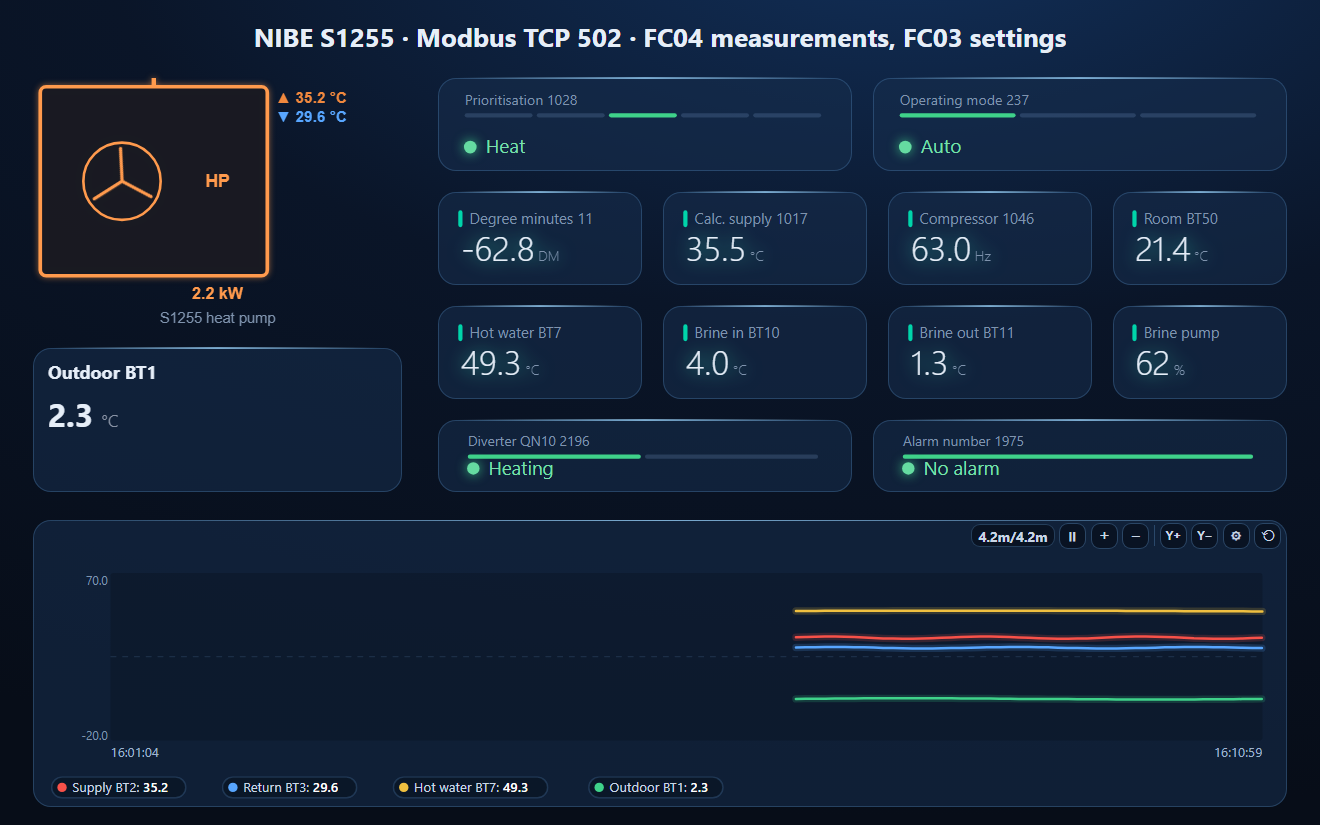
- Open the workspace below for the rest.
Download a Ready-Made Workspace
- 16 polls, each on a run of IDs that exists, every 5 s — well inside 20 registers per query and 100 per second
- 22 register tags with NIBE's types and scales: temperatures, compressor, pumps, used power and degree minutes (32-bit low word first)
- A dashboard: the heat pump element (running, alarm, power, supply and return), outdoor temperature, prioritisation, operating mode, degree minutes, brine and hot water, and a temperature trend
NIBE_S1255.json
NIBE S-series heat pump workspace (Modbus TCP). Open via Workspace › Open in ModbusManager Pro, or from the in-app Device library.
Try it with ModbusManager Pro
Heat pump element, historian for degree minutes, alarms on the alarm register, and MQTT to Home Assistant. Free 14-day trial. No credit card. Windows 10/11.
The energy meter beside a heat pump is often an Eastron SDM230 or SDM72. Heat pump to Home Assistant: the Modbus to MQTT gateway publishes the same tags with discovery.
Frequently Asked Questions
Does a NIBE S1255 need a MODBUS 40 accessory?
No. The S-series has Modbus TCP built in: activate it in menu 7.5.9 and connect to port 502. MODBUS 40 was the RS-485 accessory for the older F-series.
Why does my Modbus read from a NIBE heat pump fail?
NIBE answers at most 20 registers per query and 100 per second, only to clients on private IP ranges, and only for IDs the unit has. Read short runs of existing IDs with FC04 for measurements and FC03 for settings.
Where are degree minutes in the NIBE Modbus map?
Holding register 11 (FC03), signed 32-bit divided by 10, read as the pair 11–12 with the low word first. It can be written, but only with FC16.
Is the NIBE register ID the Modbus address?
Yes, the ID goes on the wire as it is. The CSV export from menu 7.5.9 writes 3xxxx / 4xxxx numbers, which are the ID plus 30001 or 40001.
Which NIBE register shows the compressor running?
Input register 1100: 0 off, 1 on. The compressor frequency is input 1046 divided by 10 (Hz); on an S2125 outdoor unit it is 1803 for slave 1.
Sources
NIBE, Technical information — Modbus S-series, M12676EN, TIF EN 2608 (published 2026-02-18), assetstore.nibe.se. How the IDs map to wire addresses is not stated in the document; it follows the CSV export format and the open-source NIBE library. Tested against a simulator built from this document, not against a physical heat pump.