Modbus slave simulator: test the master before the device exists
The meter is on order, the drive is on another site, the PLC program is due Friday. ModbusManager's Slave tab turns your PC into the Modbus device the master expects — over TCP and RTU, with values that move: sine waves, ramps, counters, random noise and a simulated PID process. It is in the same app as the master, so you can read your own simulator and see exactly what goes over the wire.
Windows 10/11 · TCP & RTU · in Standard ($49) and Pro ($119) · one-time license · 14-day trial
// when you need one
Every Modbus master needs something to talk to
A SCADA tag list, an HMI screen or a PLC's Modbus driver can only be tested against a device that answers. A simulator stands in for it:
Commissioning before delivery — build and check the tag list and screens while the hardware is still on its way.
Testing a PLC program — a PLC as Modbus master reads realistic values and its writes land somewhere you can see.
Factory acceptance tests and training — repeatable values without a rack of real devices.
Reproducing a field problem — the same register layout, the same data type, the same word order, on your desk.
The far end of a gateway — a source device for ModbusManager's own Modbus gateway.
// how it works
Slave IDs, register blocks, a server
① Add a device: a slave ID and its registers
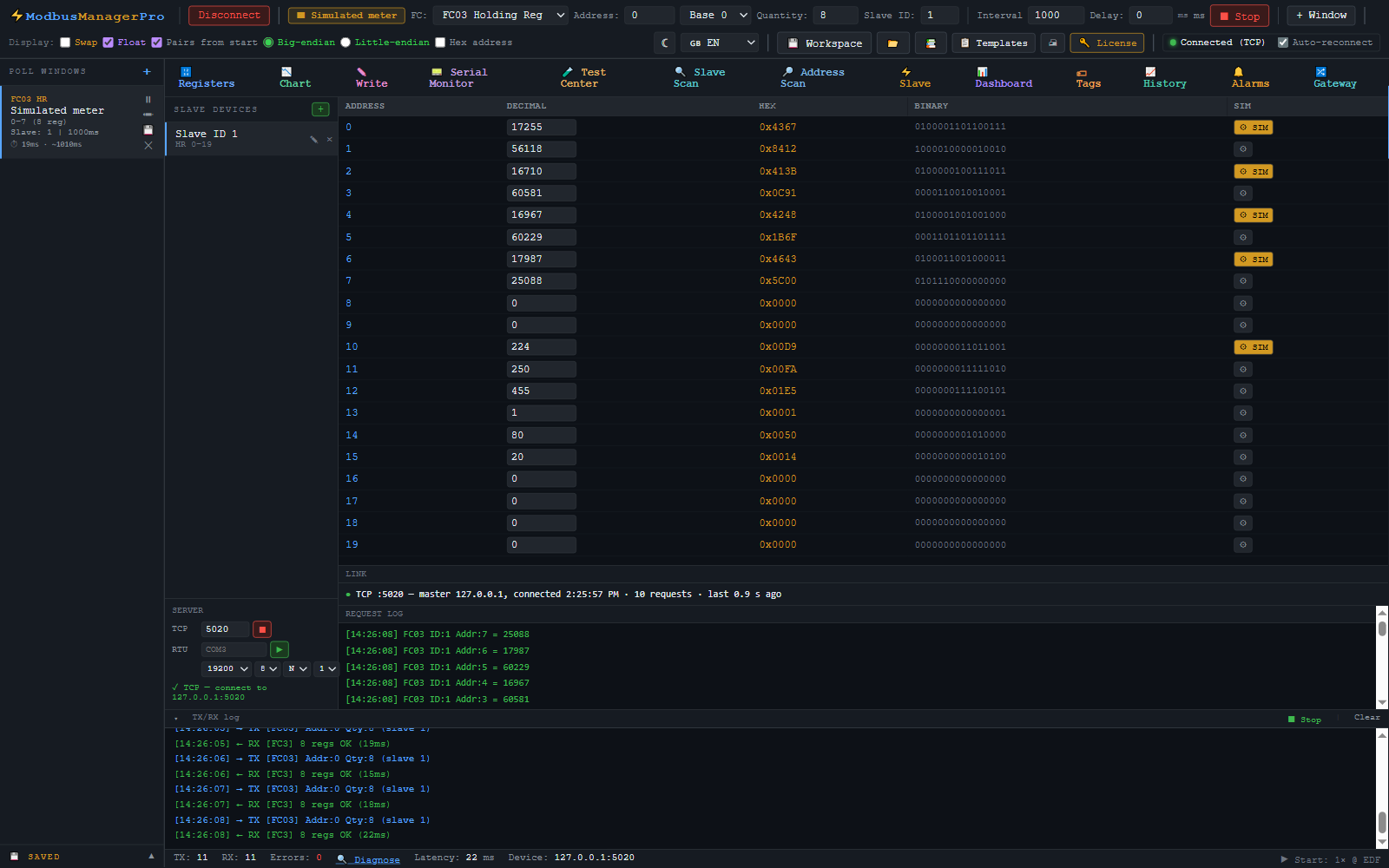
Under Slave devices, + adds a block: a slave ID (1–247), a register type (holding registers, input registers, coils or discrete inputs), a start address and a quantity (up to 1000). A slave ID can own several blocks, so a meter with registers at 0 and at 3000 is two blocks of the same ID. Overlapping blocks are refused.
Add more slave IDs and the same PC is a whole bus of devices.
② Start a server: TCP, RTU, or both
Under Server, start Modbus TCP on any port (502 by default) and/or Modbus RTU on a COM port. The RTU line has its own baud rate, data bits, parity and stop bits, independent of the connection the app uses as a master — so one PC can be master on one port and slave on another.
To test RTU on a single PC, a virtual COM port pair (com0com, for example) connects the two: the master on one end, the simulator on the other.
③ Watch the master arrive
The Link line says whether a master is really there: which address connected over TCP, how many requests came in and how long ago the last one was. On RTU it shows the request rate and the frames with a bad CRC, which point at a wrong baud rate or parity. Refused requests appear in the request log below with the reason.
Slave ID 1, holding registers 0–19, five simulations, TCP on port 5020 — and the master that is reading it
// values that move
A dead register teaches you nothing
A screen that shows 0 everywhere looks fine and proves nothing. Type a value into any register, or give it a simulation from the ⚙ button next to it:
Type
What it does
Good for
Counter ↑ / ↓
Steps up or down between Min and Max
Energy and operating-hour counters, roll-over tests
Sine wave
Swings between Min and Max with a set period
Voltages, temperatures, anything that should look alive on a trend
Ramp
Rises from Min to Max, then starts again
Tank levels, scaling and alarm limits
Random
A new value between Min and Max each interval
Noise, deadband and change detection
PID loop
A simulated process with setpoint, output, mode and tuning in six registers
PID faceplates and setpoint writes
Static value (Pro)
One typed value, written in the chosen data type
A Float32 or 32-bit value without converting it by hand
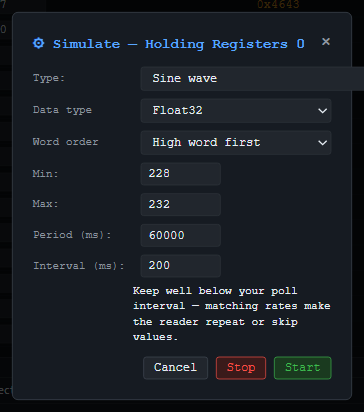
Each type writes the register as UInt16, Int16, Int32, UInt32 or Float32; the 32-bit types take two registers and a word order, high word first or low word first — so you can reproduce the exact layout of the device you are waiting for, including the word order your master has to get right.
A Float32 voltage, 228–232 V, one sine per minute
Match the simulator to the poll rate
Keep the simulation interval well below the master's poll interval, and a sine period at least ten times the poll interval. When the two rates are close, the master sees the same value twice and then skips one, and a smooth curve turns into steps that are not in the device.
The PID process
A PID loop takes six holding registers: +0 process value ×10, +1 setpoint ×10, +2 output 0–1000, +3 mode (1 = auto), +4 P ×10, +5 I in seconds. Write a new setpoint from the master — or from the dashboard's PID faceplate in Pro — and watch the process follow it.
// behaves like the real thing
It refuses what a real device refuses
A simulator that answers everything hides the mistakes your master will make on site. This one answers like hardware:
The master asks for
The simulator
An address outside the blocks of that slave ID
Exception 02, illegal data address — the classic off-by-one between 40001 and 0 shows up here, not on site
A slave ID that is not simulated, over TCP
Exception 0B, as a gateway answers for a device that does not respond
A slave ID that is not simulated, over RTU
No answer at all — on a shared RS-485 line the device with that ID answers, and a second reply would collide with it
A frame with a bad CRC, over RTU
Dropped and counted on the Link line, as a real slave drops it
A write to a coil or holding register (FC 05, 06, 15, 16)
The value changes and the write appears in the request log
// master and slave in one app
Read your own simulator
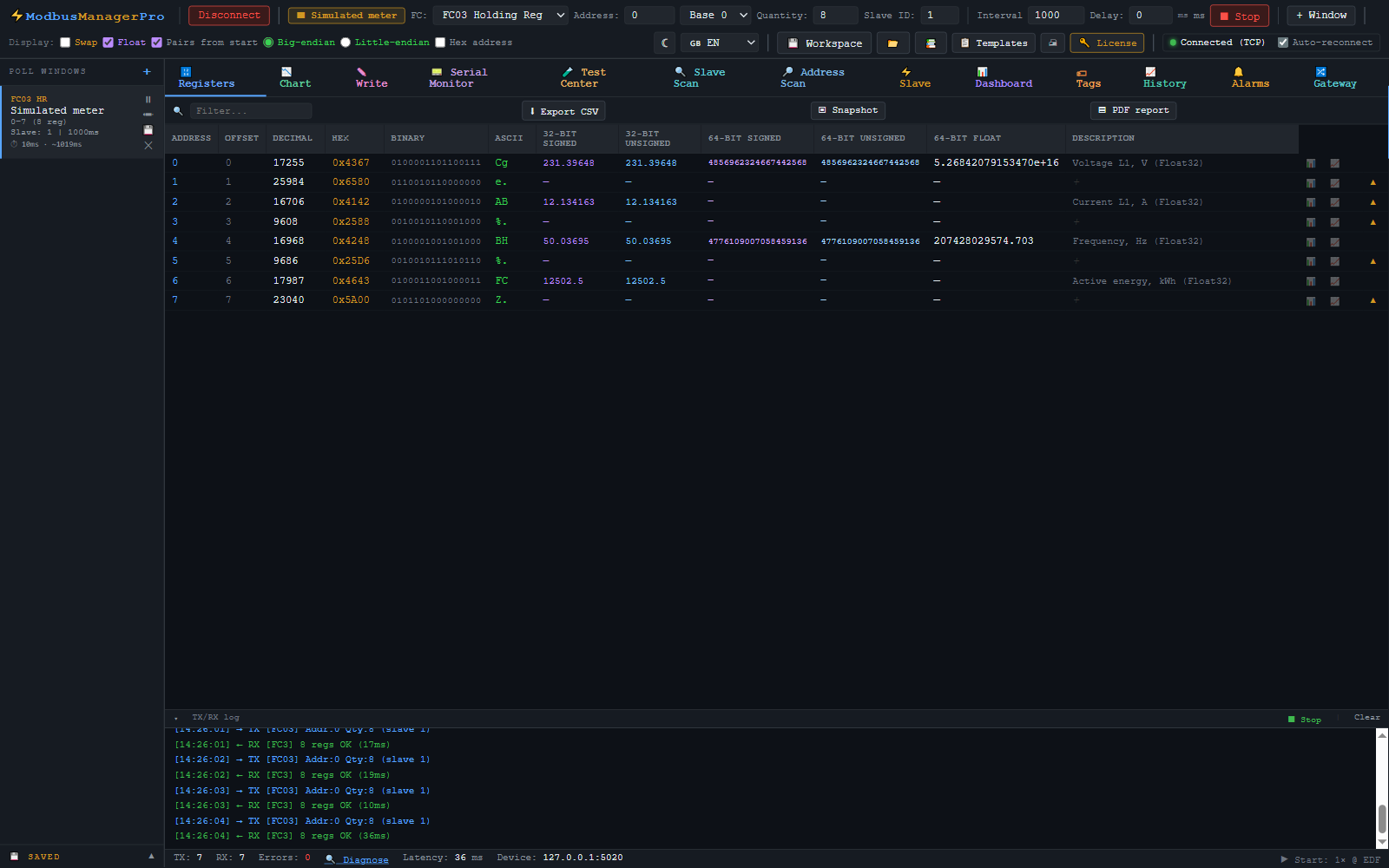
ModbusManager is a Modbus master too, so the same PC can read the simulated device and show what a SCADA will get. Here a poll window reads the simulated meter over TCP with Float on: voltage, current, frequency and energy decoded from register pairs. If your SCADA shows something else, the difference is in the SCADA's settings — data type, word order or address base.
The same app as a master: four Float32 values from the simulated meter, read every second
In Pro the simulated device can feed everything else: tags and Structured Text, a dashboard, the Historian and alarms — a complete project built and tested before the first real device is wired.
// one program, both ends
Master and slave without a second program
With some Modbus tools the master and the slave simulator are two separate programs, each bought on its own. In ModbusManager the slave simulator is part of both editions, next to the master:
Standard, $49
Pro, $119
Modbus master: poll windows, write, chart, serial monitor, scans
✓
✓
Slave simulator over TCP and RTU, several slave IDs
✓
✓
Counter, sine, ramp, random, PID process
✓
✓
Static value in a chosen data type
—
✓
Dashboard, tags, Historian, alarms, gateway against the simulated devices
Can I simulate a Modbus device without any hardware?
Yes. The Slave tab of ModbusManager turns the PC into a Modbus TCP and/or RTU slave. You define slave IDs and register blocks, give registers moving values, and point your SCADA, HMI or PLC at it. The same app can read it as a master to check what it sends.
Can it simulate several devices at once?
Yes. Add blocks for as many slave IDs (1-247) as you need; each ID can have several blocks of holding registers, input registers, coils and discrete inputs. One TCP port answers all of them, and on RTU each ID answers on the shared line like a separate device.
Does it work over Modbus RTU as well as TCP?
Yes. Start a TCP server on any port, an RTU server on a COM port with its own baud rate, data bits, parity and stop bits, or both. To test on one PC, use a virtual COM port pair (for example com0com): the master on one port, the simulator on the other.
What happens when the master asks for an address or a slave ID that is not simulated?
An address outside the blocks of that slave ID gets exception 02, illegal data address, as a real device answers. On TCP a slave ID that is not simulated gets exception 0B. On RTU it gets no answer at all, because on a shared RS-485 line the device with that ID would answer, and frames with a bad CRC are dropped and counted.
Can the master write to the simulated registers?
Yes. Writes to coils and holding registers (function codes 05, 06, 15 and 16) change the simulated values and appear in the request log. A PID loop register block follows a setpoint the master writes.
Is the slave simulator in Standard or only in Pro?
Both. ModbusManager Standard ($49) and Pro ($119) include the slave simulator with counters, sine waves, ramps, random values and the PID process. Pro adds a static-value type and the dashboard, tags, Historian, alarms and gateway that can work against the simulated devices.
Start testing without the hardware
Download the trial, open the Slave tab, add a device and start the server. Your master has something to talk to in a minute.